Burning Fridges, Cold Evidence: The French Supermarket Attack From a Forensic Perspective

On October 11, attackers switched off the cold in hundreds of French supermarkets. Food spoiled, equipment began to catch fire, and losses are expected to reach tens of millions of euros. The official response focuses on resetting the hijacked controllers, but a reset does not show how the attackers got in, and it can destroy the evidence that would.
Read on to learn about:
- What actually happened: The night of burning fridges
- The response: Fix the device, keep the evidence
- Tracing the attackers with Belkasoft tools
If you handle incident response for retail, logistics, or any business that runs remotely managed equipment, this case shows how the evidence of an attack on IoT devices can spread to the computers and networks that manage them.

What actually happened: The night of burning fridges
On Sunday night, the fridges and freezers in hundreds of French supermarkets stopped cooling. Nobody touched them in the stores. The commands came over the internet, through the central controller that runs all refrigeration in a store, The Hacker News reports.
The attackers forced the units into defrost and kept them there. Les Mousquetaires, which owns Intermarché and Netto, said its cases heated up to 50°C. Within two days, the count ran into the hundreds:
- Intermarché and Netto: at least 300 stores, according to AFP (Reuters reported about 150)
- Carrefour: 80 supermarkets
- Coopérative U: 80 of its 2,000 stores
- Monoprix: about 30 stores
Cooling Post estimates about 500 stores in total. The damage that victims reported to the Paris prosecutor includes equipment that began to catch fire. Intermarché threw away all affected products. Thierry Cotillard, who heads Les Mousquetaires, expects losses of tens of millions of euros. Coopérative U was luckier. Its staff and refrigeration contractors reacted fast enough to save the cold chain in most affected stores.
Most of the hijacked controllers came from Danfoss. Danfoss stated that the majority of affected units were either legacy models that no longer receive software or security updates or current models running outdated firmware. According to CERT-FR, Copeland and Dixell XWEB devices were targeted as well. At the time of writing, nobody has clarified who the attackers are or how they got in.
The response: Fix the device, keep the evidence
On October 12, CERT-FR, the French government computer emergency response team, issued an alert and updated it on October 13. For compromised controllers, it recommends cutting internet exposure and performing a factory reset before restoring and reconfiguring the device. That reset wipes whatever evidence the controller held.
These are remediation steps, not an evidence-preservation plan. Operational safety and stopping equipment damage come first. Still, forensic frameworks such as NIST SP 800-86 and RFC 3227 call for preserving evidence before resetting or wiping systems.
Prosecutors, insurers, and retailers each need something different from the evidence. Prosecutors need to establish what happened and who was responsible. Insurers need evidence about the cause and extent of each loss, subject to the terms of the policy. Retailers need to determine how the attackers gained access and what they must change to prevent a recurrence.
The controller was the direct target, but the initial access path remains unknown. There are several possibilities:
- Direct access: The attackers found management interfaces exposed to the internet and accessed the controllers directly. CERT-FR explicitly warns against exposing these interfaces. Attackers could find such interfaces by scanning the internet, without compromising a contractor computer first.
- Exploiting a vulnerability or default credentials: The attackers bypassed the login through a software flaw or signed in with passwords that were never changed. In this scenario, controller firmware versions and web interface logs matter most.
- Access through an endpoint: The attackers compromised a contractor’s or retailer’s Windows computer, stole credentials, or abused an existing remote-access session. Contractors may administer controllers through a web interface from laptops, store PCs, or jump hosts.
- Leaked access data: The attackers stole controller addresses and credentials from a compromised contractor or supplier, then connected to the controllers directly. E.Leclerc says one of its refrigeration equipment suppliers was hit. In this scenario, the controller logs may show a legitimate account, and the traces of the theft may remain on the contractor computers.
These hypotheses call for different evidence. Controller logs, settings, and firmware versions may show account activity, configuration changes, or known vulnerable builds. Admin PCs may hold remote-session, browser, or tool traces, and RAM captured from live machines can show more. Firewall, VPN, and remote-access logs can help connect these records, but no single source is guaranteed to identify an individual.
Investigators should preserve all of these sources before any reset or reimage, as long as it is safe to do so. Until the evidence supports one access path, the paths remain hypotheses. Not every site necessarily followed the same route, and a remote-access trace alone does not prove malicious activity.
Tracing the attackers with Belkasoft
For a triage of a single live PC, you can use the free Belkasoft T. The tool runs from a USB drive and captures RAM first. For hundreds of stores, Belkasoft R acquires drives, RAM and selected artifacts from Windows endpoints remotely, including machines behind routers and on a VPN. Acquisition can run outside store hours.
Suppose you have images and RAM dumps from a store PC and a contractor laptop. Where do you start?
In Belkasoft X, start with the Incident Investigations module, available in Belkasoft X Corporate. The module analyzes the registry, event logs and memory dumps. It collects traces typical for intrusions in one place, separately from regular artifacts. For this case, three nodes matter most:
- Remote connections lists incoming and outgoing RDP and TeamViewer connections with IP addresses and timestamps. Start here to see who reached the machines that manage the controllers.
- Execution shows what ran on the machine, based on Prefetch, Amcache, Shimcache, Syscache and BAM/DAM. Look for remote access tools that were first used around the time of the incident.
- Persistence collects scheduled tasks, startup tasks, AppInit DLLs and other footholds that attackers use to keep access.
The module also groups event logs into categories, such as successful logons and service installations, and shows Windows Defender logs.
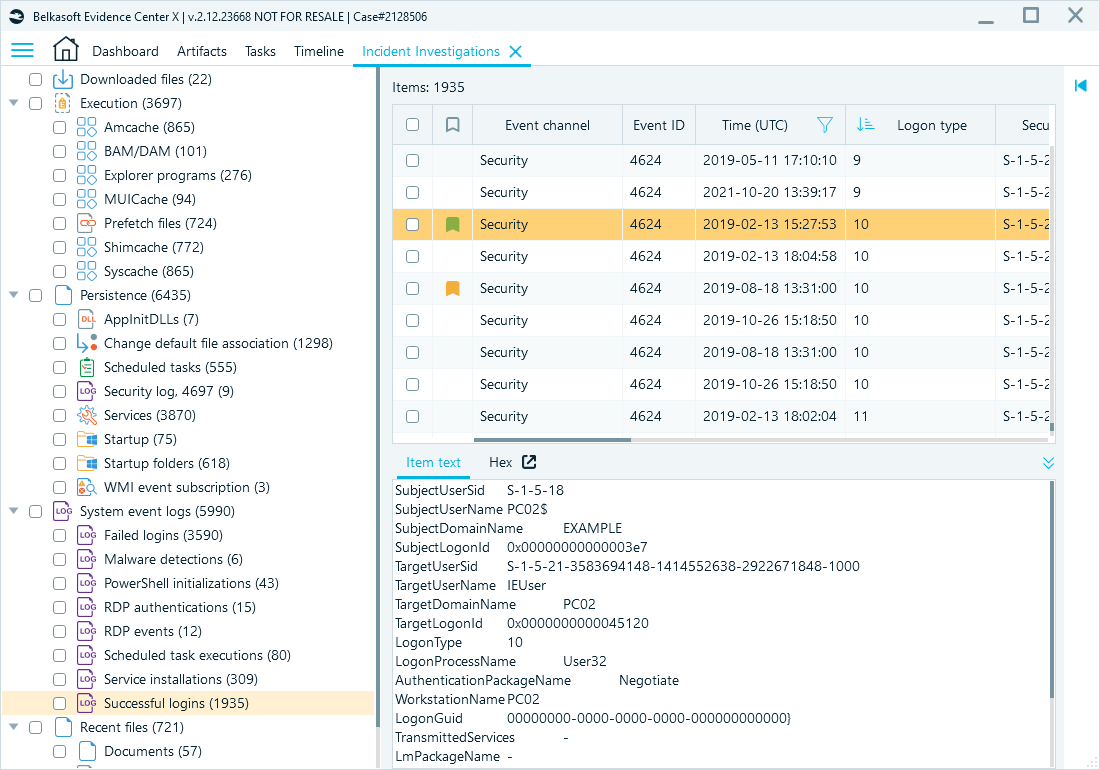
Belkasoft Incident Investigations module
A remote session is not suspicious by itself. Compare each session with service tickets, working hours and known IP addresses. The sessions that match nothing deserve a closer look.
Corroborating the findings
A remote session on an admin PC proves little on its own. It becomes evidence when other sources confirm it. First, look for the session in the firewall and VPN logs: the same source IP address should appear there at the same time. Next, check the controller logs for logins or configuration changes, such as new defrost settings, in the minutes that follow. If all three sources agree, you can link a specific session to the loss at a specific store.
Before you compare timestamps, align the time zones. Windows, firewalls, and controllers rarely share one clock, and a one-hour offset can break the chain. In Belkasoft X, you can set the time zone for each data source. When the case is ready, prosecutors and insurers can review your findings in the free Evidence Reader without an additional license.
Conclusion
The burning fridges made the headlines. A factory reset restores the controllers, but the evidence of the intrusion also sits in network gateways, VPN logs and management computers. Preserve them before remediation, and investigators can still trace the origin, tools and timeline of the attack.
To investigate the IT side of an incident like this across many sites, use Belkasoft X Corporate with Belkasoft R for remote acquisition. You can use the portable Belkasoft T for fast triage on a live Windows PC.