Belkasoft X 2.13: A Sneak Peek
Belkasoft X 2.13 is just around the corner, and it brings BelkaGPT deeper into everyday review, along with new ways to dig into deleted files and the AI apps people now talk to every day.
In this release, BelkaGPT, our fully offline AI assistant, starts showing its chain of thought as it answers your questions, learns to summarize documents, and extends topic detection to emails and SMS. On the file system side, Belkasoft X now reconstructs deleted files from NTFS MFT records. And as AI chatbots become a fixture on the devices you examine, we are adding support for Claude AI, Copilot, and ChatGPT mobile apps.
Here is a first look at what is coming.
BelkaGPT answers become even more transparent
When AI helps with an investigation, trust has to be earned. It is not enough to know what the answer is. You need to know where it came from and how it was reached, because a finding you cannot trace back is a finding you cannot defend.
BelkaGPT answers already point back to the artifacts they are based on, so you can check the evidence behind every claim. In 2.13, BelkaGPT also reveals the process behind each answer. While it works on your question, its chain of thought unfolds on screen: you can follow each stage, from interpreting your question to reviewing the evidence and composing a response, and see how long each one took.
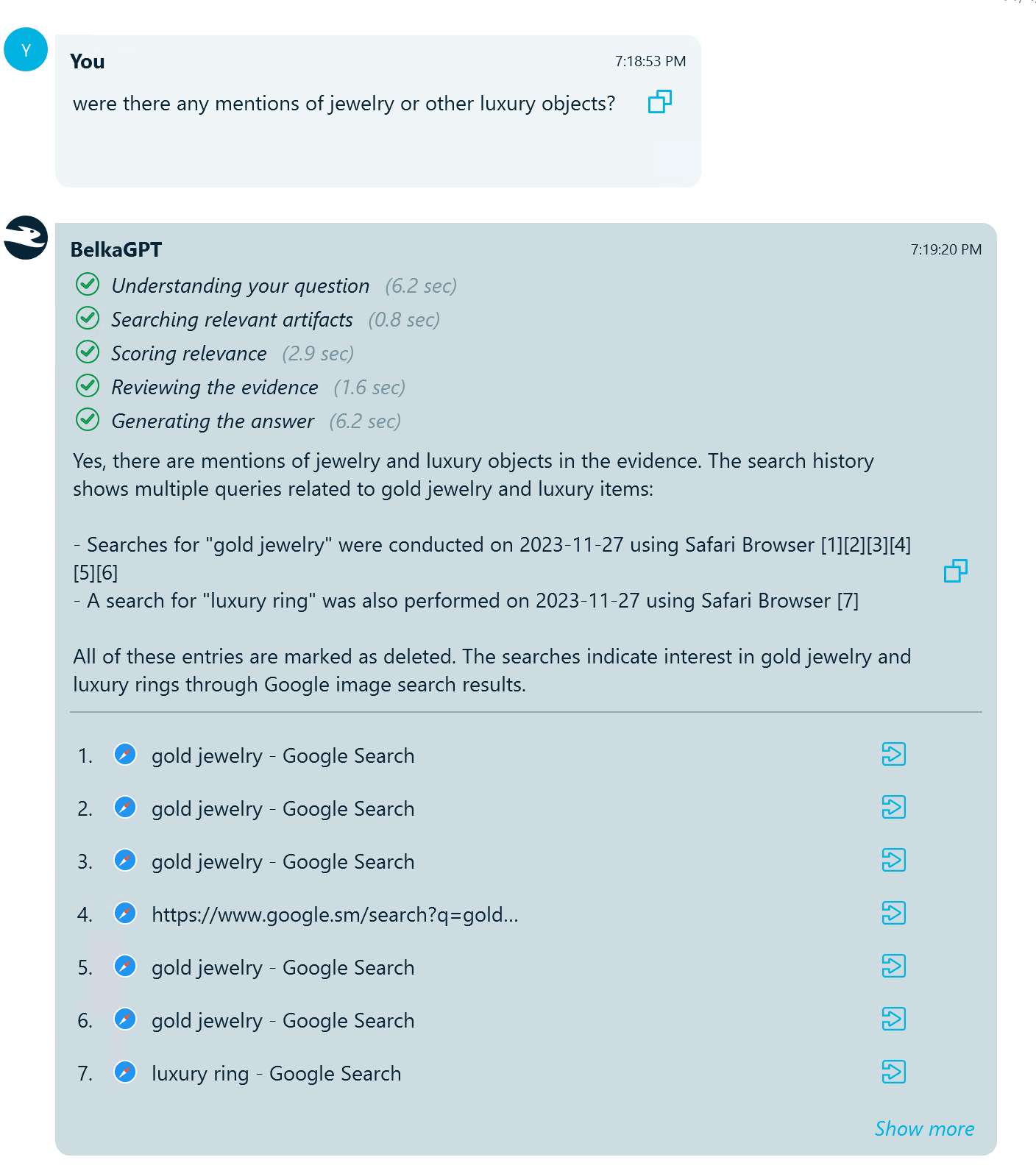
BelkaGPT chain of thought displayed alongside its answer
Source references show you what BelkaGPT relied on; the chain of thought shows you how it got from your question to its conclusion. Together, they keep BelkaGPT from becoming a black box: every answer is something you can inspect rather than simply accept, so you can judge how far to rely on it and stand behind your findings with confidence.
Know what is inside a document before you open it
Cases often contain hundreds or thousands of documents. Reading each one in full just to decide whether it matters is rarely an option.
BelkaGPT can now summarize documents, giving you the gist of a file at a glance so you can decide where to spend your time. Summarization works across a wide range of formats: word processor files, PDFs, spreadsheets, slide decks, and even plain-text logs.
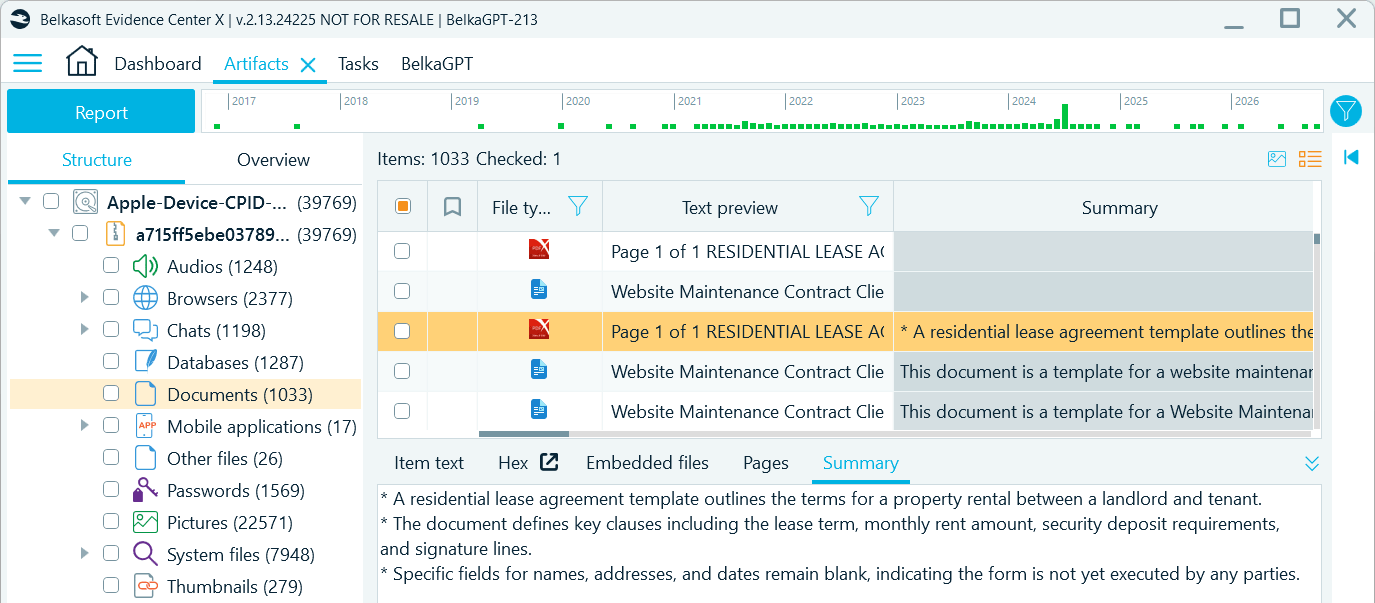
Read document summaries in Artifacts
You can summarize the whole Documents profile, a selection of items, or a single document, and choose between two modes:
- Quick summary of the first 500 words, the faster option that is often enough to tell whether a document deserves a closer look
- Full summary of the entire document, up to 25,000 words
Summaries are written in the language you choose, whatever language the original document is in. That means a contract in German, a spreadsheet with Chinese notes, or a Spanish log file can all be triaged without a translator on hand.
Topic detection reaches emails and SMS
In 2.13, topic detection extends to emails and SMS messages. The same detectors you already use for chats now work across all three communication types:
- Predefined detectors for common investigative categories, such as money, drugs, operational coordination, and account access
- Custom detectors built around your case, whether that is coded language within a criminal network or references to a confidential project in a corporate leak investigation
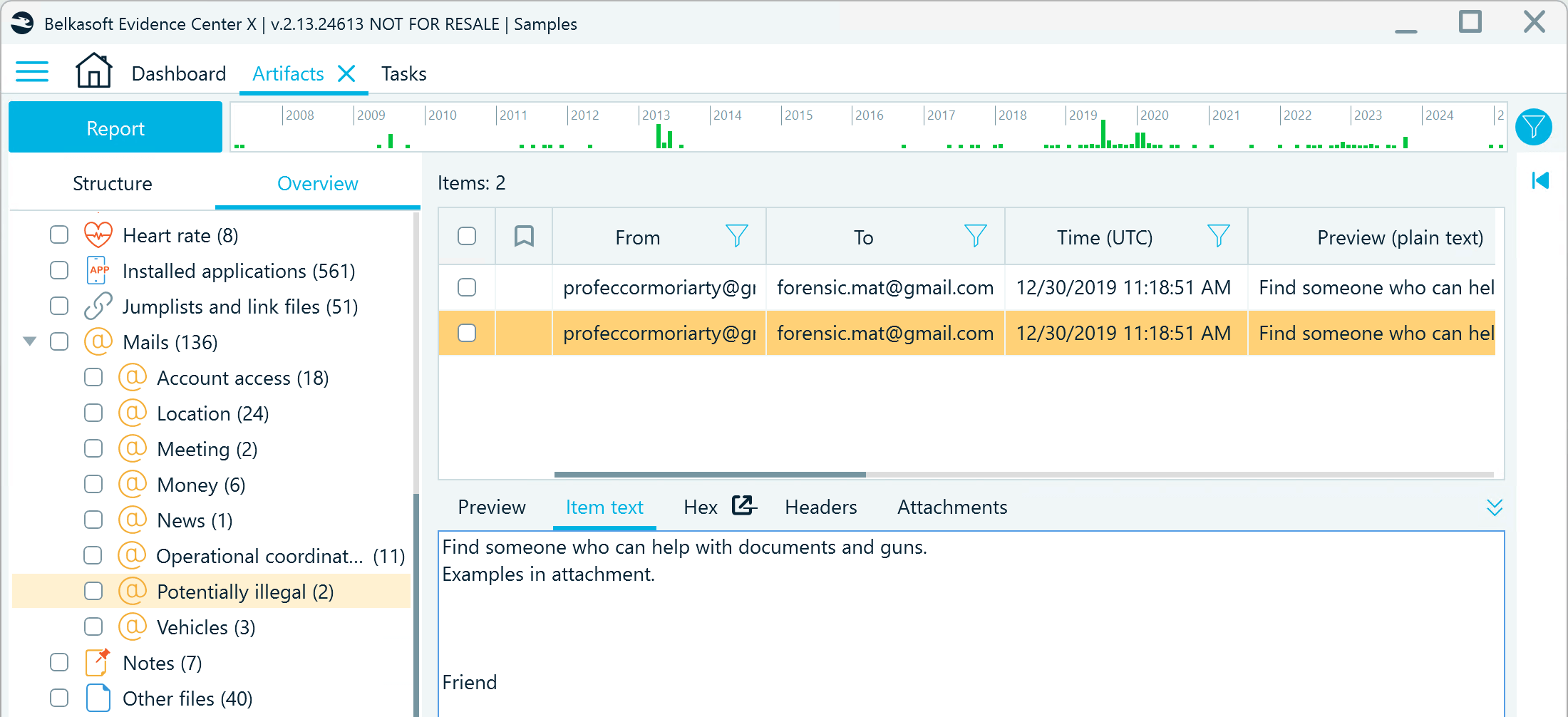
Topics detected in emails and SMS messages
Because detection relies on a large language model rather than keyword lists, it picks up slang, euphemisms, and indirect references, and a single detector works across many languages. Whether the evidence lives in a messenger, a mailbox, or a text thread, the relevant conversations come to you.
Bring deleted files back from the MFT
When a file is deleted from an NTFS volume, it does not vanish without a trace. Its record in the Master File Table (MFT) stays behind until NTFS reuses it, holding the file's name, location, timestamps, and sometimes even its contents.
Belkasoft X 2.13 reconstructs deleted files and folder records from MFT. In the File System window, every NTFS volume, and each of its shadow copies, gets a new Deleted items node, with deleted files grouped into two lists:
- Path restored, for files whose original location could be fully reconstructed
- Orphans, for files whose parent folder's record has already been reused
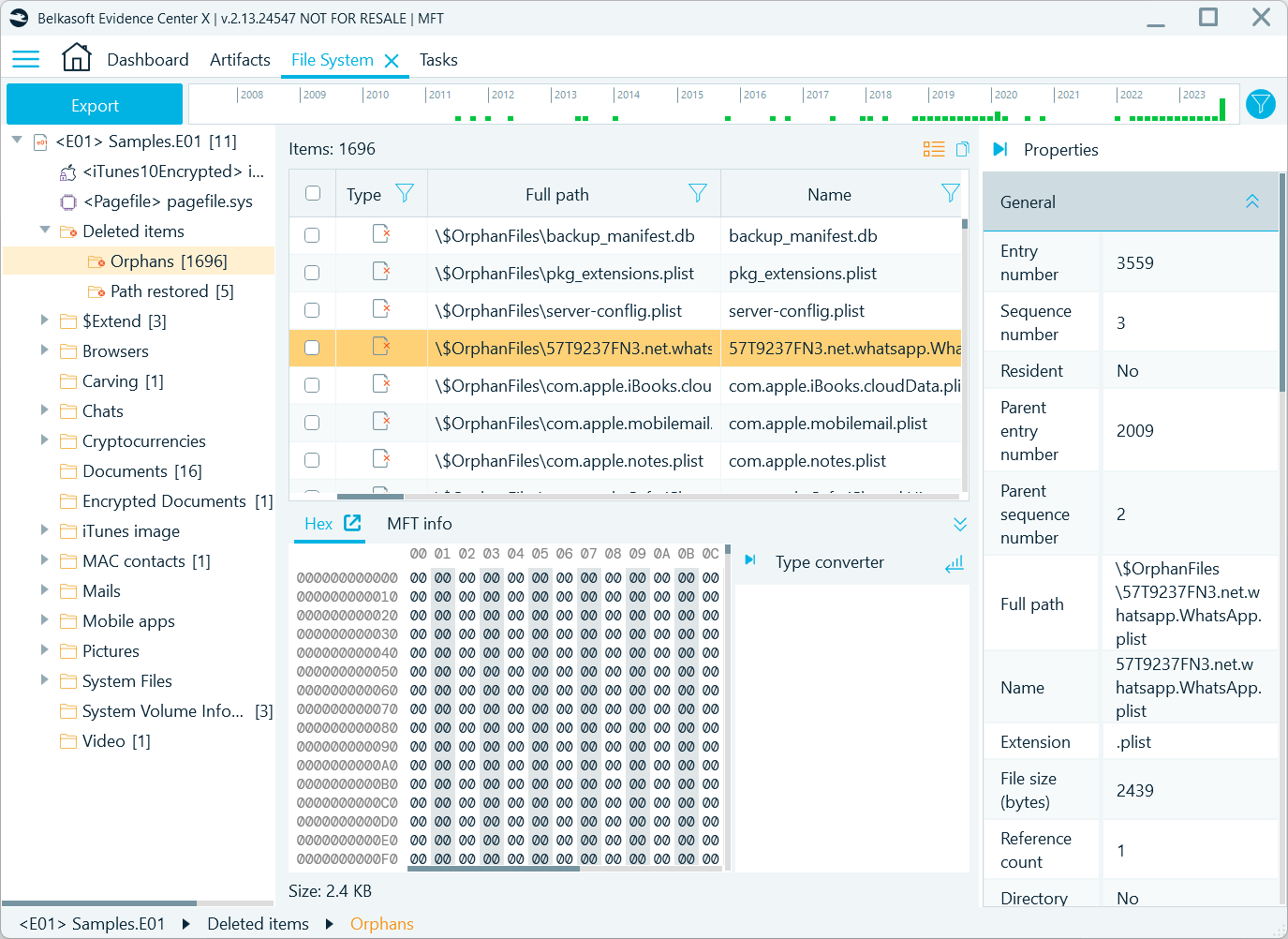
Deleted items recovered from MFT in the File System window
The recovered item list shows most of what the MFT knows about each file, and every column is sortable and filterable, so you can quickly zero in on files with specific names, sizes, or timestamps. From there, you can dig into each record:
- Examine the raw record in the Hex Viewer
- Check alternate data streams in the ADS viewer, for example, the Zone.Identifier stream where some downloaded files carry the origin link information
- Preview the contents of recoverable Plist and SQLite files in format-specific viewers
- Recover files whose data is still on the disk, as well as MFT-resident files. Resident files are small enough to live entirely inside their MFT record, so they can usually be recovered even after TRIM has wiped the freed space on an SSD
AI assistants on Android and iOS
People ask AI assistants things they would never type into a search bar: questions about their health, their finances, their plans, and their problems. For an investigator, these conversations can reveal intent, knowledge, and state of mind in ways few other artifacts can.
In 2.12, we added ChatGPT for iOS. Belkasoft X 2.13 broadens AI assistant coverage on both major mobile platforms:
- iOS: New support for Claude AI, plus support for the latest version of ChatGPT
- Android: New support for ChatGPT, Claude AI, and Copilot
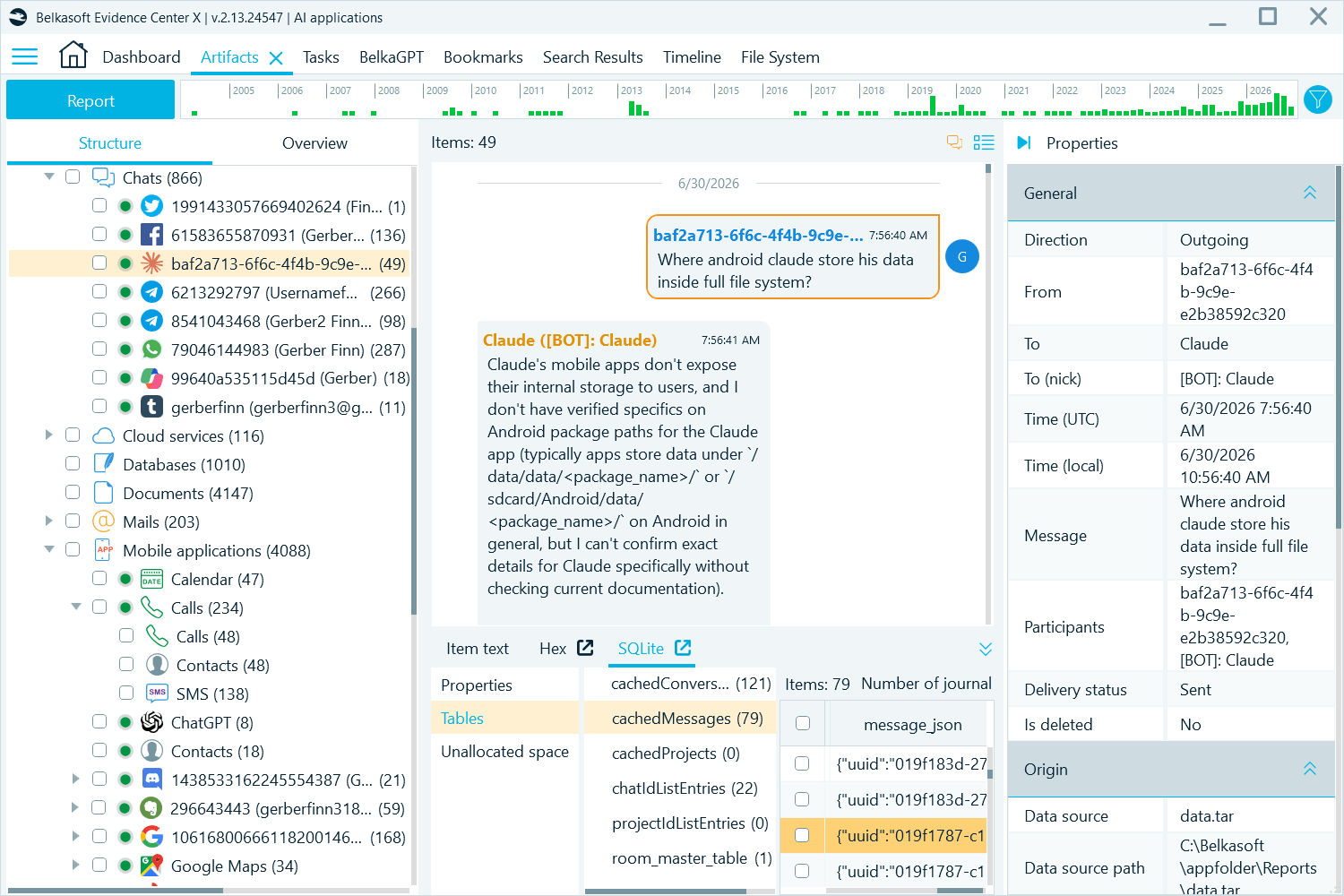
AI assistant artifacts extracted from an Android device
Data from these apps now lands in the same investigative environment as messages, browser history, documents, and the rest of your evidence, ready to be searched, correlated, and reviewed alongside everything else in the case.
More to come
These are only some of the highlights of Belkasoft X 2.13. The release also brings a faster BelkaGPT answer mode for computers without a GPU, browser-based sign-in for Google Cloud acquisition, MTK acquisition improvements, report splitting by contact or conversation, and much more.
Full details are coming with the release of Belkasoft X 2.13 next week. Stay tuned!