What's New in Belkasoft X v2.11

Belkasoft Evidence Center X (Belkasoft X) is Belkasoft's flagship product for digital forensics, cyber incident response, and eDiscovery.
Belkasoft X v2.11 expands AI-powered analysis, broadens acquisition coverage, and deepens artifact extraction across platforms:
- A new addition to the BelkaGPT toolkit—topic detection—automatically sorts chat messages by predefined or custom classes
- BelkaGPT Q&A assistant keeps getting sharper: it now handles natural-language time references for earliest and latest events, auto-detects languages in chats and documents for improved accuracy, and delivers relevance-ranked references across all matching case artifacts in every answer
- BelkaGPT Hub now supports speech-to-text conversion
- iOS agent-based acquisition now covers devices running iOS 17 and 18
- A new Telegram cloud acquisition method authenticates via an active Android session—no verification code or 2FA password required
- Microsoft 365 (OneDrive) acquisition now supports all Microsoft authentication workflows, including any 2FA method, via a standard browser login
- Restored acquisition of Google Cloud services and android WhatsApp backups
- SQLite databases found in a data source are collected under a dedicated node, putting potentially overlooked app data within reach without manual digging
- Enhanced artifact extraction surfaces more data from Android (Google Timeline, Facebook Messenger) and iOS (Instagram, Signal, Snapchat, X/Twitter) apps


Upgrading from previous versions of Belkasoft X to v2.11 is free for all customers with an active Software Maintenance and Support (SMS) contract. Customers with expired or expiring SMS contracts can review and renew them through the Customer Portal.
New Feature Details
BelkaGPT
Topic detection in chats
BelkaGPT can now analyze all chats in a data source, detecting and collecting messages with topics of interest under predefined classes like money, drugs, operational coordination, and account access, or any custom class you define.
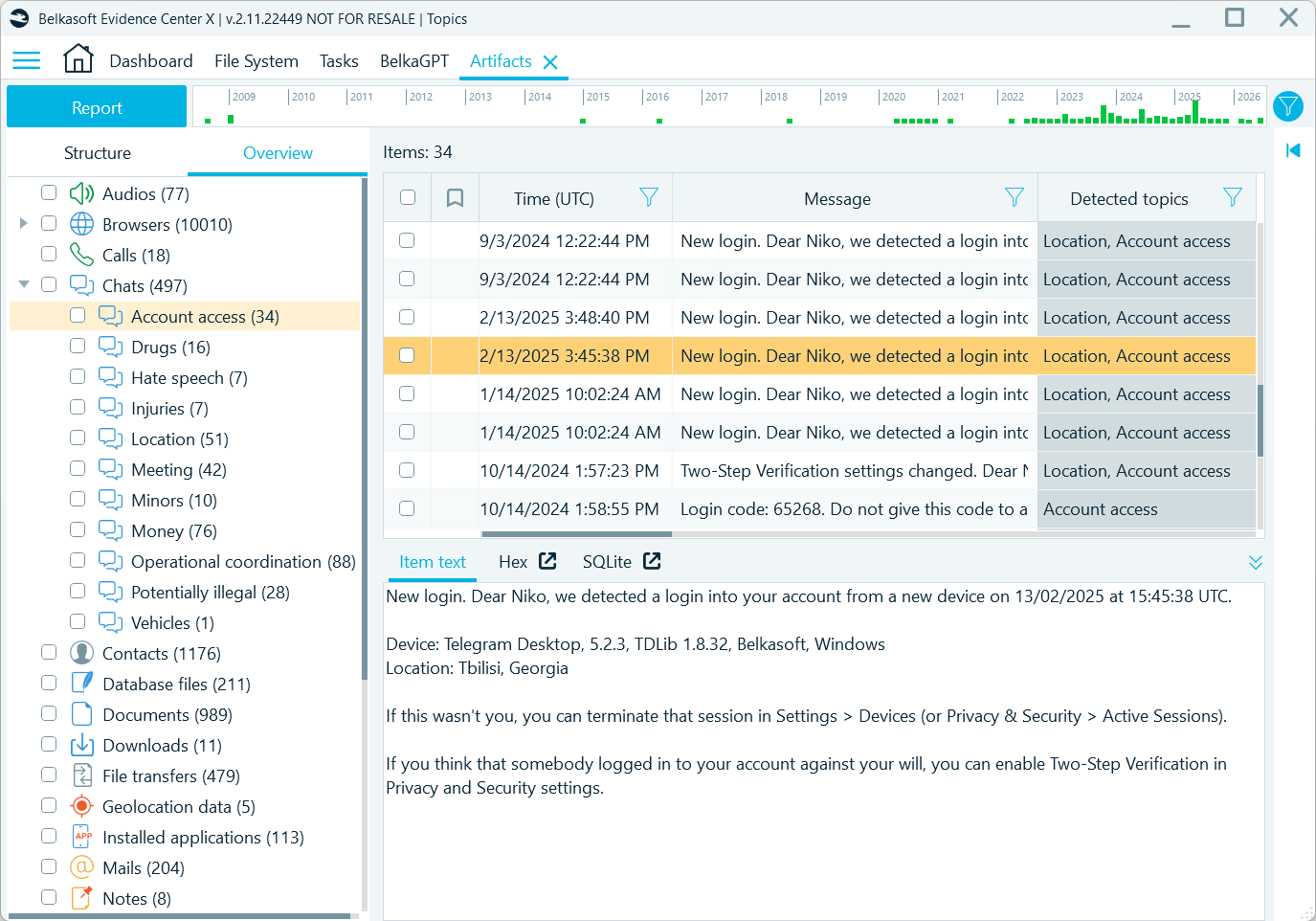
Belkasoft X displays detected topics in the Artifacts window and tags identified chats for filtering
Topic detection helps reduce the human hours spent on initial case triage: instead of reading through every chat by eye, you can first go straight to messages already classified by relevance—seeing what was discussed, with whom, and in what context—and build further investigation on these clues.
Predefined detectors cover the most common investigative categories. With custom detectors, your analysis becomes case-specific: you supply the domain knowledge—whether it is a coded language within a criminal network or references to confidential projects in a corporate leak investigation—and BelkaGPT applies it at scale.
Because detection is powered by the large language model, it can capture slang, euphemisms, or indirect references that static lists often miss. One detector works across many languages, with no parallel keyword sets needed—which also means multilingual cases no longer require upfront translation just to know where to look.
Unlimited artifact references in BelkaGPT answers
Every BelkaGPT answer now comes with a relevance-ranked list of all case artifacts—no more 15-item cap. Click the Show more button below the answer to open the list of references, load more as you go with the review, navigate to original records, or add them to bookmarks for later inspection—all from one view.
While the answer itself is grounded in up to 10 artifacts, this infinite scroll view helps you leave no stone unturned when case data includes a large number of relevant artifacts for your question.
Extended support for natural-language time references
In addition to understanding date ranges introduced in previous versions, BelkaGPT Q&A can now accurately interpret questions referencing the earliest and latest events.
Questions like "When did the user first communicate with X?", "What was the last location recorded?" or "Show the earliest file accessed" are now processed through a dedicated workflow, which sorts relevant artifacts by timestamps and prioritizes the earliest or latest items in the output. This improvement allows BelkaGPT to handle timestamps with more precision and makes timeline queries more reliable.
Automatic language detection
BelkaGPT now auto-detects the languages used in chats and documents, tagging them for search and filtering. It makes BelkaGPT Q&A significantly more accurate on language-specific queries, like "Find discussions about cars in French" or "Show me messages in Arabic mentioning investments."
UI enhancements
Artifact references in BelkaGPT answers are now shown with numbers, making it easier to locate and verify the specific artifacts mentioned.
Magnet Axiom case import
Import from Magnet Axiom case files (.mfdb) now brings in a wider range of artifacts:
- Windows user account data
- Picture geolocations
- Chrome cache
Richer imports mean more data available for BelkaGPT's AI-powered analysis—the more artifacts Belkasoft X can read from a Magnet case, the more comprehensive your AI-assisted investigation becomes.
Speech-to-text in BelkaGPT Hub
BelkaGPT Hub now converts speech from audio and video files to text. This capability lets you offload more compute-intensive tasks from your forensic workstation to a dedicated processing machine on your local network, making analysis fast, fully local, and free from external data transfers.
Mobile acquisition
Agent-based acquisition for iOS 17 and 18
The iOS agent-based acquisition method now supports devices running iOS 17 and iOS 18–18.7.1.
This method currently retrieves a partial file system with a rich set of evidence:
- Third-party app data (messengers, social media, email clients, browsers, and more)
- Media files
- Partial native app data (Safari, Notes, Apple Maps, Weather, etc.) and system files (keychain excluded)
Some native app data (Calls, SMS, Health, and other) falls outside the scope of this method, but can be collected via iTunes backup acquisition. Used together, these two methods cover nearly the full spectrum of user data, maximizing the evidence available for your investigation.
Cloud acquisition
New Telegram cloud acquisition method
Belkasoft X introduces a new Telegram cloud acquisition method that simplifies authentication using an existing active session on an Android device and extracts more data.
Normally, acquiring Telegram cloud data requires authenticating into the account with a verification code and a two-step verification (2FA) password if enabled. Authentication barriers like these are among the most common obstacles in Telegram cloud acquisition—and this method eliminates them. If an Android device with an active Telegram session is available, Belkasoft X connects to it directly, with no verification code or 2FA password required.
This new method is a go-to solution when the 2FA password is unknown or the verification code is inaccessible. It also provides a fuller set of data, additionally showing various service messages and details, such as call durations.
Microsoft 365 (OneDrive) acquisition with 2FA
Microsoft 365 (OneDrive) acquisition now supports the full range of Microsoft authentication workflows. Previously, authentication was handled directly between Belkasoft X and the Microsoft authentication server, which could cause issues due to limited protocol support.
The updated method opens a browser window with the standard Microsoft login page, where you can complete authentication as requested by the account settings. Once logged in, Belkasoft X picks up the session and begins downloading data.
This means any 2FA method Microsoft offers is now available—email code, authenticator app, and others—including the option to fall back to an alternative method if the first one fails.
Google Clouds
Google periodically updates its authentication and communication protocols, which can interrupt third-party access to its cloud infrastructure. Belkasoft X acquisition workflows have been fully updated to reflect these changes—Google Drive, Gmail, Google Keep, Google My Activity, and are all accessible again.
Android WhatsApp backups
WhatsApp backup access was similarly affected by recent protocol changes on both WhatsApp's and Google's end. It has now been restored—Belkasoft X can once again acquire Android WhatsApp backups from Google Drive. As these backups are stored in encrypted form, you will be prompted to decrypt them during analysis using an SMS code sent to the registered phone number, or a decryption key if available.
SQLite forensics
Belkasoft X now detects and shows SQLite databases found in data sources under the Database files node. From there, you can trace any database to its location in the file system and use the built-in SQLite viewer to browse and query the data directly.
Many mobile and desktop applications store their data in SQLite databases, including apps not yet supported by automatic artifact extraction. Instead of manually hunting for additional evidence, you now have potentially valuable databases in one place.
Artifacts
Android
- Android locations: Belkasoft X now extracts Google Timeline data stored in the app_semanticlocation_rawsignal_db folder, which includes a detailed history of the user’s locations
- Facebook Messenger v492.0.0.59.109: Improved chat data extraction
iOS
- All Trails v23.5.20: Improved track extraction and display on Map and supported extraction of track pictures
- Health iOS15: Improved track data extraction
- Instagram v407.0.0: Group chat extraction is now supported
- Signal v7.85: Message attachments are now decrypted, and extraction is improved for various message types
- Snapchat v13.67.1: Reactions to messages are now extracted
- Telegram v12.7: Chat participant name is now displayed for secret chat contacts
- X (ex-Twitter) v11.42.1: Improved chat and cache extraction
Other improvements
- The mobile applications profile nodes now include the Show contacts command which displays one-to-one and group chat threads for individual review
- All Belkasoft X logs now show timestamps in UTC, providing a more consistent track of processing events
- Mega Cloud acquisition UI improved to explain the process more straightforwardly
- The Volatility integration workflow is updated to mitigate compatibility issues during the analysis
See also
Belkasoft X 2.10
Belkasoft X 2.9
Belkasoft X 2.8
Belkasoft X 2.7
Belkasoft X 2.6
Belkasoft X 2.5
Belkasoft X 2.4
Belkasoft X 2.3
Belkasoft X 2.2
Belkasoft X 2.1
Belkasoft X 2.0
Belkasoft X 1.17
Belkasoft X 1.16
Belkasoft X 1.15
Belkasoft X 1.14
Belkasoft X 1.13
Belkasoft X 1.12
Belkasoft X 1.11
Belkasoft X 1.10
Belkasoft X 1.9
Belkasoft X 1.8
Belkasoft X 1.7
Belkasoft X 1.6
Belkasoft X 1.5
Belkasoft X 1.4
Belkasoft X 1.3
Belkasoft X 1.2
Belkasoft X 1.1
Belkasoft X 1.0
Belkasoft Evidence Center 9.9
Belkasoft Evidence Center 9.8
Belkasoft Evidence Center 9.7
Belkasoft Evidence Center 9.6
Belkasoft Evidence Center 9.5
Belkasoft Evidence Center 9.4
Belkasoft Evidence Center 9.3
Belkasoft Evidence Center 9.2
Belkasoft Evidence Center 9.1
Belkasoft Evidence Center 9.0
Belkasoft Evidence Center 8.6
Belkasoft Evidence Center 8.5
Belkasoft Evidence Center 8.4
Belkasoft Evidence Center 8.3
Belkasoft Evidence Center 8.2
Belkasoft Evidence Center 8.1
Belkasoft Evidence Center 8.0
Belkasoft Evidence Center 7.5
Belkasoft Evidence Center 7.4
Belkasoft Evidence Center 7.3
Belkasoft Evidence Center 7.2
Belkasoft Evidence Center 7.1
Belkasoft Evidence Center 7.0
Belkasoft Evidence Center 6.3.1
Belkasoft Evidence Center 6.3
Belkasoft Evidence Center 6.2
Belkasoft Evidence Center 6.1
Belkasoft Evidence Center 6.0
Belkasoft Evidence Center 5.4
Belkasoft Evidence Center 5.3
Belkasoft Evidence Center 5.2
Belkasoft Evidence Center 5.1
Belkasoft Evidence Center 5.0
Belkasoft Evidence Center 4.2
Belkasoft Evidence Center 4.1
Belkasoft Evidence Center 4.0
Belkasoft Evidence Center 3.9
Belkasoft Evidence Center 3.8
Belkasoft Evidence Center 3.7
Belkasoft Evidence Center 3.6
Belkasoft Evidence Center 3.5
Belkasoft Evidence Center 3.0
Belkasoft Evidence Center 2.0