Forensic Acquisition of MediaTek-Based Android Devices
Extracting as much user data as possible from a seized device is a primary goal in digital forensic investigations. However, when it comes to Android device extraction, security mechanisms can make complete forensic acquisition difficult or impossible with standard methods.
For Android devices based on supported MediaTek (MTK) chipsets, Belkasoft X provides an advanced acquisition method that can create a physical image of the device and decrypt the user data it contains. In this article, we will explain how the method works, how to acquire and decrypt an MTK device image, and how to recover the device passcode when it is unknown.
What makes it possible to acquire data from MediaTek devices?
A number of MediaTek chipsets contain vulnerabilities in BootROM (BROM) that allow forensic tools to gain low-level access to the device before Android starts. This access makes it possible to create a physical image of the device storage, including partitions such as system and userdata. More importantly, it can also provide access to the cryptographic material required to decrypt protected user data.
The MTK dump method in Belkasoft X uses this approach to extract data from MTK-based devices protected with file-based encryption (FBE). The method involves two stages:
- Acquire the device image. Belkasoft X connects to the device in BootROM mode, creates a physical dump, and obtains the cryptographic material available through this access path.
- Decrypt and analyze userdata. The acquired dump is then added to the case as a data source. At this stage, Belkasoft X can decrypt the userdata partition, extract the file system it contains, and parse supported Android forensic artifacts from it.
If the device passcode is unknown, Belkasoft X can help you recover it through brute-force.
What is BootROM mode?
BootROM (BROM) is the earliest stage of the MediaTek chipset's boot process. It provides a low-level interface to the device before Android and the later boot stages start. For the MTK dump method, Belkasoft X requires the target device to connect in BootROM mode so it can establish the low-level access needed for acquisition.
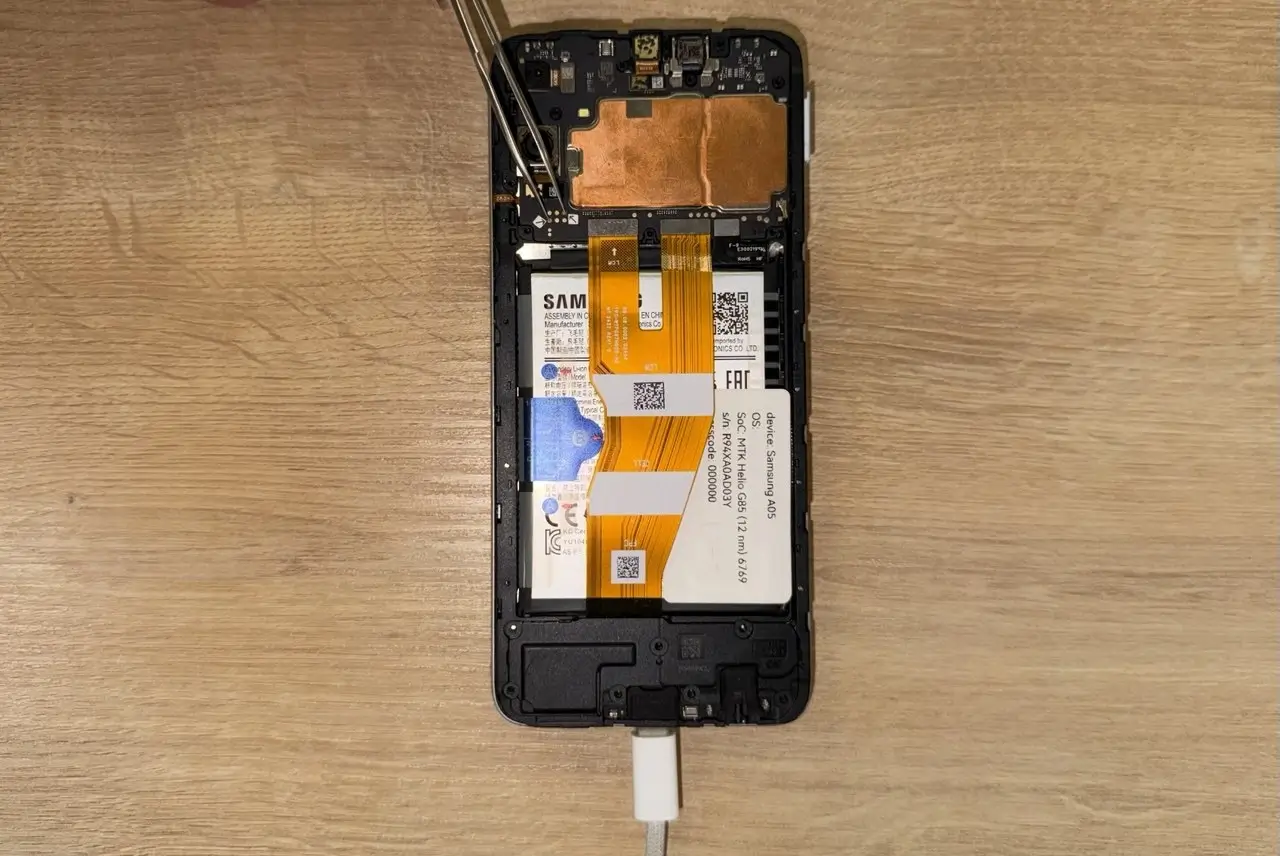
The exact procedure for entering BootROM mode depends on the device. In many cases, you need to power off the device and connect it over USB while both volume buttons are held. Other devices require access to a hardware test point(s) on the motherboard. Procedures may also differ between variants of the same model, so the correct method should be identified before acquisition begins.
| Method | Procedure | Consideration |
|---|---|---|
| Button combination |
| Available on a limited number of devices. |
| Hardware test points |
| Requires disassembling the device and researching the location of the test point(s). |
If you cannot enter BROM mode on the first attempt, the acquisition process in Belkasoft X does not need to be restarted. Unless the tool reports Acquisition failed, you can disconnect the device, power it off if needed, and connect it again using the appropriate BootROM procedure. Several attempts may be necessary until Belkasoft X detects the device.
How to acquire a physical image from a MediaTek-based device
The acquisition stage of Belkasoft X's MTK dump method workflow focuses on creating and preserving the physical image and cryptographic keys
1. Select the device or chipset
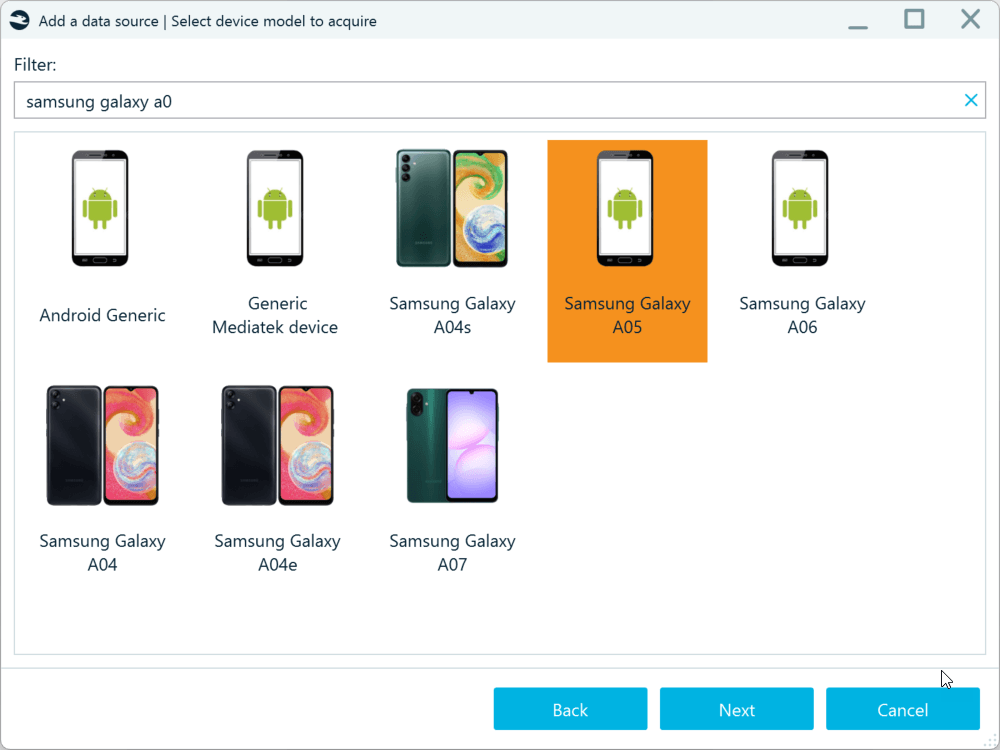
Start a new Android acquisition in Belkasoft X and locate the target device in the supported-device list. If the exact model is not listed, search by chipset name, such as MT6769. Alternatively, you can select Generic Mediatek device. If the chipset of your device is supported, Belkasoft X will detect it on a successful connection.
2. Select the MTK dump method and complete the prerequisites
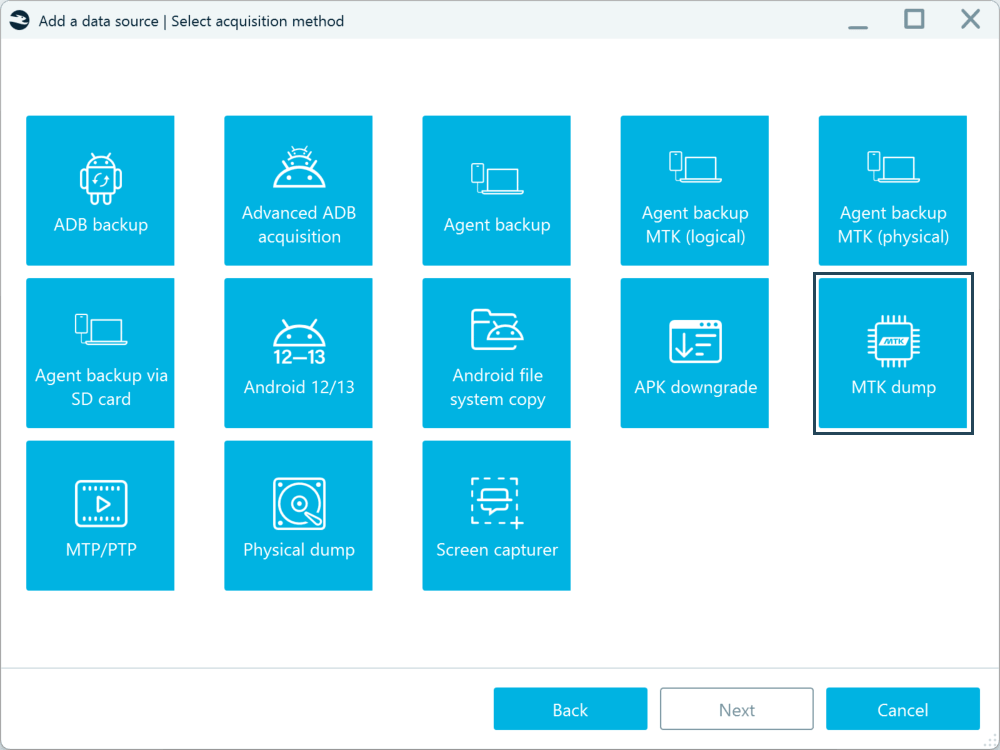
Select the MTK dump acquisition method, specify where to store the acquired image, and install the required USB development kit drivers if prompted.
3. Connect the device
Belkasoft X will prompt you to connect the device in BootROM mode. Use the appropriate procedure for the target model. If the device is not detected immediately, disconnect it, make sure it is powered off, and repeat the BootROM procedure. Several attempts may be necessary, and different variants of the same model can require different entry methods.
4. Acquire the physical image
Once Belkasoft X connects to the device, the acquisition log confirms the connection, shows the dump size, and the tool starts creating the physical image.
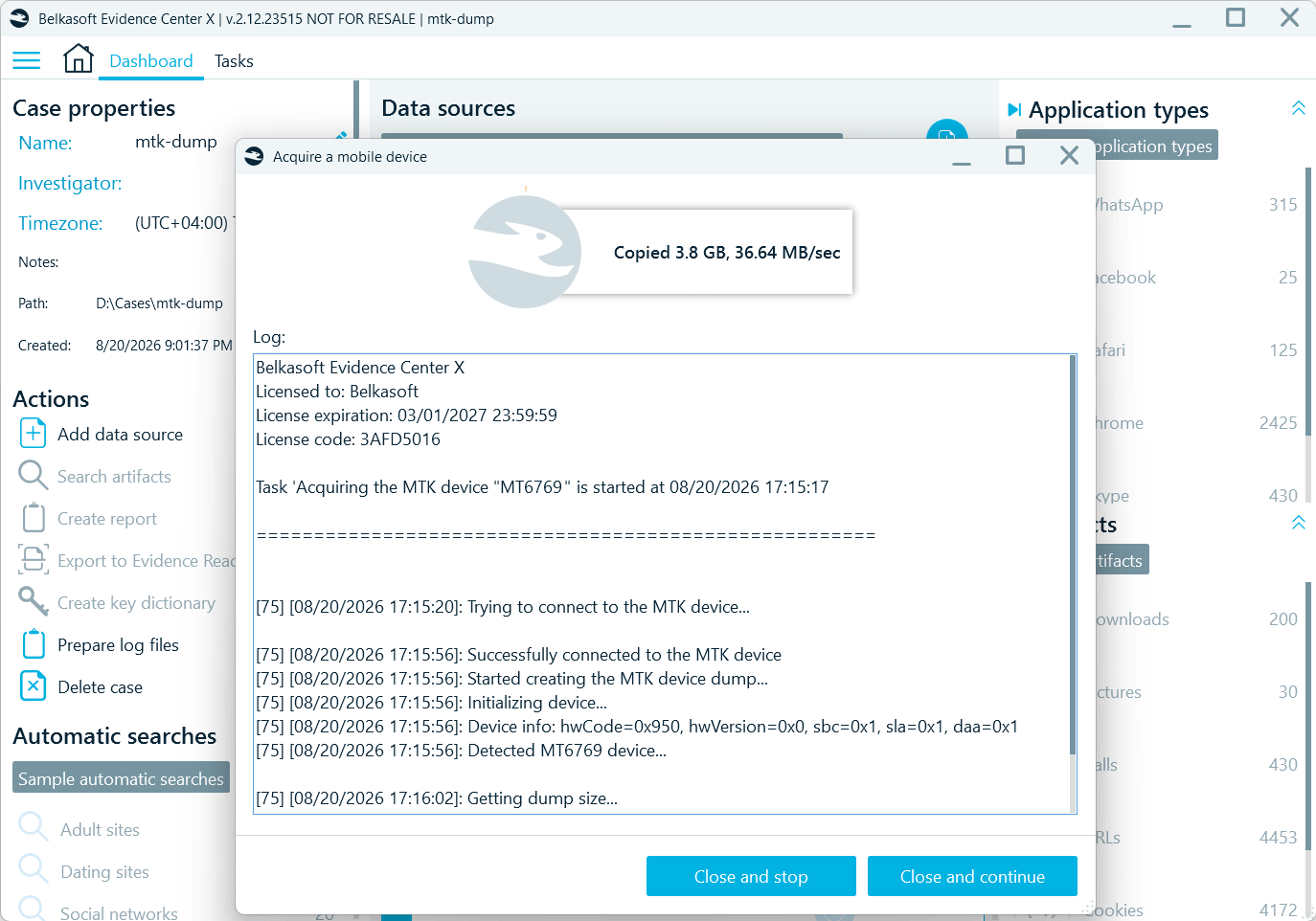
5. Save the image for further processing
After acquisition is complete, Belkasoft X opens the folder containing the image and prompts you to add the dump to the case. At that point, the acquisition stage is finished.
The video below briefly demonstrates how to begin the acquisition of an MTK-based device in Belkasoft X.

How to decrypt a MediaTek device image
After the acquisition, add the MTK dump to the case as a Mobile image and select the partitions you want to analyze. The userdata partition contains the /data folder with user and application data and is typically encrypted, so its protected contents must be decrypted before Belkasoft X can fully analyze them.
If the device passcode is known
Select the userdata partition, enter the device passcode, and click Apply the password.
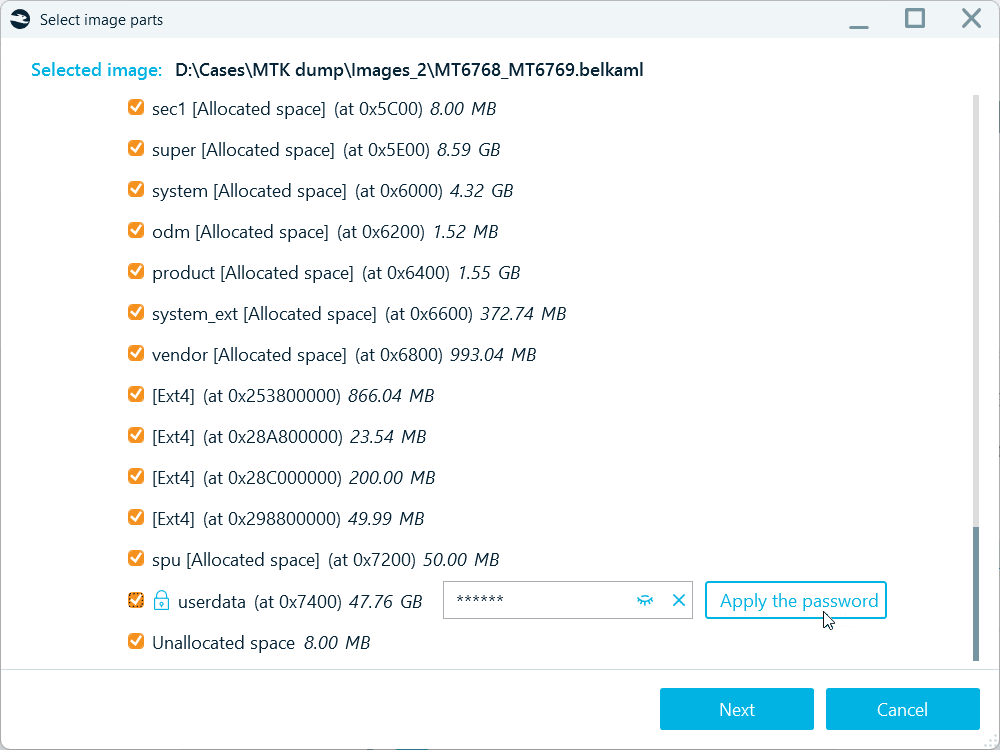
Belkasoft X verifies the credential and, if it is valid, allows you to continue adding the data source for analysis.
If no passcode is configured
Select the userdata partition and continue to the Brute-force options dialog. Choose The passcode is not set and proceed with adding the data source. In this scenario, decryption uses the available default system keys rather than a user passcode.
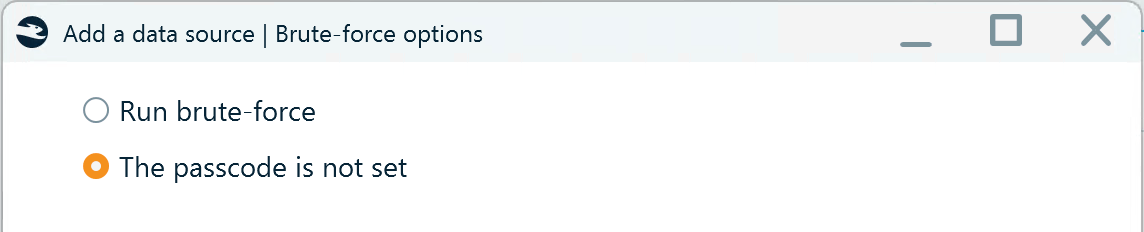
If the passcode is unknown
Belkasoft X can attempt to recover the passcode before decrypting userdata. Learn more in the following section, "How to recover an MTK-based device passcode."
If you have an image acquired with MTKClient
Belkasoft X may also be able to decrypt dumps acquired with MTKClient from devices based on supported MediaTek chipsets. However, the extracted encryption keys must first be converted to a format supported by Belkasoft X. Contact Belkasoft Support at support@belkasoft.com for assistance.
How to recover a MediaTek device passcode
If the passcode for an MTK-based device is unknown, you can use Belkasoft X to recover it through brute-force. Add an MTK dump image to your case as a Mobile image, select the userdata partition and click Next.
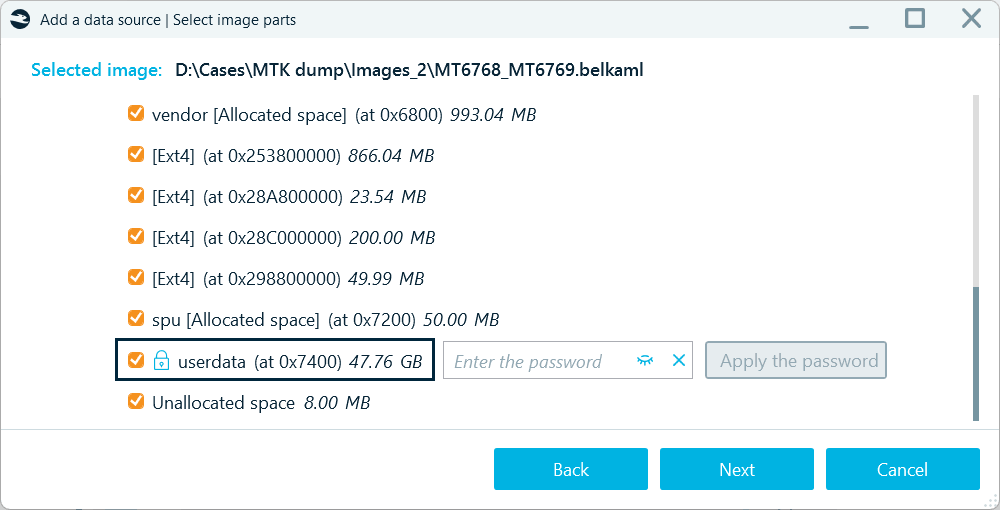
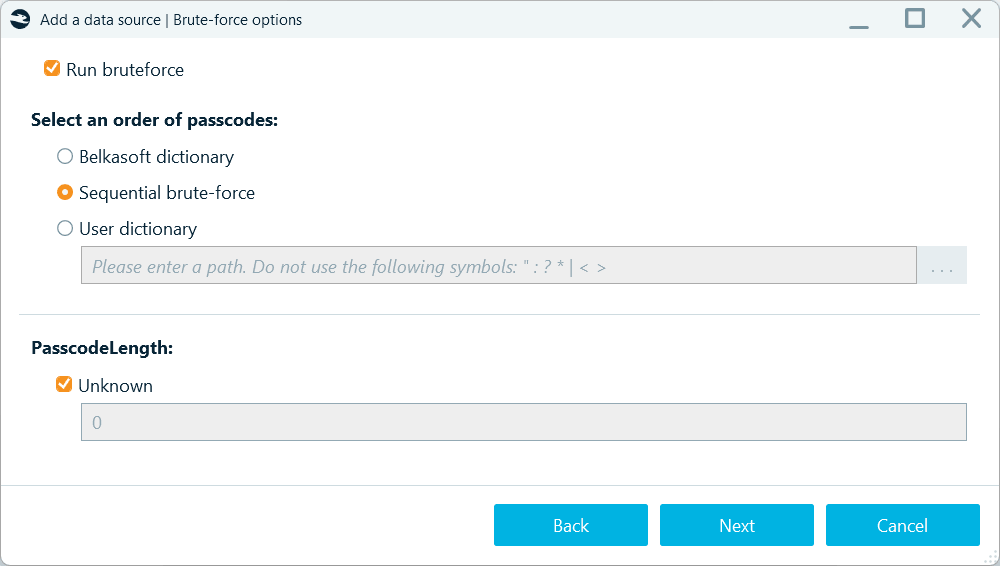
In the Brute-force options dialog, select Run brute-force. Available brute-force options include the built-in Belkasoft dictionary, sequential numeric brute-force, and a custom user dictionary.
Built-in dictionary attack
The Belkasoft dictionary option prioritizes commonly used passcodes instead of testing every possible combination sequentially. This option currently supports only the 4- and 6-digit passcodes.
Sequential brute-force
Sequential brute-force tests numeric passcodes in ascending order, starting with all zeros. For example, for a four-digit passcode, testing begins with 0000 and proceeds through the remaining combinations.
Custom dictionary
User dictionary allows you to supply your own candidate passcodes in a .txt file, with one value per line. Unlike the built-in dictionary and sequential brute force, you can use the User dictionary option for both numeric and alphanumeric passcodes.
Supported passcode lengths
On some devices, the lock screen may indicate the expected passcode length. If you can identify it on the target device, specify the value in the Passcode length field. For numeric passcodes, the supported length range is 4 to 11 digits.
If you have no information about the passcode length, keep the Unknown checkbox selected. Belkasoft X will attempt to extract the passcode type and length from the device metadata before brute-force recovery begins.
Brute-force speed for MTK devices
Because passcode recovery is performed offline using extracted cryptographic material rather than by submitting attempts to the live device, it is not subject to Android's normal lock-screen delays or attempt limits. Recovery speed instead depends on the device's security implementation and the cryptographic operations required to test each candidate.
For supported MTK devices, Belkasoft X tests about 60 passcodes per second, or 30 passcodes per minute on certain models.
Brute-force workflow
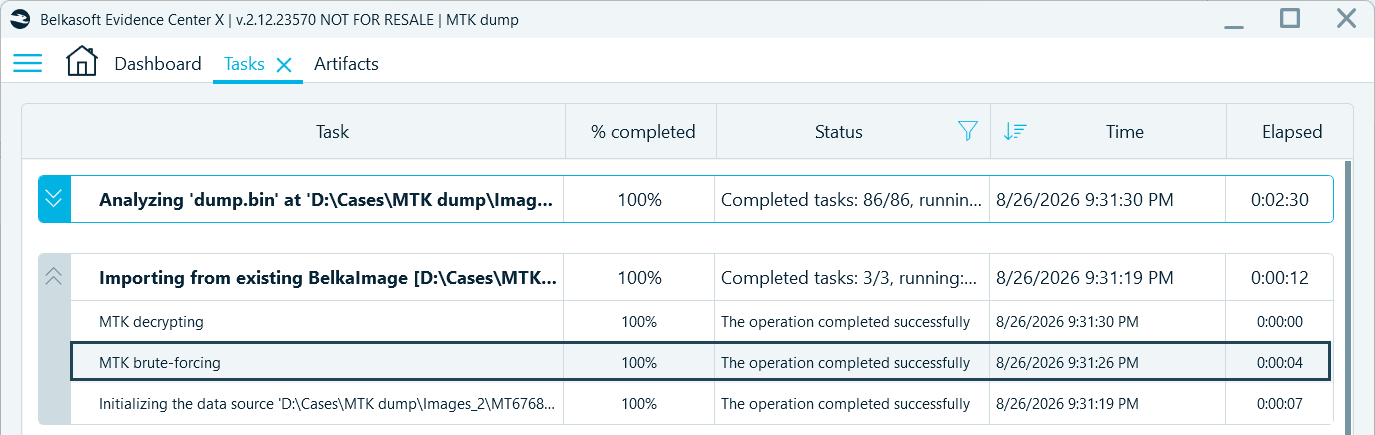
After you configure the brute-force options and add the MTK image to your case, Belkasoft X begins the analysis. You can track the brute-force and other tasks' progress in the Tasks window. After the passcode is recovered, Belkasoft X automatically uses it to decrypt the image. You can find the recovered passcode in the MTK brute-forcing task log. Double-click the task to open its log.
Devices on which MediaTek chipsets can be acquired?
Belkasoft X currently supports MTK dump acquisition for devices based on the following MediaTek chipsets:
MT3369, MT6731, MT6737, MT6739, MT6761, MT6762, MT6763, MT6765, MT6768, MT6769, MT6853, MT6873, MT6877, MT6880, MT6883, MT6885, MT6889, MT6890, MT6893, MT8765, MT8785, MT8766B, MT8768t
However, chipset support does not guarantee support for every device model. Some manufacturers may implement additional security measures that prevent successful connection to the device or the acquisition of cryptographic material required for decryption.
Limitations of MTK dump acquistion
The success of the MTK dump method depends not only on the chipset, but also on the specific device model and its security implementation. Keep the following limitations in mind:
- BootROM connection can be device-specific and challenging. Even when a chipset is supported, some device models or variants may not successfully connect in BootROM mode.
- Cryptographic material may not always be accessible. On some devices, additional security mechanisms may prevent Belkasoft X from obtaining the keys or other cryptographic material required for decryption.
- Decryption support currently focuses on FBE-protected devices. Support for devices using legacy full-disk encryption (FDE) is planned for a future release.
Conclusion
MediaTek-based Android devices can present investigators with acquisition opportunities that are not available through standard logical methods. On supported chipsets, Belkasoft X can use BootROM mode to create a physical image, obtain the cryptographic material needed for decryption, and recover the device passcode when necessary.
The workflow separates acquisition from decryption, allowing investigators to preserve the device image first and address passcode recovery and userdata decryption afterward. While success still depends on the exact chipset, device model, and its security implementation, the MTK dump method can provide access to user data that would otherwise remain unavailable through standard Android acquisition methods.
FAQ
How do I know if an Android device uses a MediaTek chipset?
Start with the exact device model and check its hardware specifications for the SoC or chipset name. MediaTek chipset identifiers usually begin with MT, such as MT6768 or MT6877. In Belkasoft X, you can also search for the device by model or chipset when starting an Android acquisition.
How to put a MediaTek device into BootROM mode?
The procedure depends on the device model. In many cases, you need to power off the device, hold the required volume-button combination, and connect it over USB. Other devices require access to one or more hardware test points on the motherboard. The exact procedure can differ even between variants of the same model, so it should be identified before acquisition begins.
What is MTK Dump in Belkasoft X?
MTK Dump is an acquisition method for supported MediaTek-based Android devices. It uses BootROM access to create a physical image and obtain cryptographic material required for subsequent decryption and analysis.
Does a supported MediaTek chipset guarantee successful acquisition?
No. Support for the chipset does not guarantee that every device built on it can be acquired. Device manufacturers may implement additional protections that prevent BootROM connection or access to the cryptographic material required for decryption.
Does acquiring a physical image automatically provide access to user data?
No. The userdata partition may remain encrypted after acquisition. The dump must be added to the case and userdata decrypted before Belkasoft X can analyze the protected user and application data it contains.
Can Belkasoft X decrypt an MTK device if the passcode is unknown?
Yes, for supported devices Belkasoft X can attempt to recover an unknown passcode using a built-in dictionary, sequential numeric brute force, or a custom dictionary. Once the passcode is recovered, it is used automatically for decryption.
Which Android encryption types are currently supported?
For the MTK dump acquisition method described in this article, Belkasoft X currently supports decryption of devices protected with file-based encryption (FBE). Support for legacy full-disk encryption (FDE) is planned for a future release.