Remote Evidence Acquisition Tools for Incident Response
2026 Comparison and Buying Guide
This guide is written for IT security and risk leadership at mid-to-large enterprises and government agencies—CISOs, IT/security directors, DFIR team leads, and procurement officers—who need to choose a remote evidence acquisition tool and justify that choice to budget owners and legal/compliance stakeholders, not just to a forensic analyst.
Learn what remote evidence acquisition is, why on-site response alone is no longer enough, how to evaluate and pilot a tool, and how 12 of the most commonly evaluated platforms compare.
What Is Remote Evidence Acquisition?
Remote evidence acquisition is the process of collecting forensically sound data—disk images, memory, logs, mobile artifacts, or cloud records—from a device or account over a network, without physically accessing the hardware. It is a capability, not a single product category: vendors deliver it through standing endpoint agents, temporary on-demand connections, or read-only remote mounts.
How is remote evidence acquisition different from EDR?
Endpoint detection and response (EDR) tools are built to detect and block malicious activity in real time and typically retain only limited historical telemetry. Remote evidence acquisition tools are built to preserve a complete, hash-verified copy of disk, memory, or account data for later analysis and potential legal use—many of the tools in this guide integrate with EDR platforms rather than replacing them.
How is it different from remote triage?
Remote triage is a fast, partial survey of an endpoint (running processes, network connections, key artifacts) used to decide whether an incident is real and how to prioritize it. Remote evidence acquisition is the fuller collection step that may follow triage, capturing complete disk images or memory dumps rather than a targeted snapshot. Cyber Triage and KAPE are positioned primarily as triage tools; most others in this guide perform both.
How is it different from live response?
Live response refers to interacting with a running, compromised system to gather volatile data or take containment action (killing a process, isolating a host) in real time. Remote evidence acquisition overlaps with live response but emphasizes preservation and evidentiary integrity—hashing, logging, and chain of custody—over immediate containment.
How is it different from traditional (on-site) digital forensics?
Traditional digital forensics typically involves physically seizing a device and imaging it in a lab with a hardware write-blocker. Remote evidence acquisition performs the equivalent of that imaging step over a network instead, which is faster and avoids shipping hardware, but depends on network conditions, endpoint agents, and software-based (rather than hardware-based) write protection.
Do You Need Remote Forensic Acquisition Capability?
Relying on physical, on-site response is measurably slower and more expensive than remote acquisition. Organizations with remote/hybrid workforces, cloud infrastructure, and encrypted endpoints cannot rely on shipping hardware or dispatching staff every time an incident occurs.
The cost of speed. According to IBM's 2025 Cost of a Data Breach Report, organizations took a mean of 241 days to identify and contain a breach in 2025 (158 days to identify, 83 to contain), and breaches resolved in under 200 days cost $1.14–$1.88 million less on average than slower ones. IBM's earlier 2020 report found that when remote work was identified as a contributing factor in a breach, the average cost was $1.07 million (24.2%) higher than breaches where it was not a factor.
Attacker speed has also increased, which compresses the window an organization has to respond. Mandiant's M-Trends 2026 report (drawing on more than 500,000 hours of incident response work in 2025) found that global median dwell time rose to 14 days in 2025, and in intrusions involving a hand-off between two threat-actor groups, the median time between initial access and hand-off fell to 22 seconds in 2025, down from more than 8 hours in 2022. Mandiant's 2025 report separately found a median dwell time of 6 days specifically for ransomware-related intrusions—responders have days, not weeks, to act.
Beyond speed and cost, three structural factors make remote acquisition close to mandatory for most organizations today:
- Distributed operations. Multinational or multi-site organizations cannot get a physical responder to every location within a useful timeframe.
- Legal and regulatory deadlines. Breach notification laws, e-discovery holds, and sector-specific reporting rules require evidence to be preserved quickly and defensibly.
- Encryption and BYOD. Full-disk encryption and bring-your-own-device policies make offline imaging impractical without live, authenticated access to the running system.
What Criteria Should You Use to Evaluate a Tool?
Evaluate candidates against eight dimensions: platform/OS coverage, cloud and SaaS reach, mobile device coverage, deployment model, evidentiary integrity, SIEM/SOAR/EDR integration, scalability, and licensing/support model. These are the criteria vendors themselves compete on, independent of any one buyer's priorities.
- Platform and OS coverage. Windows, macOS, Linux, and increasingly hypervisor (ESXi) or ChromeOS support.
- Cloud and SaaS reach. Native collection from Microsoft 365, Google Workspace, AWS, and Azure, where an increasing share of evidence now lives.
- Mobile device coverage. The ability to remotely acquire iOS/Android devices, which only a minority of tools in this category support natively.
- Deployment model. Standing agent versus agentless/on-demand collection, and how the tool reaches distributed endpoints (GPO, WMI, existing endpoint management, or a live network connection).
- Evidentiary integrity. Hash verification, chain-of-custody logging, and the track record of the tool's evidence container format in court or regulatory proceedings.
- SIEM/SOAR/EDR integration. Whether acquisition can be triggered directly from a security alert.
- Scalability. The ability to run collection simultaneously across large, geographically distributed fleets.
- Licensing and support model. Open-source/free versus commercial, and the vendor's patch cadence and roadmap stability.
How to Run a Proof-of-Concept Before Committing (5 Steps)
- Define a realistic test scenario—a low-bandwidth or VPN-constrained remote endpoint, at least one encrypted disk, and, if relevant, one mobile device and one cloud/SaaS account.
- Time the actual collection, not the vendor demo timing, from trigger to usable evidence.
- Measure completeness of volatile memory capture under real network conditions.
- Have legal or compliance review the evidence output format before the pilot closes.
- Confirm the vendor's patch cadence and vulnerability-disclosure process for the acquisition agent itself, since it is a privileged remote-access tool.
Which Remote Evidence Acquisition Tools Are Available, and How Do They Compare?
There is no universally best remote evidence acquisition platform. Some tools prioritize enterprise-scale incident response and rapid triage, others focus on forensic soundness and legal defensibility, and still others provide a narrower, specialized capability such as remote disk access or local Windows artifact collection. Among the most commonly evaluated options, below are 12 tools listed alphabetically.
| Tool | Relative Cost Tier | Platform / Cloud / Mobile Reach | Deployment Model |
|---|---|---|---|
| Belkasoft X Corporate (Remote Acquisition) | $$ | Windows; Microsoft 365, Google Workspace, iCloud; mobile device acquisition | Agent via Active Directory/GPO, WMI, or manual installation |
| Binalyze AIR | $$ | Windows, Linux, macOS, ESXi, AWS, Azure; Chromebook via ChromeOS Enterprise integration; no mobile | Agent, automated |
| Cellebrite (Endpoint Inspector) | $$$ | Windows, macOS, iOS, Android; Microsoft 365 and other workplace SaaS integrations per Cellebrite's documentation (verify current SaaS coverage before purchase) | Agent-based |
| Cyber Triage | $ | Windows, macOS, Linux; local installation or remote Windows collection over the network, with cloud-hosted processing | Local install or remote network collection |
| Detego (Remote Acquisition) | $$$ | Windows, macOS; extensive mobile support per vendor (tens of thousands of phone models, 2,000+ apps); no native cloud collection documented publicly | Network agent (WinRM), resumable |
| OpenText Endpoint Investigator (formerly EnCase) | $$$ | Windows, macOS; remote endpoint collection and selected cloud integrations | Agent + agentless |
| F-Response | $$ | Windows, macOS, Linux; provides read-only remote disk, memory, and cloud mounting so a separate tool (EnCase, FTK, X-Ways, Belkasoft, etc.) can perform the acquisition | Agent, read-only mount |
| FTK / AD Enterprise (Exterro) | $$$ | Windows, macOS, Linux; Microsoft 365 and Teams are documented (Google Workspace support should be verified directly with Exterro) | Agent, Site Server for off-VPN |
| GRR (Rapid Response) | Free | Windows, Linux, macOS; no native cloud/mobile | Agent/server, self-hosted |
| KAPE | Free | Windows artifact collection; no remote-fleet capability of its own | Local triage engine, routinely invoked remotely via Velociraptor, GRR, SCCM, Intune, PsExec, PowerShell, or an EDR |
| Magnet AXIOM Cyber | $$ | Windows, macOS, Linux; cloud evidence source support has broadened in recent versions beyond AWS S3/EC2; no mobile | Agent-based |
| Velociraptor | Free | Windows, Linux, macOS; no native cloud/mobile | Agent/server, self-hosted or managed |
Cost tiers are relative approximations (Free / $ / $$ / $$$). Pricing is typically sold through custom quotations, with two exceptions: Exterro publishes entry-level perpetual FTK licensing beginning at approximately $8,000 (pricing subject to change), and Belkasoft publishes tiered subscription pricing for Belkasoft X Corporate starting at €999/month for the Small Business edition, €1,999/month for Scale, and €9,999/month for Enterprise, with a custom-quoted Site edition for unlimited licenses—Remote Acquisition is included only in the licensing tiers that support it, not automatically with every Belkasoft X Corporate purchase. Every other commercial vendor listed here—Binalyze, Cellebrite, Detego, OpenText, F-Response, and Magnet—typically sells through custom quotes rather than a published price list.
How to Choose a Remote Evidence Acquisition Tool for Your Organization?
These 12 tools are not interchangeable, and the right choice depends less on which one scores highest in the abstract than on which category matches how your organization actually runs investigations. They span five distinct categories with different primary purposes—fleet-wide hunting platforms, full enterprise suites, acquisition modules tied to a broader forensic ecosystem, triage automation, and single-purpose utilities—and the most common buying mistake in this space is treating all of them as competing for the same decision. Start from the workflow you need to support, not a feature checklist: the table below groups each tool by category so you can narrow the field before comparing specific products within it.
| Category | Tools | What It Means |
|---|---|---|
| Open-source DFIR/IR platforms | Velociraptor, GRR | Built for fleet-wide monitoring and hunting, not single-case point acquisition. |
| Enterprise DFIR and collection suites | Belkasoft X Corporate, Binalyze AIR, OpenText Endpoint Investigator, FTK/AD Enterprise, Magnet AXIOM Cyber | Full platforms combining collection, case management, and analysis. |
| Enterprise forensic acquisition modules | Belkasoft Remote Acquisition, Cellebrite Endpoint Inspector, Detego | Collection components tied to a vendor's larger forensic or mobile-forensics ecosystem. |
| IR triage automation | Cyber Triage | Purpose-built for guided IR triage rather than full forensic imaging. |
| Point utilities | F-Response, KAPE | F-Response mounts a remote target read-only for another tool to image; KAPE is a local artifact-collection engine that depends on an external mechanism to run at scale. |

Which tools support mobile device acquisition?
Only three tools in this guide natively acquire mobile devices remotely: Belkasoft X Corporate, Cellebrite Endpoint Inspector, and Detego. Detego stands out for the breadth of that support—vendor-stated coverage of tens of thousands of phone models and 2,000+ apps—while Belkasoft X and Cellebrite pair mobile acquisition with broader endpoint and cloud coverage in the same console.
Which tools support Microsoft 365?
Belkasoft X, Cellebrite Endpoint Inspector, and FTK/AD Enterprise all document native Microsoft 365 collection. Magnet AXIOM Cyber has broadened cloud evidence source support in recent versions; confirm current Microsoft 365 coverage directly with Magnet before purchase.
Which tools support Google Workspace?
Belkasoft X documents native Google Workspace collection. Cellebrite's marketing references broader workplace SaaS coverage, but Google Workspace support specifically should be verified against current Cellebrite documentation. FTK/AD Enterprise's Google Workspace support is undocumented in public materials and should be confirmed directly with Exterro.
Which tools can collect RAM remotely?
Most tools in this guide capture live memory remotely: Belkasoft X, Binalyze AIR, Cyber Triage, Detego, OpenText Endpoint Investigator, F-Response (via mount), FTK/AD Enterprise, GRR, Magnet AXIOM Cyber, and Velociraptor. KAPE does not natively capture RAM and is typically paired with a separate memory-capture utility. Cellebrite's remote RAM acquisition capability is not confirmed in the documentation reviewed for this guide.
Which tools perform full disk imaging?
Nearly all tools reviewed support full or selective disk imaging, including Belkasoft X, Binalyze AIR, Cellebrite, Cyber Triage, Detego, OpenText Endpoint Investigator, FTK/AD Enterprise, GRR, Magnet AXIOM Cyber, and Velociraptor. F-Response provides the disk as a read-only mount for a separate imaging tool rather than imaging it directly. KAPE performs targeted artifact collection rather than full-disk imaging.
Which tools are agentless?
Cyber Triage is generally described as agentless, using a temporary, on-demand connection rather than a permanently installed agent; confirm the exact mechanism against current Cyber Triage documentation, since vendor terminology in this space varies. F-Response similarly avoids a persistent forensic agent, instead presenting a lightweight, read-only mount on demand. Every other commercial tool in this guide installs a standing agent as part of normal operation.
Which tools are open source or free?
Velociraptor and GRR (Rapid Response) are free and open-source. KAPE is free for internal use but requires a license for third-party or paid engagements. No other tool in this guide is free.
Which tools support Linux?
Binalyze AIR, Cyber Triage, F-Response, FTK/AD Enterprise, GRR, Magnet AXIOM Cyber, and Velociraptor support Linux endpoints. Belkasoft X, Cellebrite, Detego, OpenText Endpoint Investigator, and KAPE do not document Linux endpoint support in this category.
Which tools support macOS?
Every tool reviewed except KAPE documents macOS support to some degree: Belkasoft X (more limited than its Windows support), Binalyze AIR, Cellebrite, Cyber Triage, Detego, OpenText Endpoint Investigator, F-Response, FTK/AD Enterprise, GRR, Magnet AXIOM Cyber, and Velociraptor. KAPE is Windows-only.
Which tools support cloud evidence (AWS, Azure, and other IaaS)?
Binalyze AIR documents AWS and Azure support. Magnet AXIOM Cyber documents AWS S3 and EC2, with broader cloud evidence source support in recent versions. Belkasoft X, Cellebrite, and FTK/AD Enterprise focus their cloud reach on SaaS tenants (Microsoft 365, Google Workspace) rather than IaaS platforms. Detego, F-Response (aside from its generic cloud-storage mount), GRR, KAPE, OpenText Endpoint Investigator, and Velociraptor do not document native IaaS collection.
A Simple Decision Tree for Choosing a Remote Evidence Acquisition Tool
- Do you need remote mobile device acquisition?
- Yes → shortlist Belkasoft X, Cellebrite Endpoint Inspector, or Detego.
- No → continue.
- Do you need a zero license cost option and have in-house DFIR engineering capacity?
- Yes → shortlist Velociraptor or GRR.
- No → continue.
- Do you need SIEM/SOAR-triggered, highly automated triage at enterprise scale?
- Yes → shortlist Binalyze AIR.
- No → continue.
- Do you need the deepest court-admissibility track record for litigation or law-enforcement handoff?
- Yes → shortlist OpenText Endpoint Investigator (EnCase) or FTK/AD Enterprise.
- No → shortlist Cyber Triage (lean team, fast deployment) or Magnet AXIOM Cyber (e-discovery integration).
- Do you already own a forensic analysis tool and just need remote, read-only access to a device?
- Yes → F-Response.
- Do you need fast local Windows artifact collection as one component of a larger workflow?
- Yes → KAPE, paired with a remote-execution mechanism such as Velociraptor, GRR, or an EDR.
How Remote Acquisition Fits Together
The diagram below shows the general architecture behind most tools in this guide: an investigator operates a management console, which reaches out to an agent (or temporary connection) on the target endpoint, which in turn exposes the underlying evidence sources.
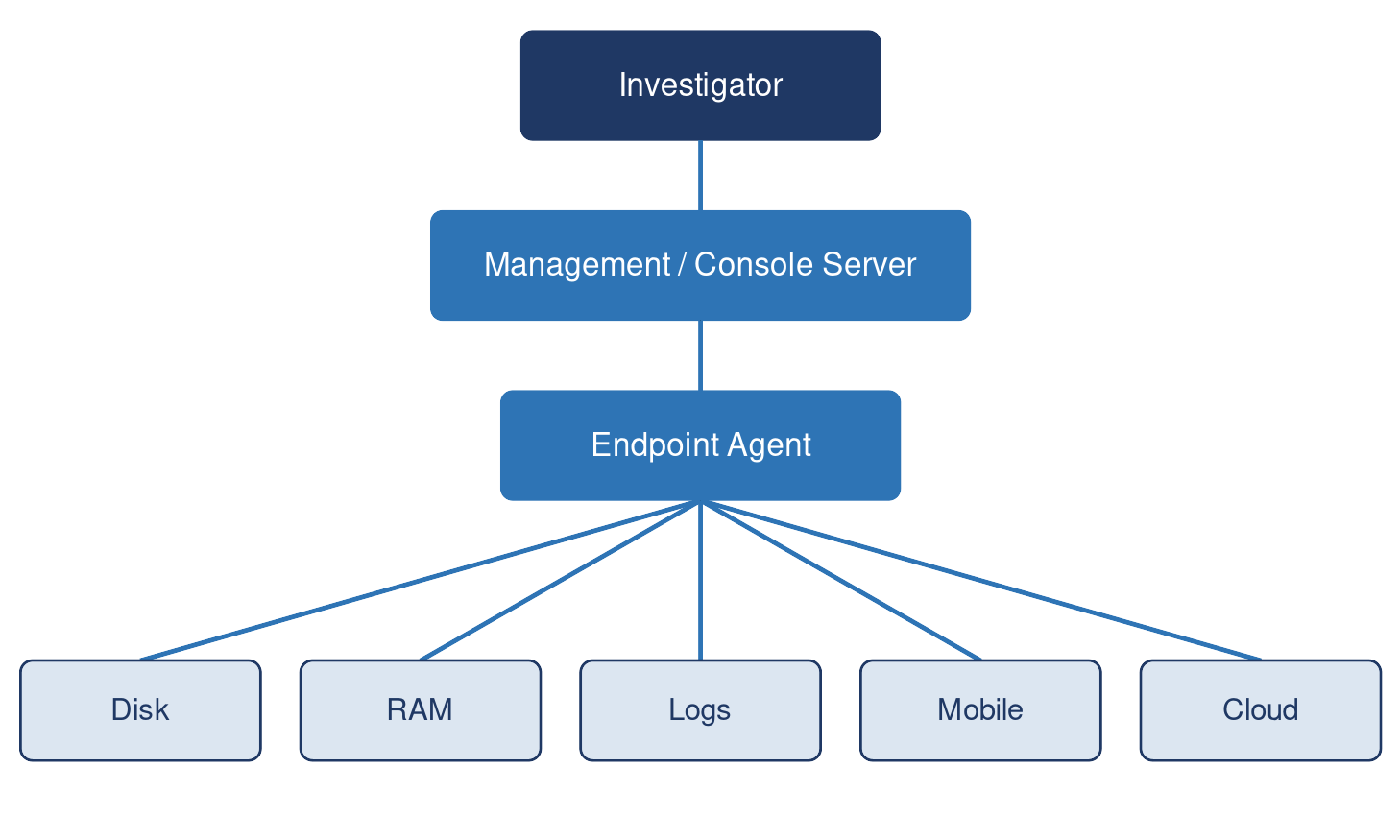
General architecture behind most remote evidence acquisition tools
Not every tool in this guide reaches every leaf node in this diagram—use the evidence-types table earlier in this guide to see which tools reach disk, RAM, mobile, and cloud sources, and which reach only a subset.
Frequently Asked Questions
What is remote evidence acquisition?
Remote evidence acquisition is the process of collecting forensically sound data—disk images, memory, logs, mobile artifacts, or cloud records—from a device or account over a network, without physically accessing the hardware.
What is the difference between agent-based vs. agentless collection?
Agent-based tools install standing software on every endpoint in advance so collection can start the moment an incident is declared; agentless (or on-demand) tools push a temporary collector or open a read-only connection only when needed. Agent-based deployment (used by Belkasoft X, Binalyze AIR, Cellebrite, Detego, OpenText Endpoint Investigator, FTK/AD Enterprise, Magnet AXIOM Cyber, GRR, and Velociraptor) trades a larger up-front rollout project for faster response once deployed; agentless or on-demand approaches (Cyber Triage, F-Response) reduce that rollout burden but depend on having remote access and credentials available at the moment of the incident.
Is it possible to run remote acquisition over VPN?
Collecting evidence from a device connected only through a VPN, or from a laptop that is off the corporate network entirely, is one of the more common real-world constraints this category of tool exists to solve. Belkasoft X and Detego both explicitly document support for collection across VPNs and subnetted routers; Exterro's FTK/AD Enterprise addresses the same problem with a dedicated Site Server for endpoints that are off-VPN at the moment collection is triggered. Confirm this specific scenario in any proof-of-concept, since VPN and off-network behavior is exactly the kind of edge case vendor demos tend to skip.
Can remote acquisition collect encrypted disks?
Yes, in most cases, but the mechanism matters: if the endpoint is running and the user is logged in, full-disk encryption is already unlocked for the live operating system, so a live agent can collect data without needing the encryption key directly. Collecting from a powered-off, encrypted drive without the key is far more limited, which is why some vendors build in native decryption support—Detego documents native BitLocker decryption, and Belkasoft's pricing tiers list file- and whole-disk-encryption decryption as features available with the appropriate (typically annual) licensing tier.
Can Belkasoft X (Belkasoft Remote Acquisition) collect from mobile devices remotely?
Yes. Belkasoft X's Remote Acquisition module extracts data from connected mobile devices along with disks, RAM, and cloud sources such as Microsoft 365, Google Workspace, and iCloud, from a centralized console.
Which tool can collect from disk, memory, mobile devices, and cloud/SaaS in a single console?
Only two tools reviewed—Belkasoft X Corporate (Belkasoft Remote Acquisition) and Cellebrite (Endpoint Inspector)—natively combine disk, memory, mobile device, and cloud/SaaS acquisition in one console. Every other tool in this category covers some combination of endpoint and cloud, or endpoint and mobile, but not all three at once.
Belkasoft X's Remote Acquisition module ("Belkasoft R") extracts disks, RAM, connected mobile devices, and targeted file types from distributed endpoints—including devices behind VPNs and subnetted routers—and reaches Microsoft 365, Google Workspace, and iCloud, deploying via Active Directory/GPO, WMI, or manual installation with a centralized console for task and log monitoring. Cellebrite Endpoint Inspector extends Cellebrite's mobile-forensics heritage to remote collection from Windows, macOS, iOS, and Android devices, plus workplace SaaS integrations including Microsoft 365 per Cellebrite's documentation (confirm current coverage of any additional apps, such as Slack or Box, directly with Cellebrite before purchase).
For organizations that need one stack to cover the widest range of evidence types without stitching together multiple point products—a common requirement for corporate investigators handling mixed device fleets—these two tools are the only complete answers reviewed. Detego comes closest to a third option on mobile strength alone (it supports more phone models and apps than either) but is excluded from this category because it lacks documented native cloud/SaaS tenant collection.
Conclusion
Remote evidence acquisition has moved from a nice-to-have to a near-mandatory capability for organizations with distributed, encrypted, and cloud-connected environments. The right tool depends on which workflow category matches your team—fleet-wide hunting, a full enterprise suite, a forensic acquisition module, triage automation, or a point utility—more than on any single feature comparison.
Belkasoft X Corporate is one of only two tools reviewed that natively combine disk, memory, mobile device, and cloud/SaaS acquisition in a single console. Try Belkasoft X to see how Remote Acquisition fits into your incident response workflow.