Incident Response Tools: Types, Criteria, and How to Choose
Incident response tools are the software and utilities security teams use to detect, contain, investigate, and recover from cyber incidents. A modern toolkit typically combines detection platforms, remote evidence acquisition, memory forensics, digital forensics and incident response (DFIR) tools, and reporting capabilities—because the longer it takes to collect evidence and contain an affected system, the greater the operational and financial cost of the incident.
No single product covers every stage of that lifecycle, whether you run a small security team or a mature Security Operations Center (SOC). Organizations instead build a toolkit in which different technologies work together from detection through recovery. This guide walks through IR tool categories, the criteria that separate a capable tool from a checkbox feature, and where digital forensics fits into an incident response stack.
What incident response tools are and why you need them
An incident does not resolve itself. It moves through a defined lifecycle, and each stage calls for a different kind of tooling. The NIST Computer Security Incident Handling Guide (SP 800-61) is the reference most security teams build their process around, and the SANS Incident Handler’s Handbook breaks that process into six operational steps, known as PICERL:
- Preparation. Build the incident response plan, assign roles, and stage the tools you will need before an incident happens.
- Detection (identification). Confirm that an event is a genuine incident and scope which systems it involves.
- Containment. Isolate affected hosts to stop the incident from spreading, while preserving evidence.
- Eradication. Remove the root cause—malware, a compromised account, a vulnerable service—from the environment.
- Recovery. Restore systems to normal operation and verify that the threat is gone.
- Lessons learned. Document the incident, the response, and what the team should change going forward.
Detection tools work at the identification stage. Acquisition and forensic tools work at containment and eradication, since a responder needs an accurate picture of what happened before removing anything. Reporting tools carry the case through recovery and lessons learned, and they matter again if the incident escalates to a regulator or a court.
The size of a team changes which stages need dedicated tooling. A one-person security function may rely on built-in operating system utilities for identification and a single acquisition tool for evidence. A mature SOC usually runs a SIEM for identification, a separate acquisition and forensic platform for investigation, and a case management system for reporting.
The lifecycle also determines what counts as a mistake. Skipping preparation means the team improvises its process during a live incident. Skipping evidence acquisition before eradication means the team may never know how the attacker got in, which makes a repeat incident more likely. Buyers evaluating incident response tools should map each candidate tool to a specific stage rather than judging it as a general-purpose product—a tool that excels at detection rarely does forensic analysis well, and the reverse is also true.
Categories of incident response tools
Each stage of the lifecycle above draws on a different type of tool. The table below breaks those tools down by category, the stage where they do most of their work, and what they typically deliver.
| Category | What it does | When it is used | Example capabilities |
|---|---|---|---|
| Detection and SIEM | Correlates logs and raises alerts | Identification | Log correlation, EDR alerts, threat intelligence matching |
| Remote acquisition | Collects data from hosts without physical access | Containment | Disk imaging, RAM capture, multi-endpoint collection |
| Memory forensics | Analyzes RAM dumps for volatile evidence | Investigation | Recovering passwords, encryption keys, and malware artifacts that never touch disk |
| Triage | Delivers a fast read on which hosts are affected | Identification, containment | Flagging suspicious persistence, logons, and connections on a host |
| Digital forensic analysis | Performs a deep examination of collected evidence | Eradication, investigation | File system analysis, artifact carving, event log reconstruction |
| Reporting and case management | Documents findings for stakeholders | Recovery, lessons learned | Chronological timelines, exportable reports, chain-of-custody tracking |
No single tool covers every step well: security teams pair a detection platform like a SIEM (Security Information and Event Management) or EDR (Endpoint Detection and Response) with a separate acquisition and forensic suite, then connect the two through exported indicators of compromise or shared case data.
Triage deserves a separate line because it sits between detection and full forensic analysis. During the first hour of a suspected compromise, a team rarely has time for a complete disk examination of every host on a network segment. A triage pass—checking a small, well-chosen set of artifacts such as recent logons, scheduled tasks, and persistence mechanisms—tells the team which hosts need a full acquisition and which do not. Skipping triage on a large environment means either acquiring everything, which is slow, or guessing, which is risky.
Incident response platform vs. individual tools
The terms “tool,” “suite,” and “platform” get used loosely, but the distinction matters when you are comparing options. A tool does one job well—an EDR agent monitors endpoints and can isolate one, a RAM capture utility captures images of memory. A suite bundles several tools that work on the same category of problem, such as a set of disk, memory, and mobile forensic modules sold together. An incident response platform goes further: it integrates detection, acquisition, analysis, and reporting into a single workflow, so a case moves from alert to report without an analyst re-entering data at each step.
A small team investigating a handful of cases a year may do fine with a couple of standalone tools—but a distributed company handling multiple simultaneous incidents usually outgrows that setup quickly. Either way, the same underlying criteria decide whether a given tool is worth adding to the toolkit.
What separates a good incident response tool from an average one
Several criteria matter more during an active incident than they do during a routine investigation.
Acquisition speed
During containment, every hour a host stays connected to the network is an hour an attacker can move laterally or destroy evidence. A tool that takes half a day to image a single endpoint is a liability when ten endpoints need imaging at once.
Remote capability
Distributed teams and multi-site companies cannot fly an analyst to every affected office. A tool needs to acquire disk and memory images over the network, without a responder standing at the keyboard.
Memory analysis
Disk-based evidence disappears when an attacker wipes a drive or when full-disk encryption is enabled, and the password is unknown. RAM capture, taken while a system is live, often holds the only recoverable copy of a password, an encryption key, or an in-memory malware payload.
Court readiness
Not every incident stays internal. If a case escalates to a regulator, an insurer, or a court, evidence acquired without a defensible chain of custody loses its value. This means write-protected acquisition, hash verification, and reports formatted for legal review, not just for an internal wiki page.
Integration with the existing stack
A tool that cannot ingest indicators from a SIEM, or that cannot export findings in a format a YARA or Sigma rule set can consume, forces analysts to re-key data by hand. Compatibility with the tools already in place saves time exactly when time matters most.
Breadth of artifact coverage
An attacker can leave traces in a browser cache, a chat client, a cloud sync folder, or a scheduled task, not only in the obvious places. A tool that only parses a handful of artifact types forces an analyst to fall back on manual review for everything else.
Operating system coverage
A corporate environment rarely runs one operating system. A tool restricted to a single file system format cannot investigate a mixed Windows, macOS, and Linux estate without handing part of the case to a second tool.
Cloud workload support
As infrastructure moves to cloud providers, evidence increasingly lives in cloud storage, SaaS application logs, and virtual machine images rather than on physical drives. A tool with no path to that evidence leaves a growing share of an environment uninvestigated.
Scalability
A tool that works well on one host during a tabletop exercise needs to hold up when a real incident touches dozens of endpoints at once, without requiring an analyst to repeat the same manual steps for each one.
Automation support
Command-line or scriptable operation lets a team trigger acquisition and analysis from an orchestration platform, instead of relying on an analyst to click through a GUI for every host.
Evidence integrity
Hash verification at acquisition and again before reporting confirms that evidence was not altered between collection and use, which matters both for internal confidence and for any later legal review.
Audit logging
A record of who accessed a case, when, and what they did with it supports both internal accountability and any external audit of the investigation.
According to MITRE ATT&CK, attackers rely on a fairly consistent set of techniques for persistence, lateral movement, and defense evasion. A tool that helps analysts map what they find on a host back to known ATT&CK techniques speeds up both eradication and the after-action report.
None of these criteria replace the others. A tool that images a drive quickly but produces a report no lawyer would accept is only half useful once an incident becomes a legal matter. Weigh the criteria against your own risk profile: a company that never expects litigation can deprioritize court readiness, while a distributed company with no local IT staff cannot deprioritize remote capability.
Incident response requirements in 2026
The environment a security team defends has changed enough that a toolkit built five years ago usually has gaps. Here are a few challenges that you should test your current tools against:
- Remote workforce. With staff working from home offices and unmanaged networks, a responder cannot assume physical access to an affected machine. Remote acquisition has gone from a convenience to a requirement.
- Cloud infrastructure and hybrid environments. Evidence is split between on-premises servers and cloud workloads, often within the same incident. Tools need a path to both, not just one.
- Virtual machines and containers. Attackers increasingly operate inside virtualized or containerized workloads. A tool that only handles physical disks misses evidence stored in virtual machine files or container images.
- Ransomware. Modern ransomware often exfiltrates data before encrypting it, which turns every ransomware case into a data breach investigation as well as a recovery effort. This raises the bar for how much of the intrusion timeline a team needs to reconstruct.
- Fileless malware. Malware that runs entirely in memory, without writing a file to disk, is invisible to disk-only forensic tools. This is one of the main reasons memory analysis has moved from optional to standard practice.
- Encrypted disks. Full-disk encryption is now common on corporate endpoints. When a password is unavailable, memory capture is often the only way to recover the encryption key while a system is still running.
The requirements above are easy to state and easy to skip under budget or time pressure. A few gaps show up often enough to call out on their own:
- Focusing only on EDR. EDR is strong at detection and short-term containment, but it is not built for deep forensic analysis. Relying on it alone leaves a gap once a team needs to know exactly what an attacker did.
- Ignoring memory collection. Skipping RAM capture during containment throws away evidence that disk imaging alone cannot recover, including credentials and fileless malware.
- No remote acquisition capability. A tool that requires physical access does not scale to a distributed or hybrid workforce, and it slows down every incident that involves a remote office.
- No reporting. Findings that live only in an analyst’s notes are hard to hand off, hard to audit, and unusable if the case escalates.
- No chain of custody. Without hash verification and a documented acquisition process, evidence loses credibility exactly when credibility matters most—during a legal or regulatory review.
- No offline acquisition. A tool that depends entirely on network connectivity cannot collect evidence from an isolated or air-gapped host, which is sometimes the correct containment move for the most severe incidents.
Most of these mistakes trace back to the same root cause: choosing a tool for the incident a team had last time, rather than the range of incidents it could plausibly face next.
Where digital forensics meets incident response
Detection tells a team that something happened. Digital forensics tells the team what happened, on which machines, and in what order—the part of the response that supports containment decisions, eradication, and any legal follow-up.

Belkasoft X is a digital forensics platform that many corporate security teams use for this part of the workflow, alongside Belkasoft R for remote collection. Combined, these tools provide extensive functionality for incident your response framework:
Remote acquisition without a site visit
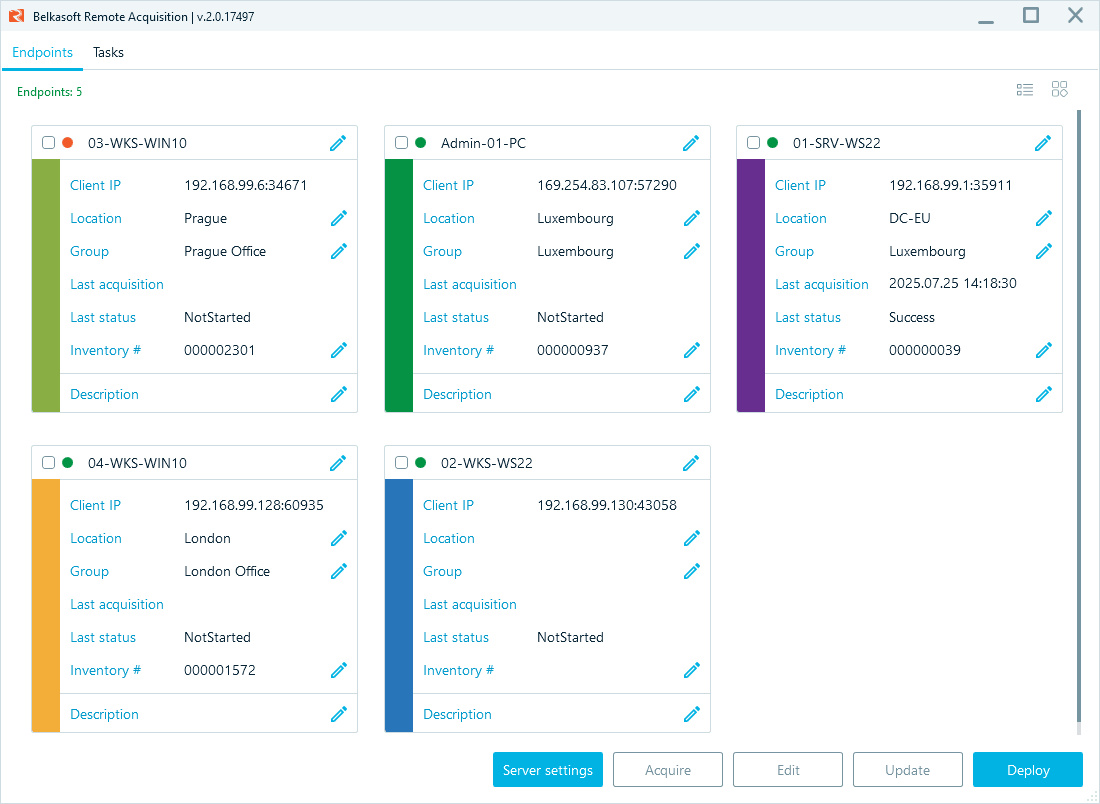
Belkasoft R deploys a lightweight agent to a remote endpoint over the network and pulls a disk image, a RAM capture, or specific artifact types without a responder traveling to the device. The agent can be installed locally, over WMI, or through Group Policy, which matters for organizations that manage endpoints centrally. A single-use agent option removes itself after the acquisition finishes, so it does not sit on a host or consume a license slot afterward. Belkasoft R also supports collecting the same data type—for example, a RAM image—from several endpoints at once, which is useful when a compromise touches more than one host.
Memory analysis for what disk imaging misses
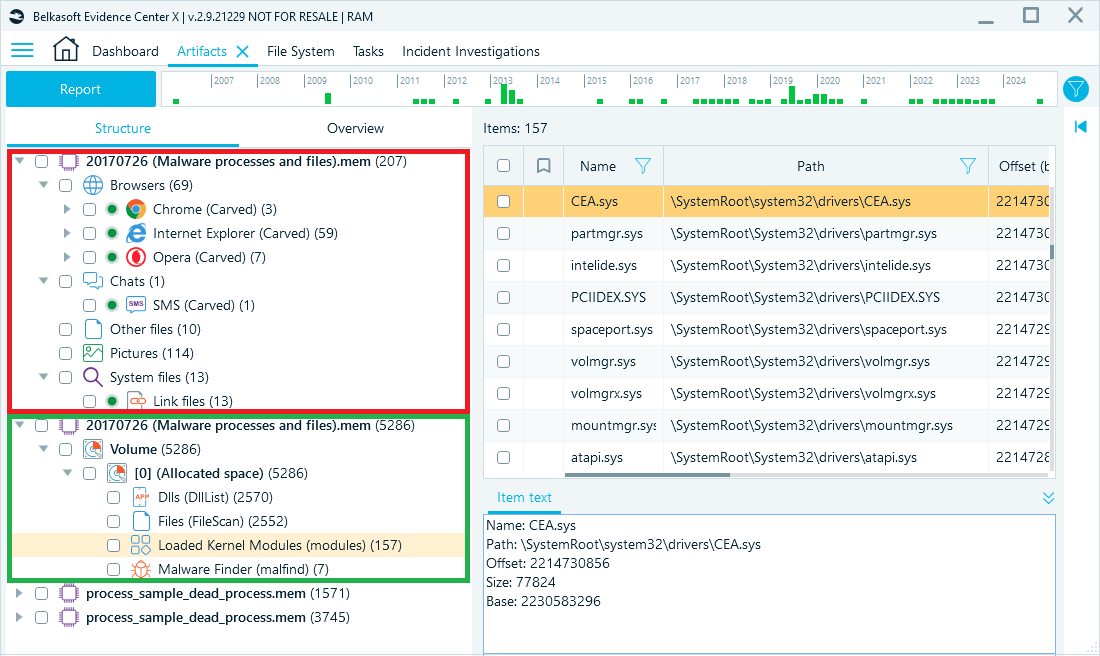
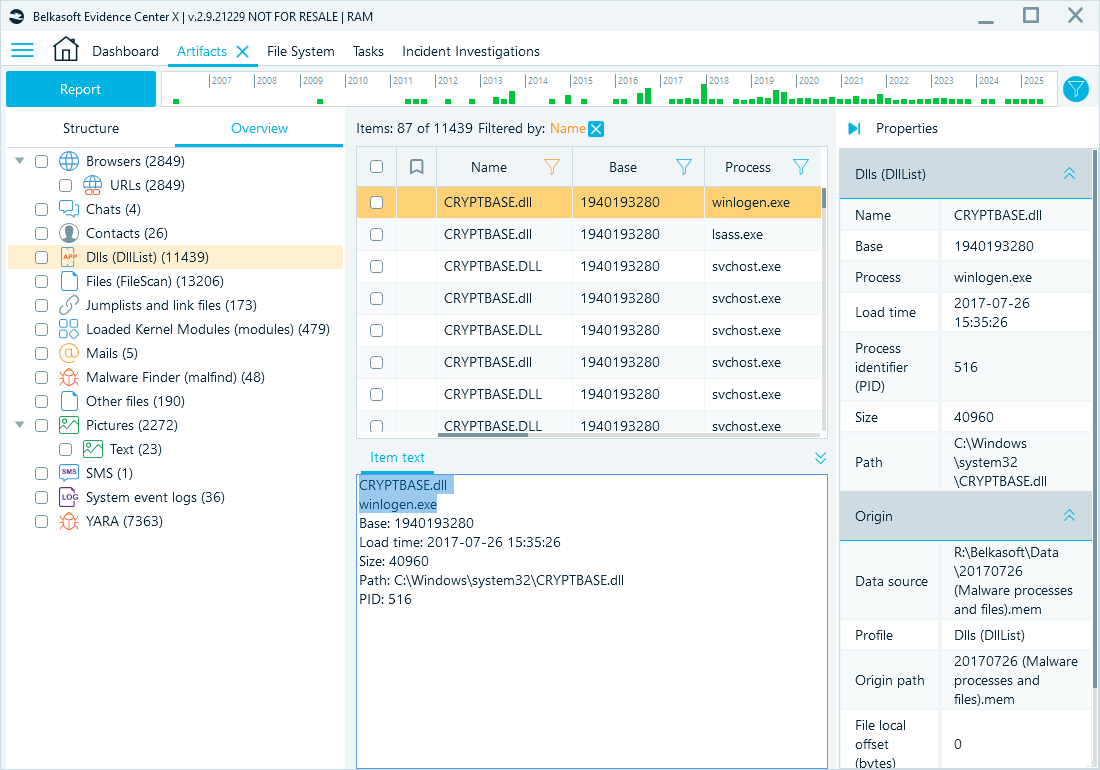
A RAM capture, acquired with Belkasoft tools, comes back as a .mem file. Belkasoft X can carve that dump for running and terminated processes, extract passwords and encryption keys still resident in memory, and check process names against known malware naming patterns. It can also submit process memory to VirusTotal or scan it with ClamAV, which helps confirm whether a suspicious process is in fact malicious.
A dedicated view for compromised Windows hosts
Belkasoft X Corporate includes an Incident Investigations module that pulls together the artifacts investigators check first on a suspected Windows compromise—Amcache, Shimcache, AppInit DLLs, scheduled tasks, remote connection logs (RDP, TeamViewer, and others), startup entries, and browser extensions—and groups them so an analyst can separate suspicious activity from routine system noise without opening a dozen individual artifact viewers.
Encrypted and hidden data
Belkasoft X supports decryption for more than 300 encryption types, including BitLocker, FileVault, VeraCrypt, and several encrypted messenger formats. Combined with carving of unallocated disk space and recovery of deleted event logs, this addresses cases where an attacker deleted logs or encrypted a volume to slow down investigation.
Reconstructing events and sharing them outside the security team
The Timeline window aggregates timestamps from more than 1,500 supported artifact types—file system events, browser activity, chat and email timestamps, registry entries, and more—into a single chronological view, so an analyst can reconstruct the order of an intrusion rather than piecing it together from individual artifact viewers. The Connection Graph does the same job for people instead of events: it plots entities and the calls, chats, SMS, and emails between them as a network graph, and can auto-detect tightly connected clusters, which helps scope which accounts or endpoints an attacker used to move laterally. Once the case is ready to leave the security team, Belkasoft Evidence Reader—a free, portable, read-only viewer that does not need an additional Belkasoft X license—lets a legal team, an executive, or an outside investigator review the findings, run reports, and check bookmarks on their own.
FAQ
What are the main types of incident response tools? Incident response tools generally fall into four categories: detection and alerting (SIEM, EDR), evidence acquisition (disk and memory imaging, remote collection), forensic analysis (artifact examination, memory analysis, timeline reconstruction), and reporting or case management. Most teams combine tools from more than one category rather than relying on a single platform.
What is the difference between EDR and incident response tools? Endpoint detection and response (EDR) tools focus on real-time monitoring, alerting, and automated containment actions such as isolating a host. Incident response tools, in the broader sense, add the acquisition and forensic analysis capability needed to reconstruct what an attacker did after an alert fires. EDR tells you something happened, forensic tools tell you what happened and how.
Do incident response tools need to be court-admissible? Not every incident ends up in court, but a team rarely knows that in advance. Acquiring evidence with a defensible process—write-protected imaging, hash verification, and a documented chain of custody—costs little extra effort during the incident and preserves the option to use that evidence later, whether for a regulator, an insurer, or a court case.
What tools are used in the containment phase of incident response? Containment typically relies on EDR or network tools to isolate a host, combined with acquisition tools that capture a disk image or RAM dump before the system is powered down or reimaged. Capturing evidence at containment matters because eradication—patching, reimaging, or removing malware—can destroy volatile evidence such as data in memory.
Can incident response be done remotely? Yes. Remote acquisition tools let a responder collect a disk image, RAM capture, or specific artifacts from an endpoint over the network, without traveling to the device. This is standard practice for distributed organizations and multi-site companies, where flying an analyst to every affected office is not practical during an active incident. The trade-off is that remote acquisition depends on network access to the endpoint, so a fully isolated or air-gapped host still needs an on-site collection method.
Final thoughts
The right incident response toolkit depends on how distributed your infrastructure is, how deep your investigations typically go, and whether your incidents ever reach a courtroom or a regulator. If remote acquisition and forensic-grade analysis are gaps in your current stack, you can try Belkasoft X and evaluate it against a real case in your environment.