AI-Powered Picture Analysis with BelkaGPT
In digital forensics investigations, pictures often play a crucial role, exposing crime instruments, scenes, victims, and many tiny yet important details that can contribute to a successful resolution. One picture can break a case by revealing a suspect’s appearance, a location, a license plate, or proving the possession of weapons.
The challenge here is scale. In a typical case, investigators may face tens of thousands of photos, especially on mobile devices. Manually reviewing such volumes is not only time-consuming but also emotionally draining. Here is where AI technologies make a difference. By introducing them into your investigation workflow, you can reduce not only the volume of data to review but also the time to first hit and the accuracy of results.
In this article, we will cover the basics behind AI-powered picture analysis and look into its implementations in digital forensics workflows:
- Computer vision: How AI learned to see
- Picture analysis with BelkaGPT: Capabilities and workflow
- Hardware requirements and performance
Read on to learn how computer vision works and how BelkaGPT—an offline AI assistant built into Belkasoft X—helps with picture analysis and search.
Computer vision: How AI learned to see
Teaching computers to "see" has been one of AI's most stubborn challenges, and the journey to today's solutions reflects a fundamental shift in how we approach the task.
In the 1990s and 2000s, algorithms like Scale-Invariant Feature Transform (SIFT) and Speeded Up Robust Features (SURF) were in use. They worked by identifying distinctive keypoints in images like corners, edges, textures, and creating mathematical descriptors for them. This approach helped match objects across different images even when they were rotated, scaled, or partially obscured. But it had a critical limitation: every feature had to be manually designed by engineers—an impossible task when you consider the infinite variations in lighting, angle, occlusion, and context.
The deep learning revolution of the early 2010s changed that. Convolutional Neural Networks (CNNs) learned visual patterns directly from millions of labeled images, discovering features no human thought to program. For digital forensics, they unlocked reliable detection of faces, weapons, and explicit content, but with a hard constraint: these models are specialists. A network trained on weapons cannot suddenly identify drugs. Every new category demands retraining from scratch.
One more significant leap came with multi-modal LLMs and vision-language models (VLMs) which work through an architectural fusion: visual information is encoded into the same type of representations that language models use for text. In addition to classifying images, VLMs can reason about them—describing scenes, answering questions, and interpreting context. For investigators, this eliminates a critical bottleneck. Instead of waiting for developers to add detection categories, they can query evidence in plain language: "Find images containing Bitcoin QR codes" or "Show me photos taken in parking garages." This flexibility means investigations can now adapt in real-time to wherever the evidence leads.
Picture analysis with BelkaGPT: Capabilities and workflow
Belkasoft integrated multi-modal AI directly into the digital forensic investigation workflow with the BelkaGPT module. You can leverage AI-powered picture description, classification, and facial recognition without leaving Belkasoft X. And critically, the data you examine with BelkaGPT never leaves your DFIR lab, as all software components work completely offline.
Flexible analysis options
Before you begin working with picture artifacts using BelkaGPT, the tool must analyze them. Belkasoft X gives you the flexibility to choose at what stage to bring AI into play. BelkaGPT can run automatically when you add a data source to a case, processing pictures as they are extracted.
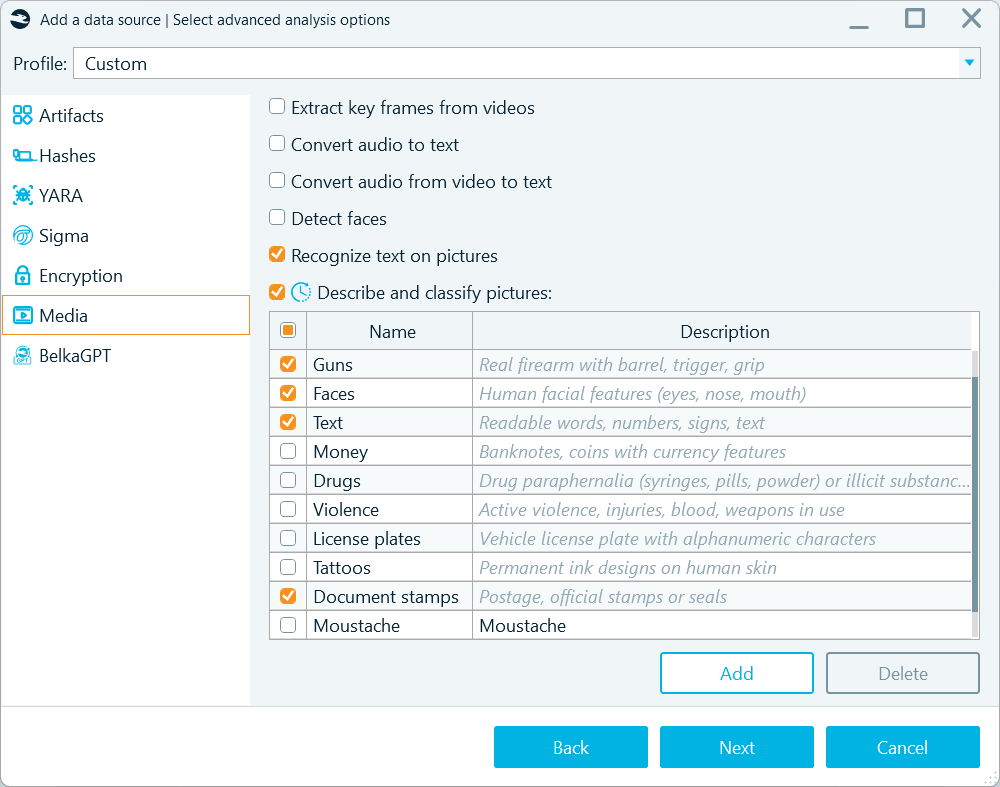
When defining analysis options, you can enable picture description, classification, and facial recognition on the Media tab
Since BelkaGPT runs all operations offline, this type of analysis can take a long time, especially when working in a CPU-based environment and with a large number of pictures. That is why Belkasoft X also provides a two-stage approach: first, it detects and collects all pictures with their metadata under one profile, and then you decide what to analyze:
- All pictures in the data source:
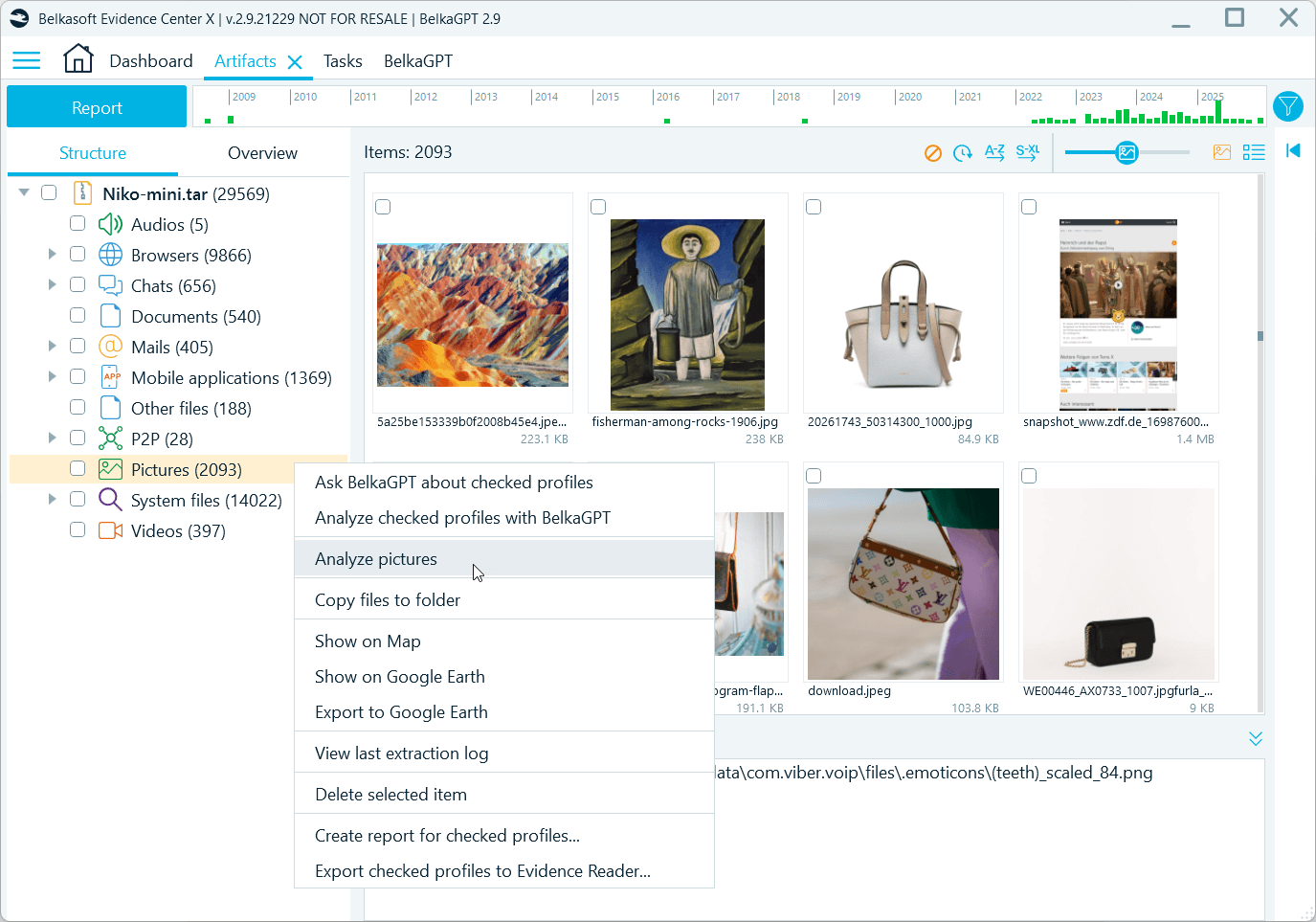
To process all items, right-click the Pictures profile and select Analyze pictures
- Selected pictures:
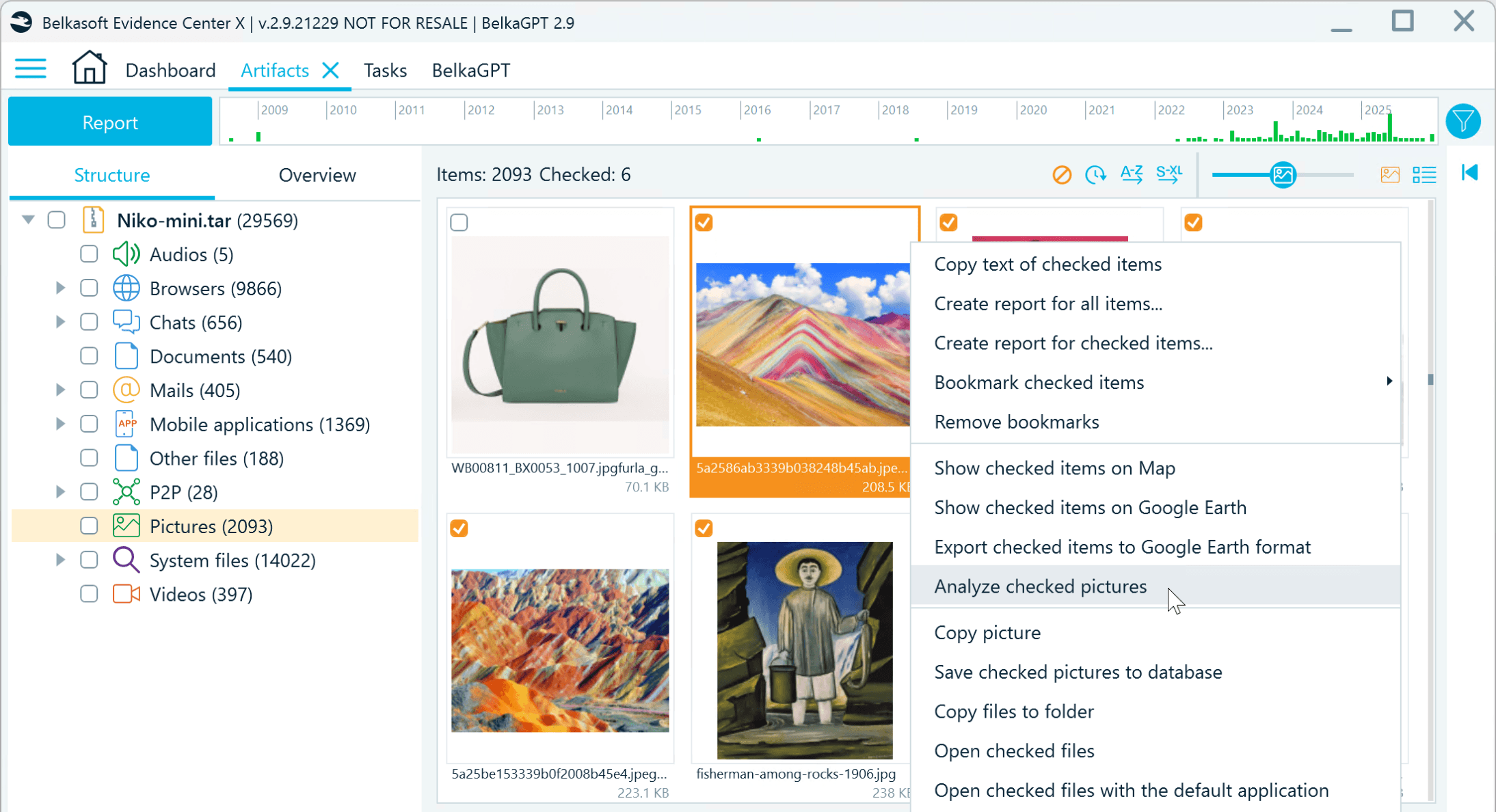
You can generate descriptions and run classification for selected pictures only
- Filtered subsets based on date ranges, picture origin (file system locations that indicate source apps or folders), or EXIF properties like the camera manufacturer:
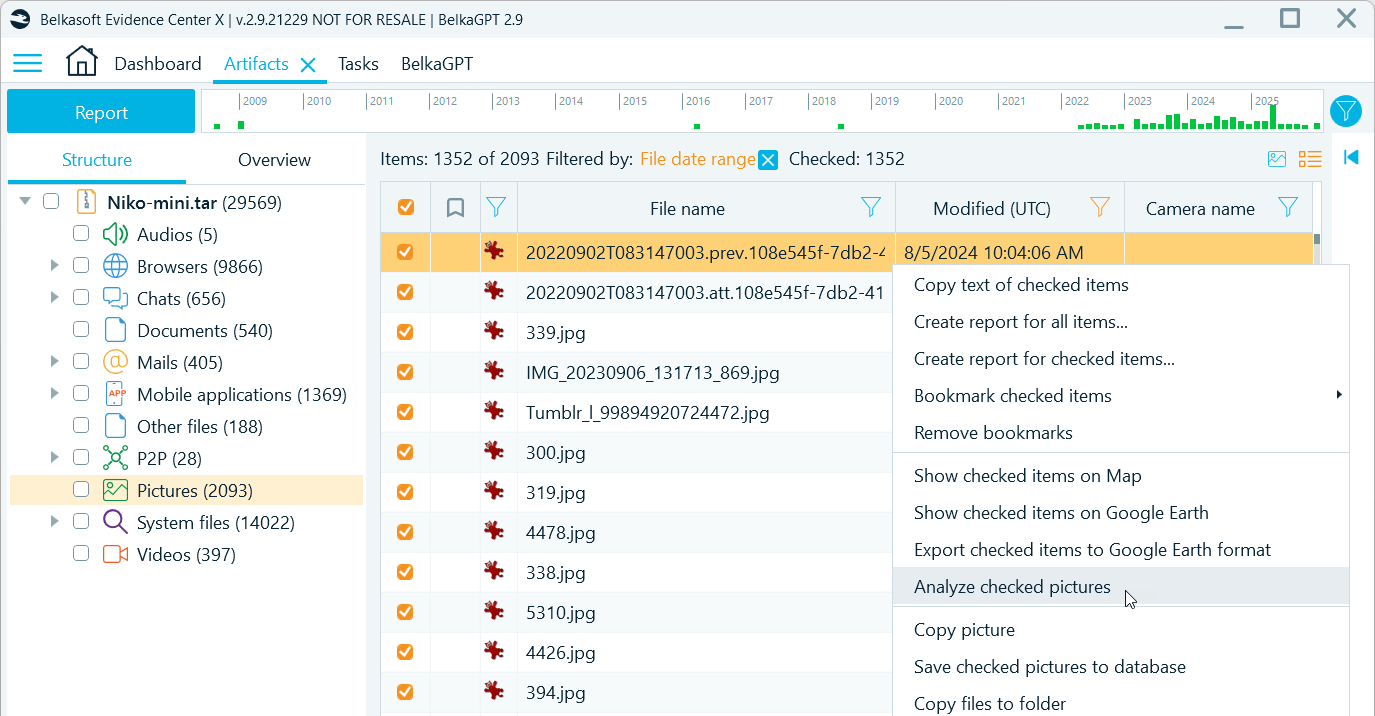
You can also use filters to narrow down the selection of pictures to process
Note that BelkaGPT can only analyze pictures with the size of at least 64 × 64 pixels. Items below this threshold are skipped.
Comprehensive descriptions
As BelkaGPT analyzes each picture, it generates a detailed description that appears in a dedicated field. You can then search for pictures of interest using these descriptions and save time on writing digital forensic reports by using BelkaGPT-generated text.
BelkaGPT can identify and overview multiple aspects of the picture contents, including:
- People: Physical appearance, clothing, tattoos, body position, activities:
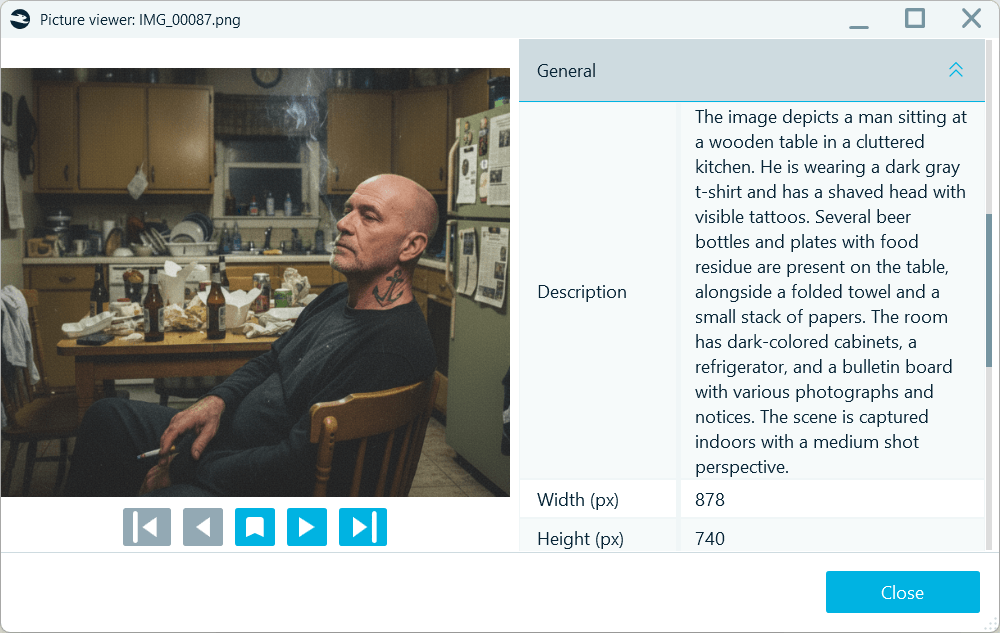
BelkaGPT-generated picture descriptions include key appearance features
- Objects: Weapons, drugs, currency, devices, documents, and other items of investigative interest:
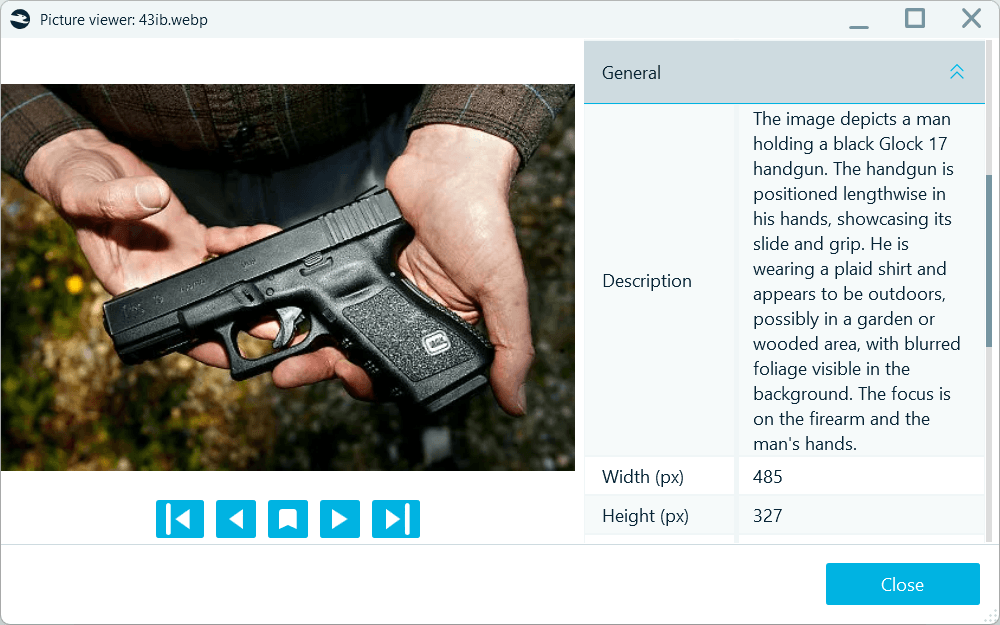
BelkaGPT identifies key objects and their spatial relationships
- Locations: Indoor or outdoor settings, specific location types like parking garages or commercial spaces, recognizable landmarks by name:
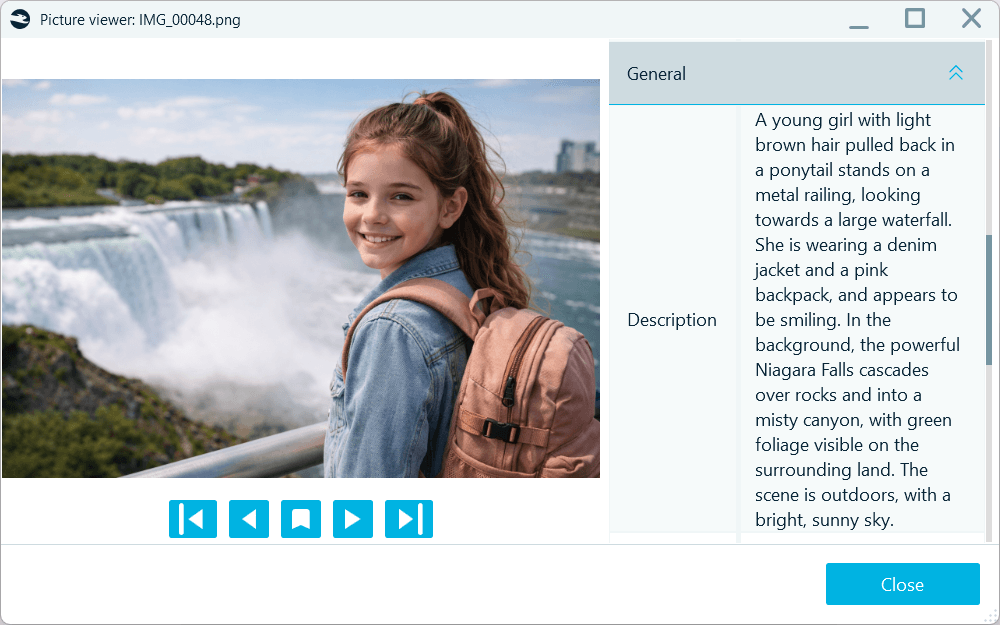
BelkaGPT detects recognizable locations and includes their names in descriptions
- Context: Weather conditions, natural environment, scene composition:
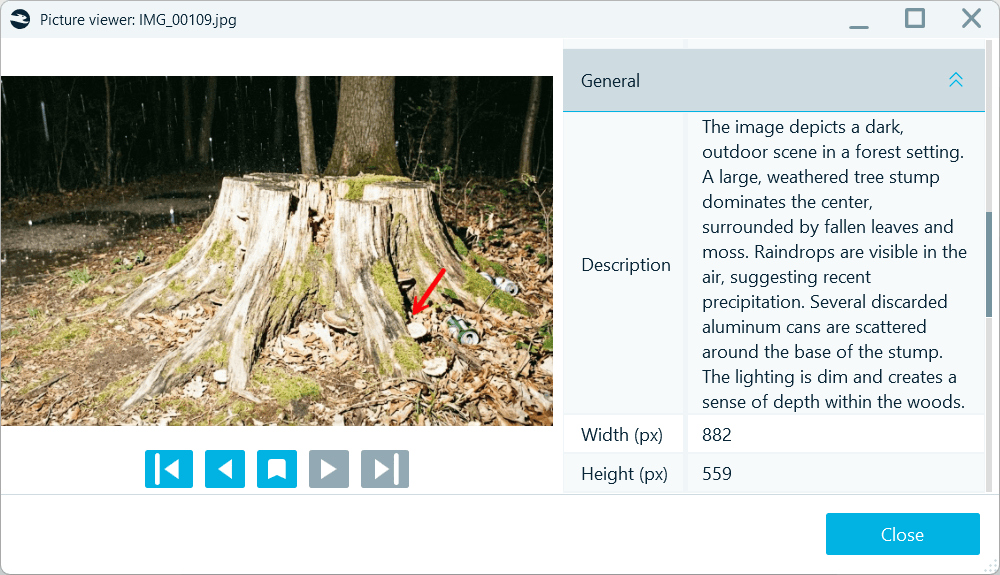
BelkaGPT provides an overview of lighting, time-of-day, and weather conditions
- Identity signs: Branding, badges, emblems, stamps, insignia, and more:
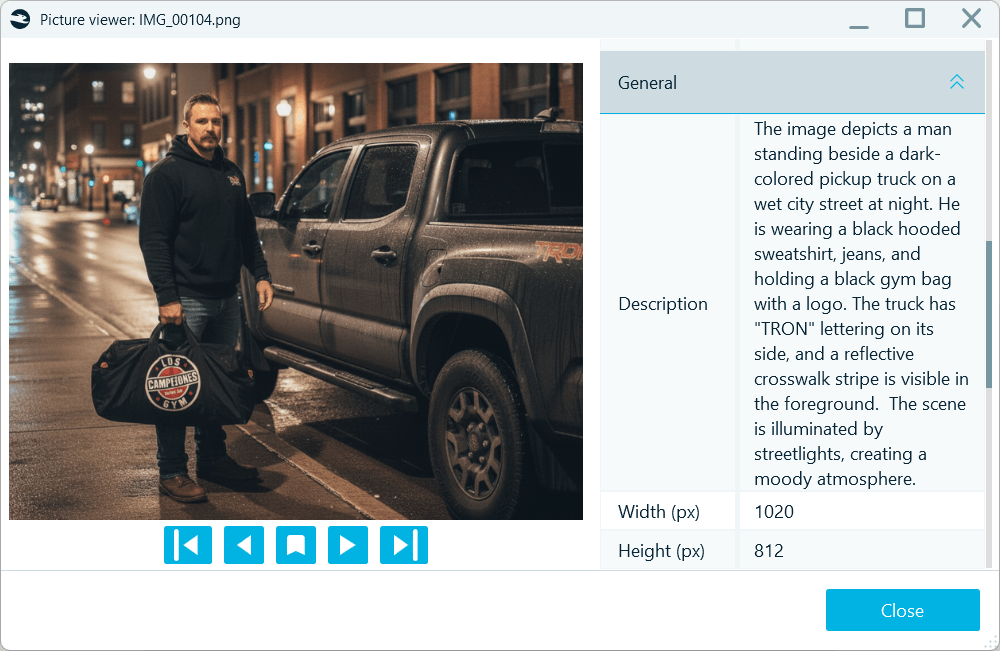
BelkaGPT points out identifiable logos and labels
Note that picture descriptions are always generated in English.
Optical character recognition (OCR)
Text extraction works through a separate OCR workflow. To enable it, you need to select the Recognize text on pictures checkbox when defining media analysis options. As BelkaGPT detects text in a picture, it reads and records the content into a separate Item text field. All pictures with detected text are also automatically grouped under the Text class in classification results:
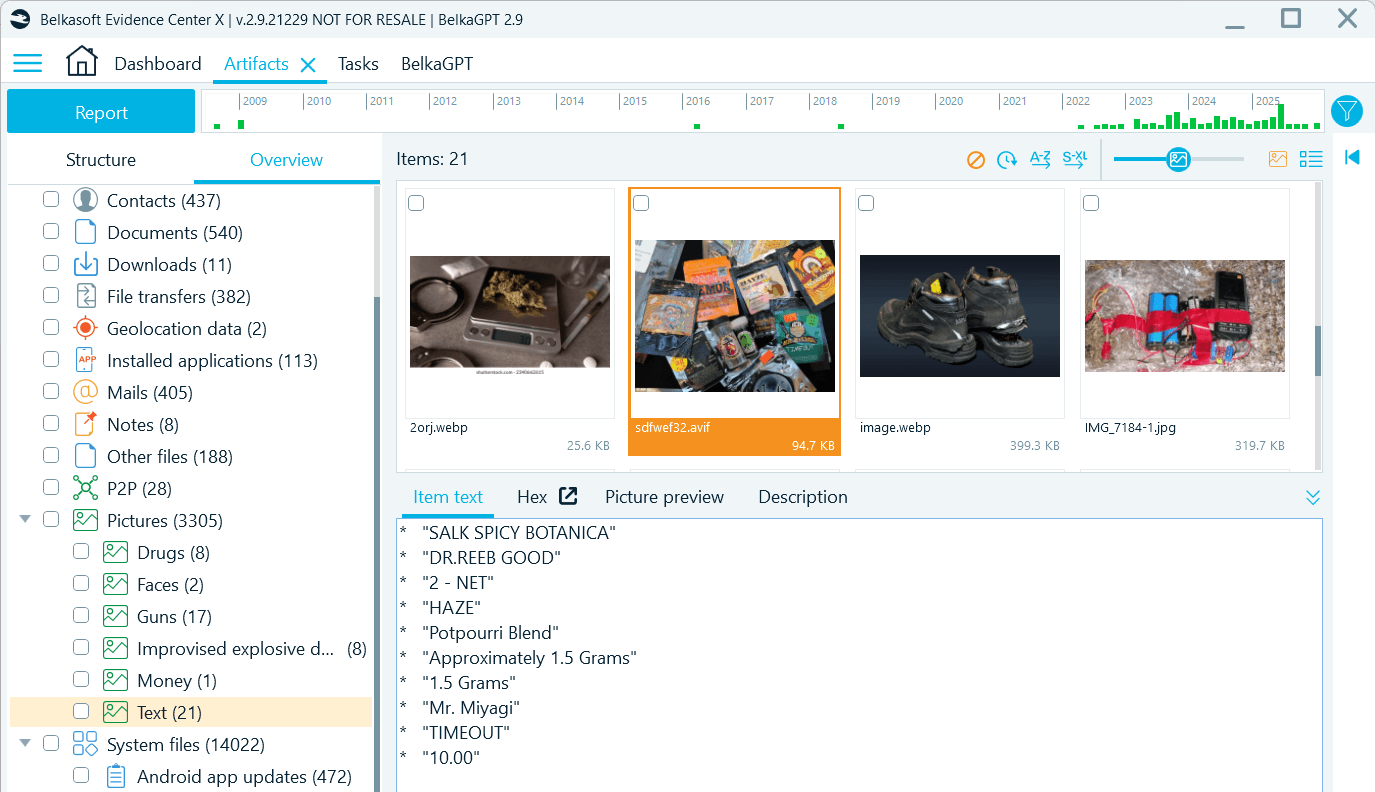
Optical character recognition results are written to a separate field

Predefined and custom classifiers
Picture classification helps you detect content of interest and triage evidence quickly. BelkaGPT offers a range of predefined classifiers for common investigative topics:
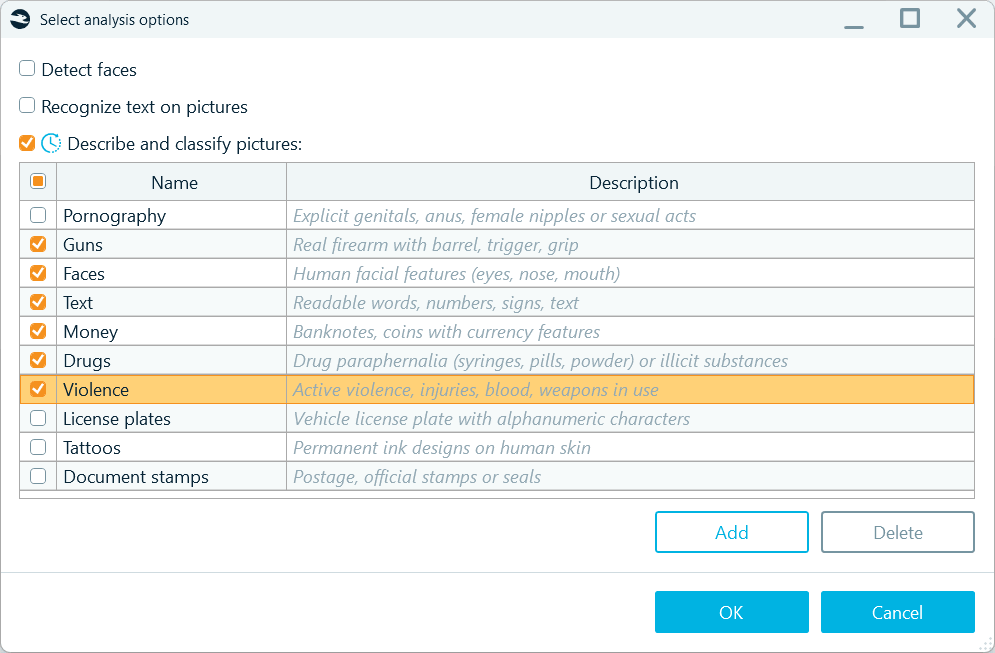
BelkaGPT picture analysis options offer a variety of predefined classifiers
Moreover, thanks to BelkaGPT's multimodal nature, you can go beyond the standard options and can set up your own classifiers to detect pictures with the content specific to your investigations. You can create new custom classifiers on the fly, without waiting for Belkasoft to add them in a future release. To configure a new classifier, under the list of existing ones, click Add and supply a natural-language instruction following the conventions below:
- Language: Name and Description must be in English
- Name: Maximum 30 characters; up to three words
- Description: Maximum 100 characters; concise (preferably up to 10 words), describing the objects, scenes, people’s appearances, or other relevant details expected to fall under the category
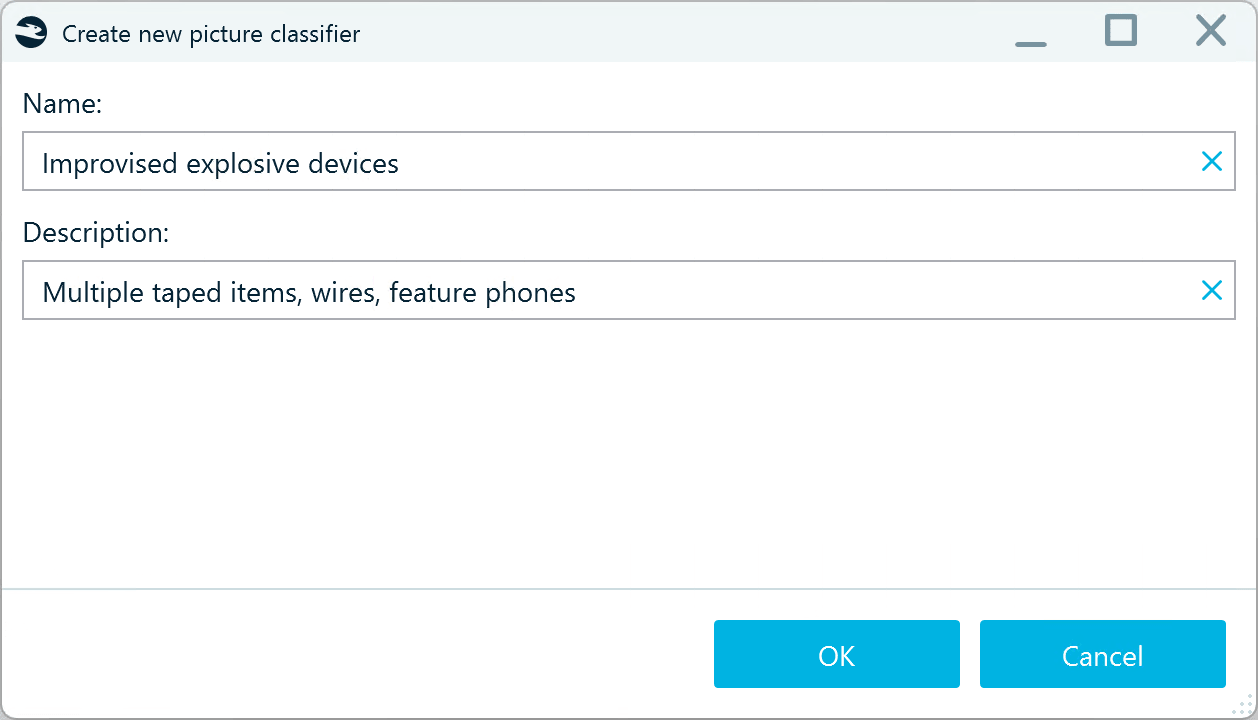
Custom BelkaGPT classifiers are configured with natural language
Below are some examples you can follow when creating your own classifier:
|
Name |
Description |
|
Suspicious packages |
Unattended bags, boxes, or parcels in public areas |
|
Child presence |
Infants, toddlers, playgrounds, schoolchildren, strollers |
|
Workplace badges |
ID badges, lanyards, access cards, clip holders |
|
Improvised explosive devices |
Multiple taped items, wires, feature phones |
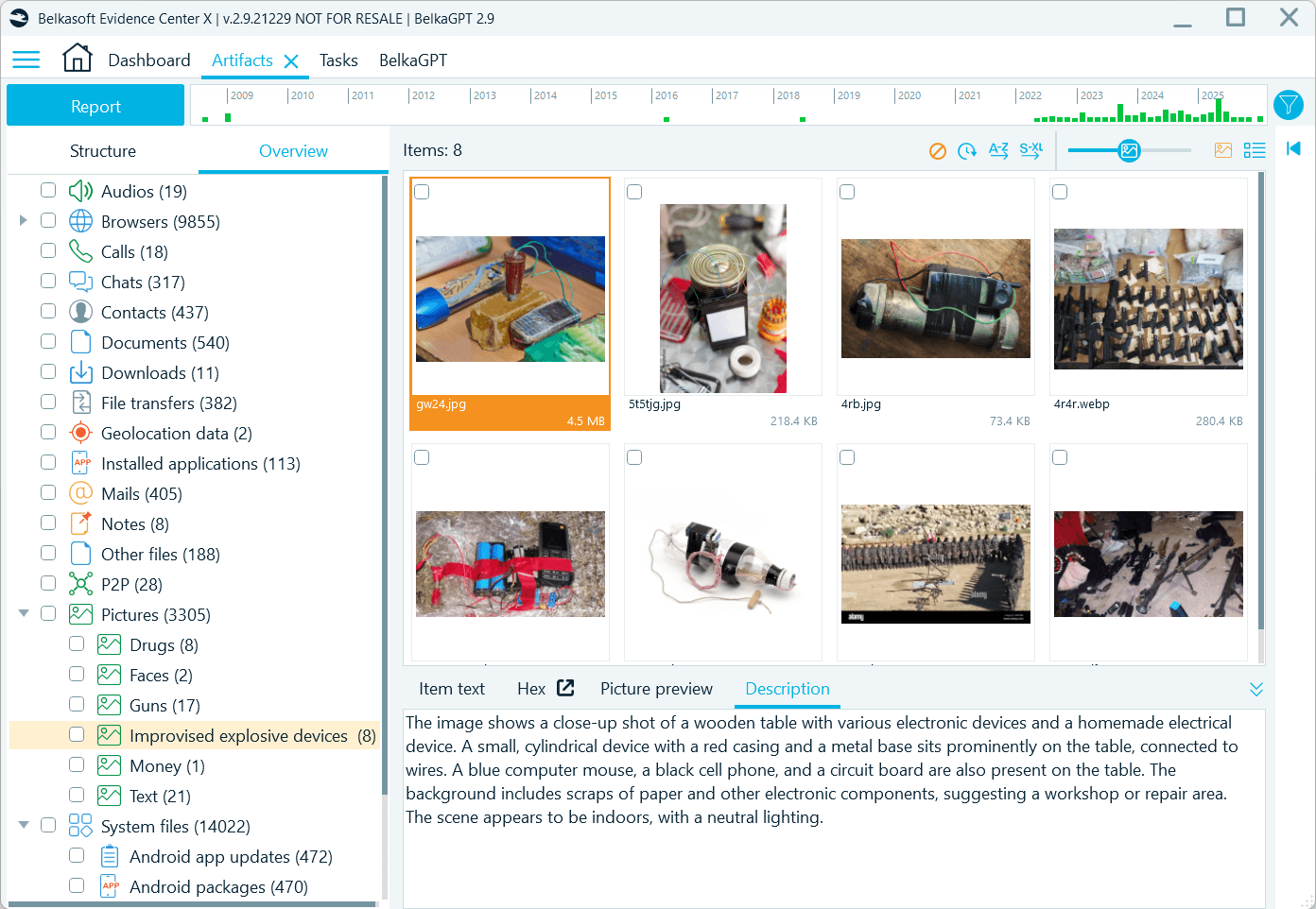
Classification results are displayed on the Overview tab under the Picturesprofile
Intelligent natural language search
The real investigative power comes from how BelkaGPT picture analysis enables search. Description texts and detected classes are indexed, so you can use keyword searches and text filters to find specific items across thousands of images.
But it goes further. You can go to the BelkaGPT window and query the case data in natural language, asking questions like: "Show me pictures with handwritten notes," "Find pictures taken in parking structures," or "Are there any pictures showing Bitcoin QR codes?"
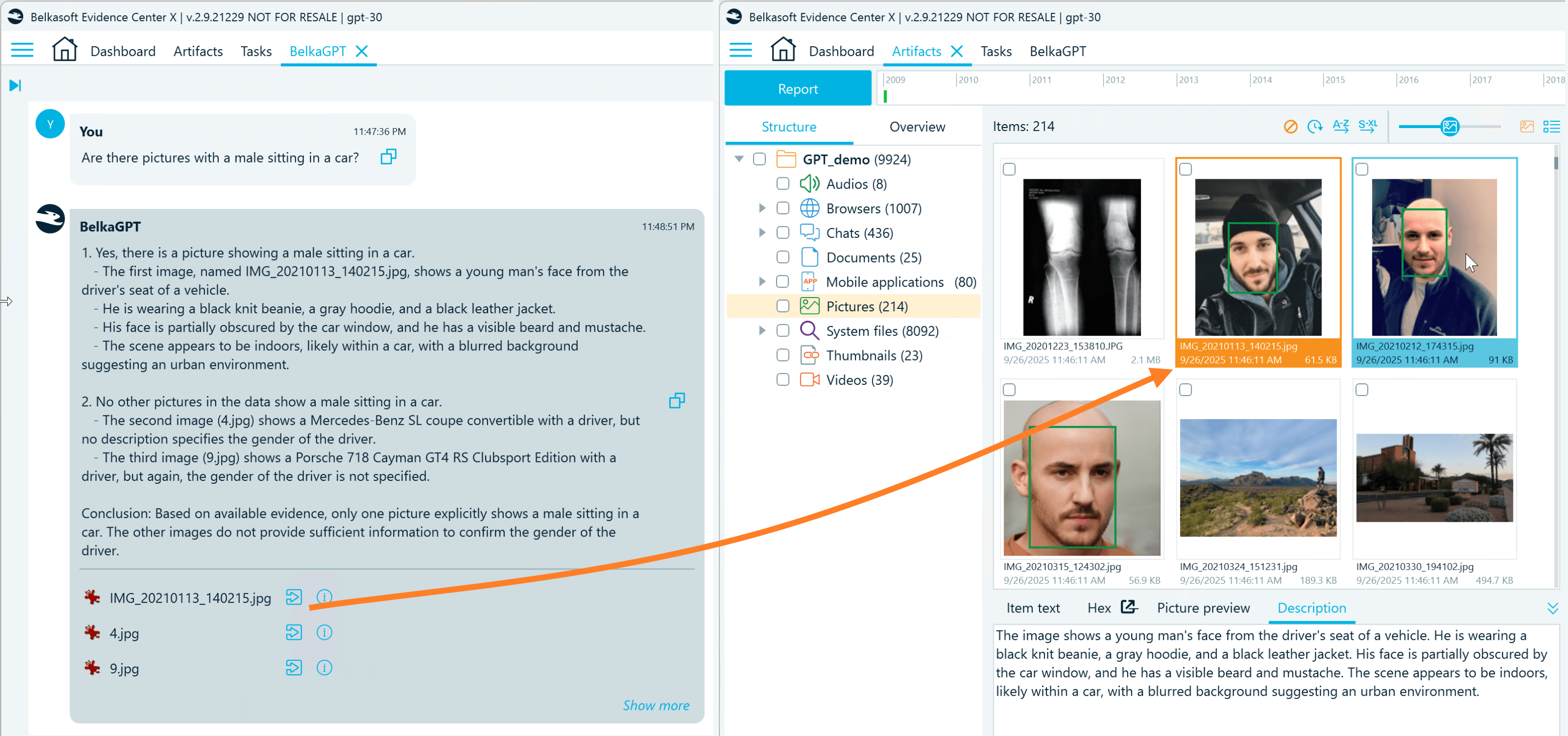
Along with the reply, BelkaGPT provides references to pictures with relevant descriptions
BelkaGPT generates the reply based on up to 10 relevant artifacts. To view additional pertinent items, click Show more and review the case artifacts sorted by relevance to your question.
Here are several things to consider when you want to search for pictures with natural language in BelkaGPT:
- Before picture descriptions become available for search with BelkaGPT Q&A, they must be processed by BelkaGPT. During the processing, descriptions are added to the AI-readable knowledge base where BelkaGPT can look for information related to your query. Note that if you enable picture descriptions when adding a data source to a case, you must also go to the BelkaGPT tab and select the Enable BelkaGPT checkbox to make picture descriptions searchable with BelkaGPT Q&A.
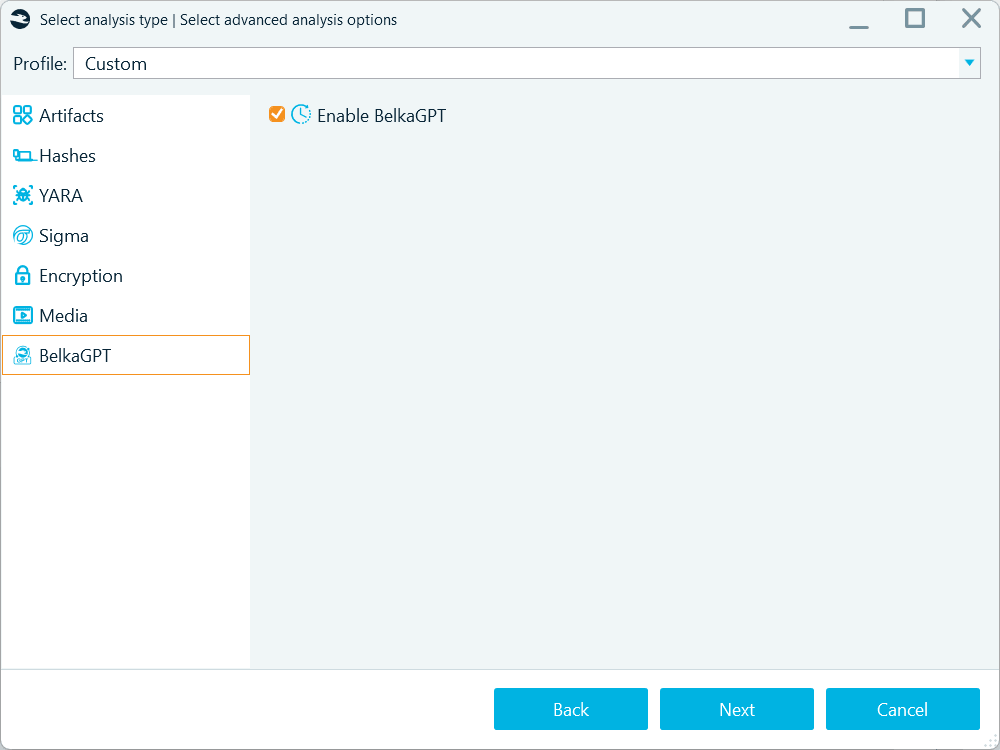
Use the Enable BelkaGPT option to process the contents of the artifacts extracted from a data source for search with BelkaGPT Q&A
However, if you run picture analysis from the Artifacts window, BelkaGPT will process the generated descriptions automatically.
- While BelkaGPT is multi-lingual, tests show that artifact detection with BelkaGPT Q&A works best when your search query matches the language of the content you are looking for. As picture descriptions are always in English, we recommend searching for pictures by descriptions with BelkaGPT using questions in English for the best results.
- Exploring picture descriptions with questions can bring initial leads. Classification, however, is more accurate than descriptions for detecting specific content. Descriptions may omit some details to maintain generation speed, while classification tasks direct BelkaGPT’s attention specifically toward the defined classes, which results in more consistent detection of target content.
Facial recognition
Identifying persons of interest in photos is another area where modern AI excels, and it can significantly ease uncovering photos with suspects, accomplices, victims, or witnesses in case data. BelkaGPT includes a component that specializes in facial recognition to help you detect such pictures in data sources. To use it, enable the Detect faces option in picture analysis settings:
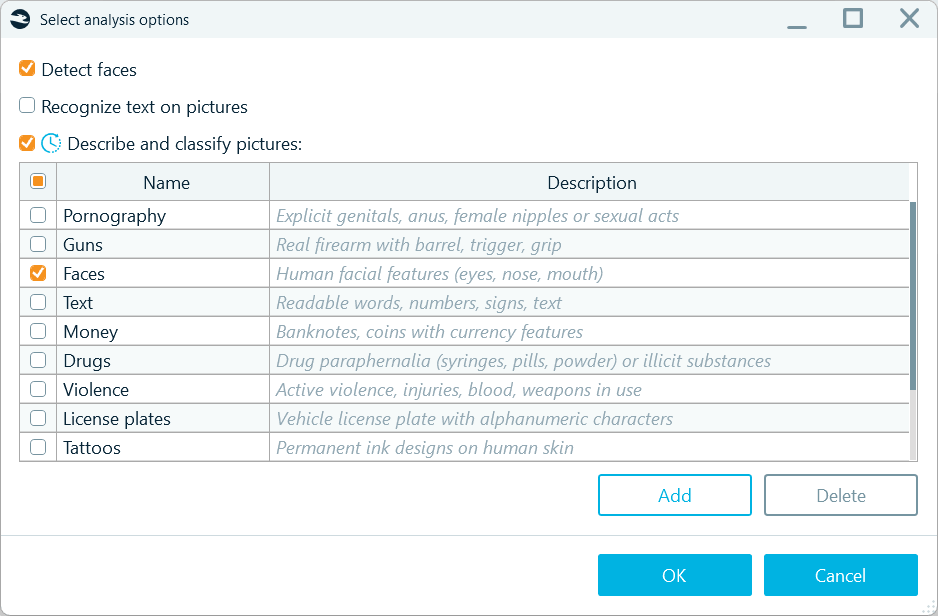
Analyzing pictures with the Detect faces option enabled makes them available for facial recognition
After a data source or selected pictures are analyzed by BelkaGPT, you can locate pictures with identified faces on the Overview tab under the Face category. Below each picture, you will find the Similar faces tab showing the detected faces and pictures of similar-looking individuals found in the analyzed pictures.
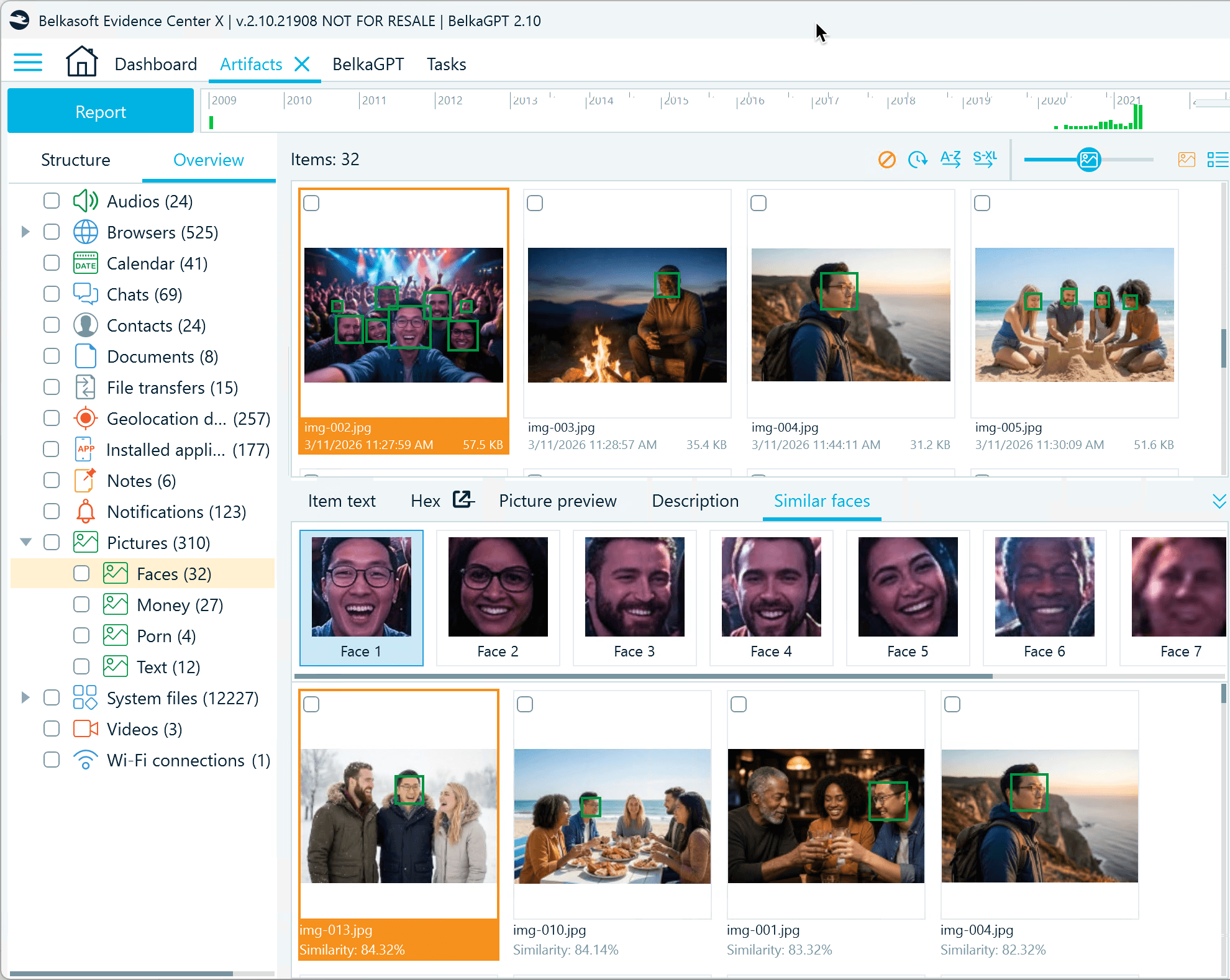
Select a detected face to view pictures with similar-looking individuals
Another way to use facial recognition in Belkasoft X is to search for similar faces using uploaded pictures.
- Go to the Dashboard window and under Actions, click Search artifacts.
- Select the Similar faces option and browse to a picture with the persons of interest.
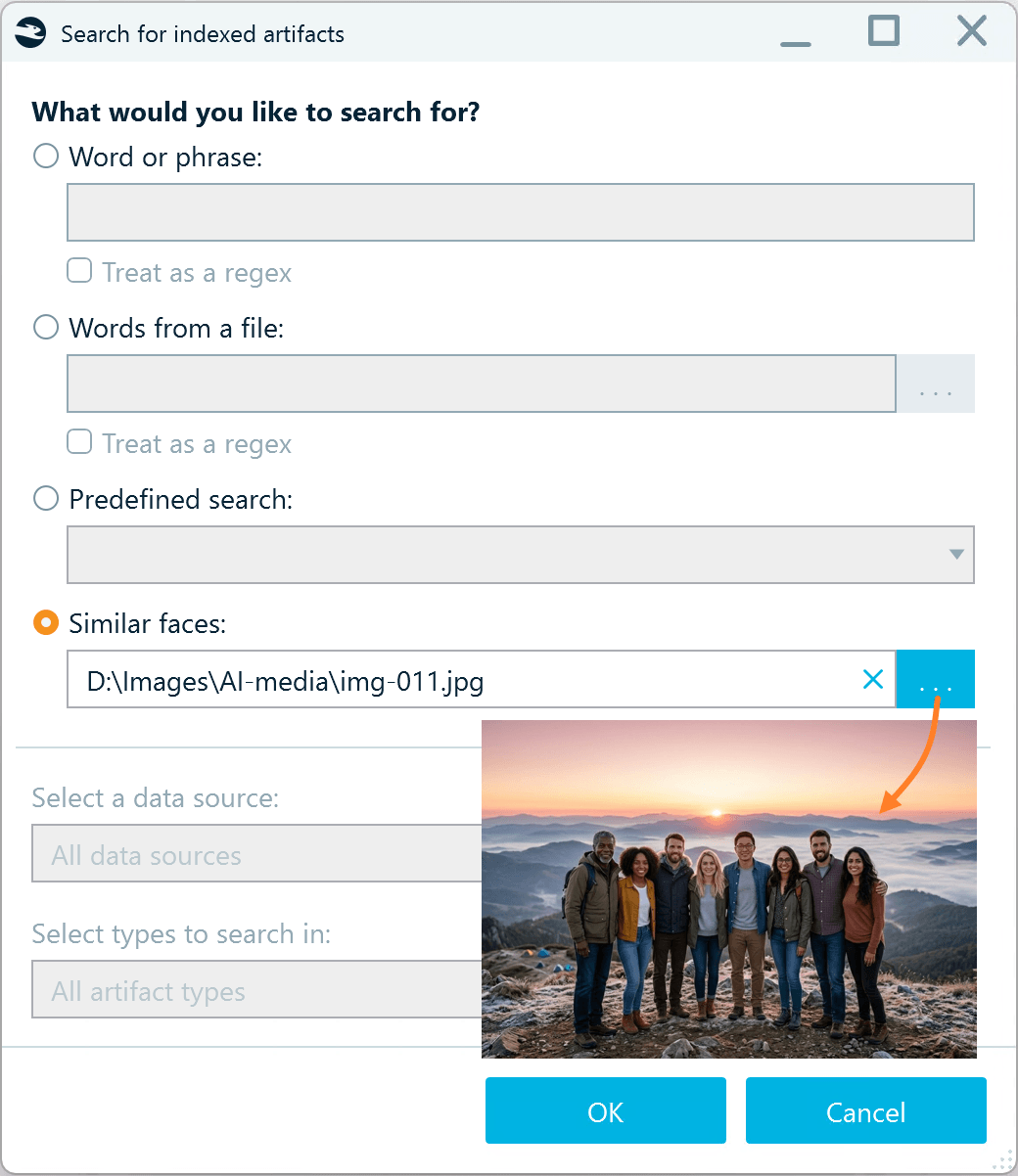
You can select a picture with one or more individuals
- After you click OK, BelkaGPT scans all pictures processed with the Detect faces option enabled and displays matching items in the Search Results window.
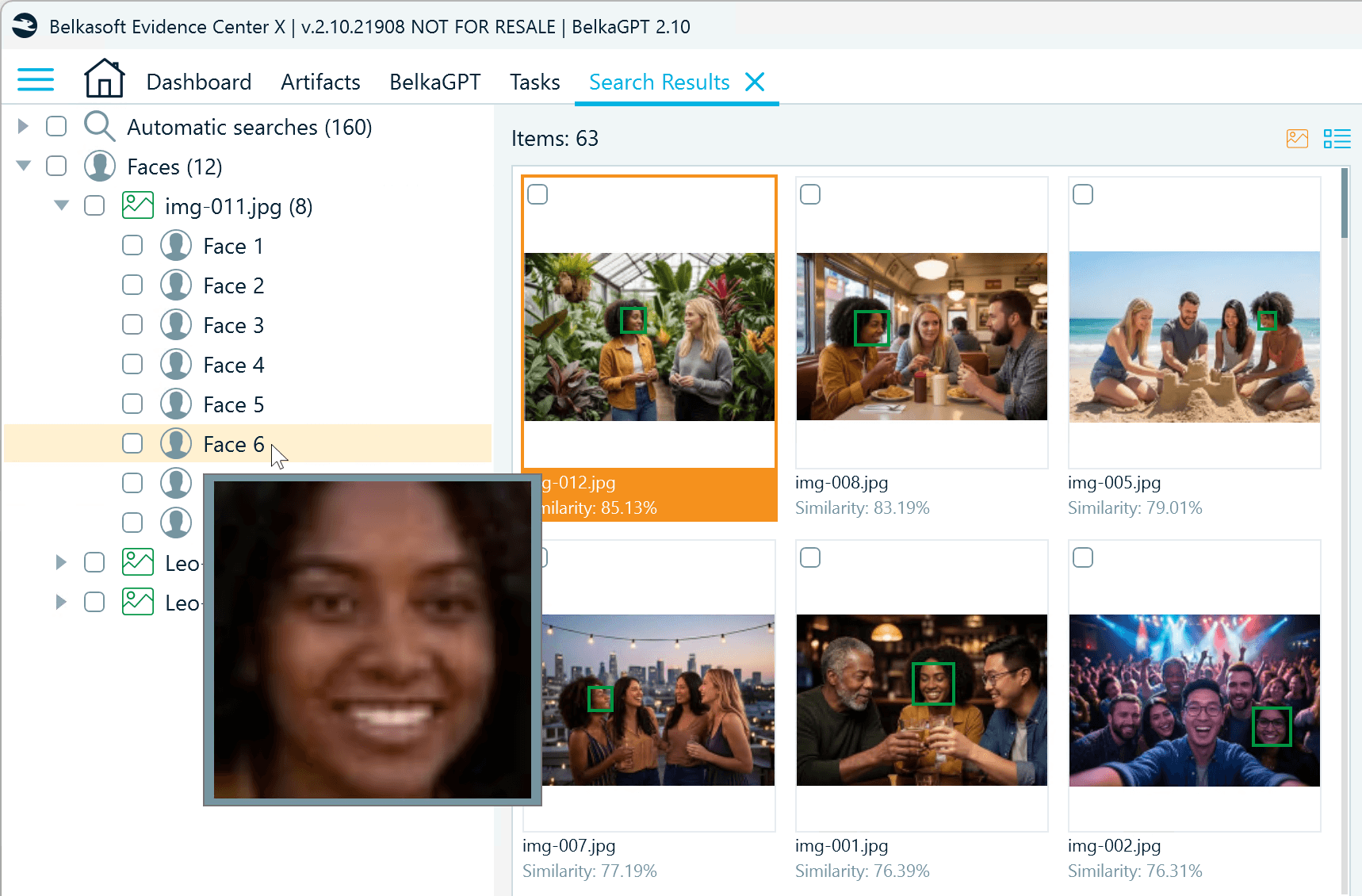
Search results show matching faces from the processed data, broken down by each face detected in the uploaded photo
BelkaGPT helps you to identify the same people across multiple photos, even when lighting, angles, or image quality vary. Results show pictures with up to 50% similarity and are sorted by similarity rate, so you can quickly prioritize the most likely matches and work efficiently through your review.
Hardware requirements and performance
One of BelkaGPT's key advantages is its completely offline operation. All picture analysis happens locally on your forensic workstation, ensuring that sensitive case evidence never leaves your lab. However, this local processing means performance directly depends on your hardware configuration.
BelkaGPT can run on CPU-only systems, which makes it accessible even without specialized hardware. However, the performance difference between CPU and GPU processing is substantial and worth considering for labs that regularly handle large data sources.
- CPU-based performance: On a machine with a standard Intel Core i5 processor without a discrete GPU, generating descriptions and running classification with eight classifiers takes approximately 90 seconds per image. While functional, this means processing 1000 images would require about 25 hours of continuous analysis.
- GPU acceleration: With a discrete Nvidia-based GPU equipped with 16GB of VRAM, the same analysis drops to roughly 5 seconds per image. That same 1000-image dataset now processes in under 90 minutes—an 18x performance improvement.
For labs handling multiple cases simultaneously or dealing with devices containing tens of thousands of images, GPU acceleration transforms BelkaGPT from a selective-use tool into one that can be applied comprehensively to entire datasets.
When outfitting each forensic workstation with high-capacity hardware is not practical, Belkasoft offers the BelkaGPT Hub module as a cost-effective solution. BelkaGPT Hub distributes processing tasks across machines on your lab network, allowing Belkasoft X clients throughout the lab to connect to powerful machines via the Hub and offload their picture analysis tasks. This configuration enables multiple investigators to share GPU resources while maintaining fast analysis speeds.
Conclusion: From thousands of pictures to actionable intelligence
The large volumes of visual evidence in modern investigations no longer have to be a bottleneck. BelkaGPT transforms what was once an overwhelming manual review into a structured, AI-assisted workflow that delivers faster leads and consistent results.
By combining comprehensive image descriptions, flexible custom classifiers, OCR, and facial recognition, investigators gain multiple complementary ways to surface relevant evidence. Natural language search makes the process intuitive, allowing queries to adapt in real time as an investigation evolves, rather than being locked into predefined categories.
Crucially, all of this happens entirely offline. Sensitive case data never leaves the forensic lab, preserving evidentiary integrity and chain of custody. And with GPU acceleration or the BelkaGPT Hub for shared processing, even large datasets become manageable within practical timeframes.
Whether the goal is identifying a suspect across hundreds of photos, detecting contraband, or locating a single handwritten note buried in a mobile device backup, BelkaGPT brings the power of modern AI to bear exactly where investigators need it, without compromise on privacy, accuracy, or control.