Automatic Speech Recognition in DFIR Investigations
Audio and video recordings have become increasingly common artifacts in both criminal and corporate investigations. Voice messages on platforms like WhatsApp and Telegram are now used as often as text messages, shifting critical evidence—agreements, business communications, threats— from written to audio format. Video recordings found on phones, computers, and other digital devices often contain relevant conversations or verbal commentary. Manually reviewing this material is resource-intensive and frequently impractical given tight timelines and heavy caseloads.
The challenge multiplies in multilingual cases. Modern investigations regularly cross borders, and a single case might include recordings in several languages. Determining which files contain actionable intelligence without linguistic expertise can stall the progress entirely.
Automatic speech recognition (ASR) addresses these operational realities and, when built right into digital forensics tools, can help find relevant evidence faster. In this article, we will look into how it works and how to use it effectively with BelkaGPT in your digital forensic and incident response investigation workflows.
ASR in a nutshell
Automatic speech recognition, also known as speech-to-text, is a technology that enables computers to process spoken language and transcribe it into written text. It has found applications across many domains and often functions as a component within larger AI-driven systems and workflows.
ASR technology has evolved significantly over the past decades. Early systems relied on rigid acoustic and language models that required extensive training on special vocabularies and struggled with variations in accent or speaking style. Modern ASR solutions leverage deep learning and neural networks, which enables them to analyze complex audio patterns with far greater flexibility and accuracy across diverse speech conditions.
ASR accuracy may vary depending on several factors: audio quality, speaker clarity, background noise, accents, and technical terminology. In optimal conditions—clear audio with minimal background noise and standard speech patterns—modern ASR systems can achieve very high accuracy rates. However, real-world forensic audio often presents challenges: poor recording quality, multiple overlapping speakers, heavy accents, or specialized jargon. In these scenarios, accuracy may drop, though modern systems continue to improve through ongoing machine learning advancements.
For investigative purposes, ASR serves as a powerful triage and search tool. While transcripts require verification for formal evidence presentation, they enable investigators to quickly identify relevant content within large audio and video collections, search for specific terms or names, and prioritize recordings for manual review.
Speech recognition with BelkaGPT
BelkaGPT is an AI assistant built into Belkasoft X that helps with smart search and analysis of various forensic artifacts, including media files. One of its components is designed specifically for speech recognition in audio and video. It works with European, Asian, and Semitic languages—the full list is available on the BelkaGPT page. In this section, we will explore how ASR with BelkaGPT works and how it helps in digital forensic investigations.
Running speech recognition in Belkasoft X
You can enable ASR with BelkaGPT automatically when you add a data source to a case. The tool will run speech recognition on recordings as they are extracted.
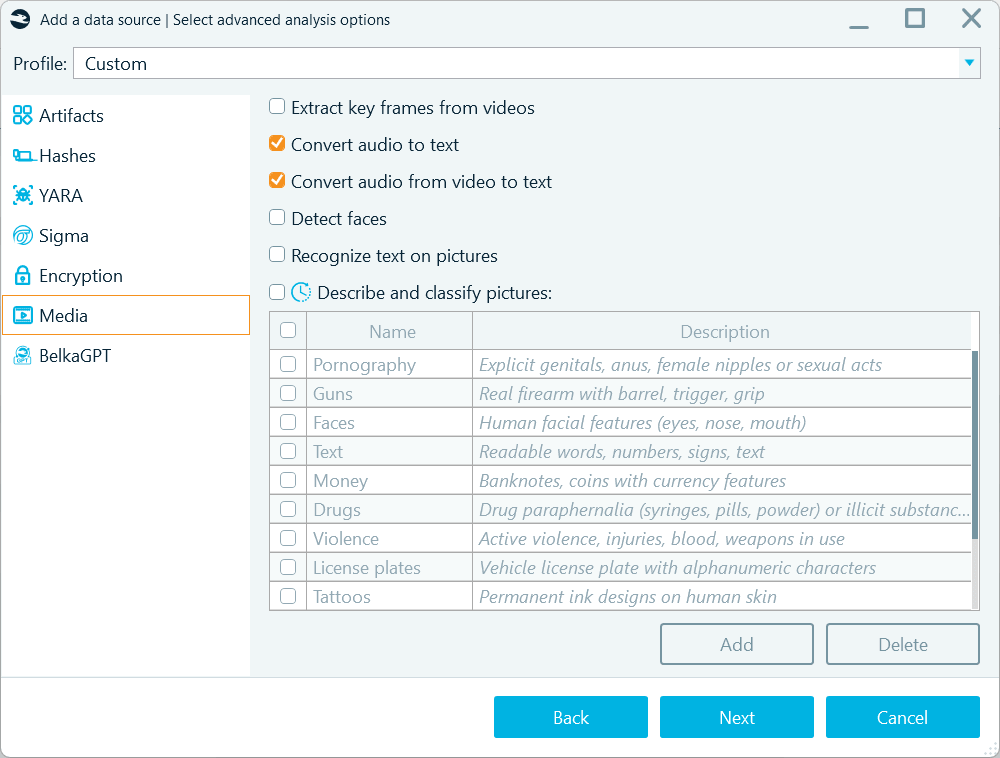
You can enable BelkaGPT speech-to-text transcription on the Media tab when defining analysis options for a data source
Another approach is to run speech recognition from the Artifacts window after Belkasoft X extracts audio and video files from your data source. Here, you have several options:
- Transcribe all extracted audio or video files:
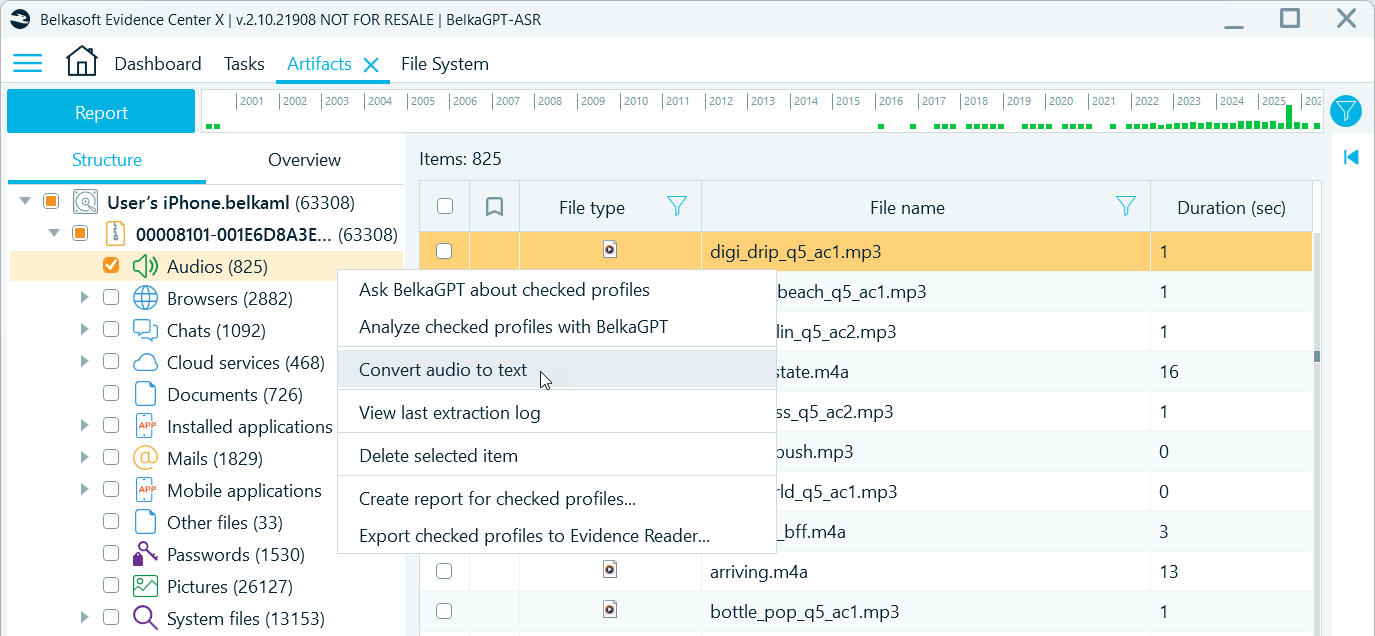
To transcribe all recordings after artifact extraction, right-click the Audios or Videos profile and select Convert audio to text
- Transcribe filtered subsets based on date ranges, file origin (file system locations that indicate source apps or folders), or other criteria:
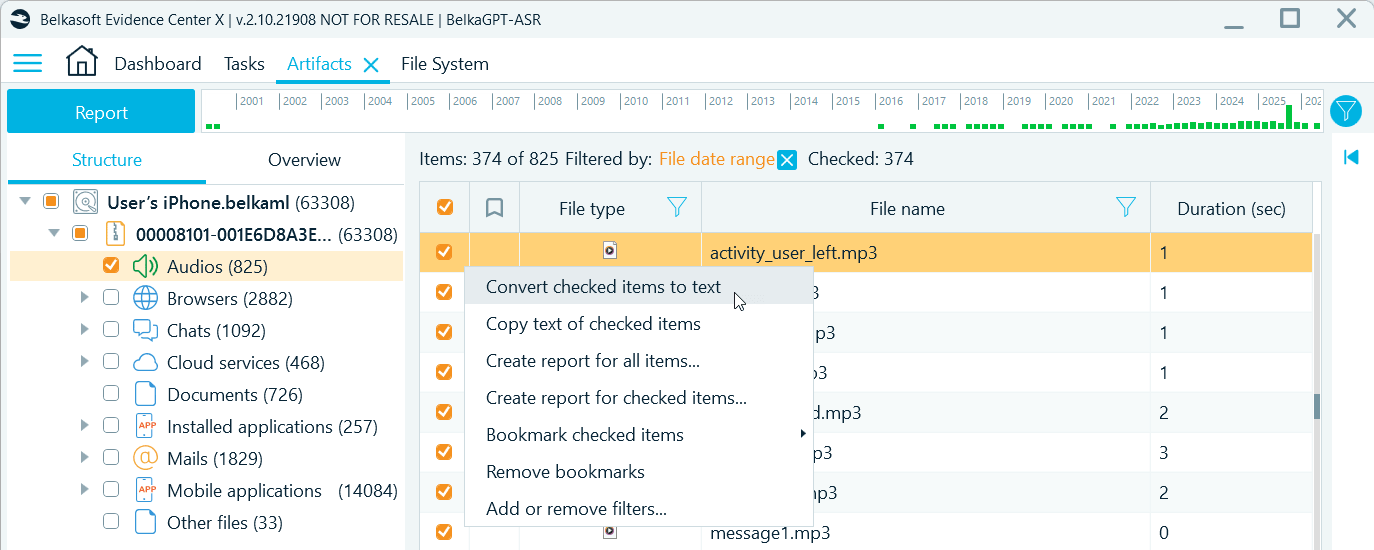
Use filters to narrow down the selection of items for transcription
- Run ASR for selected recordings:
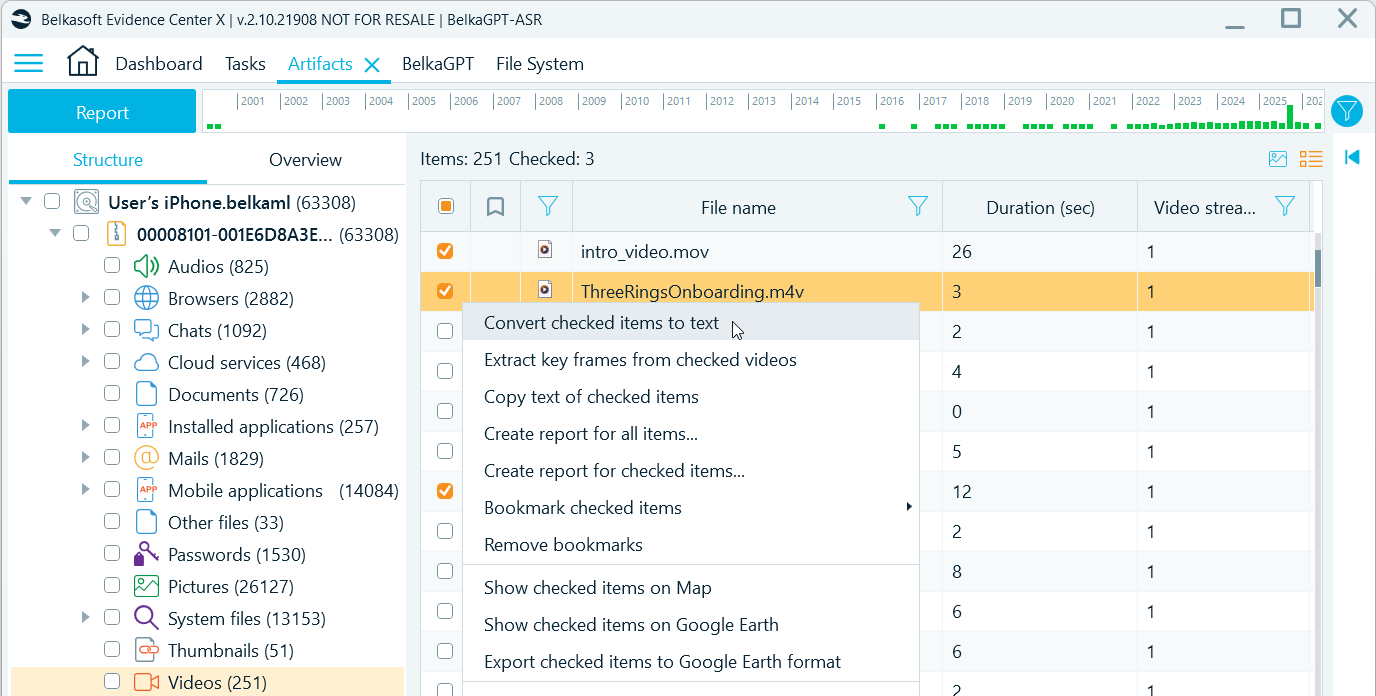
To generate transcripts for specific recordings, select those items in the grid, right-click, and select Convert checked items to text
Note: BelkaGPT transcribes audio and video recordings with the duration of up to 30 minutes (or 1800 seconds). Longer items are skipped.
AI operations may be time-consuming, so Belkasoft X lets you choose when to run speech-to-text and how many recordings to process. You can run overnight processing for the entire data source or pick the items from the timeframes of interest after artifact extraction. You can also quickly convert just a handful of items to include their transcripts in your digital forensic report.
After you initiate the analysis, you can view its progress in the Tasks window. When the Data processing for BelkaGPT task is complete, all transcripts become available in the Tools pane → Item text tab and in the Text field of the artifact properties. Transcript text includes timestamps, making it easy to verify the parts of the audio or video containing incriminating or otherwise relevant information.
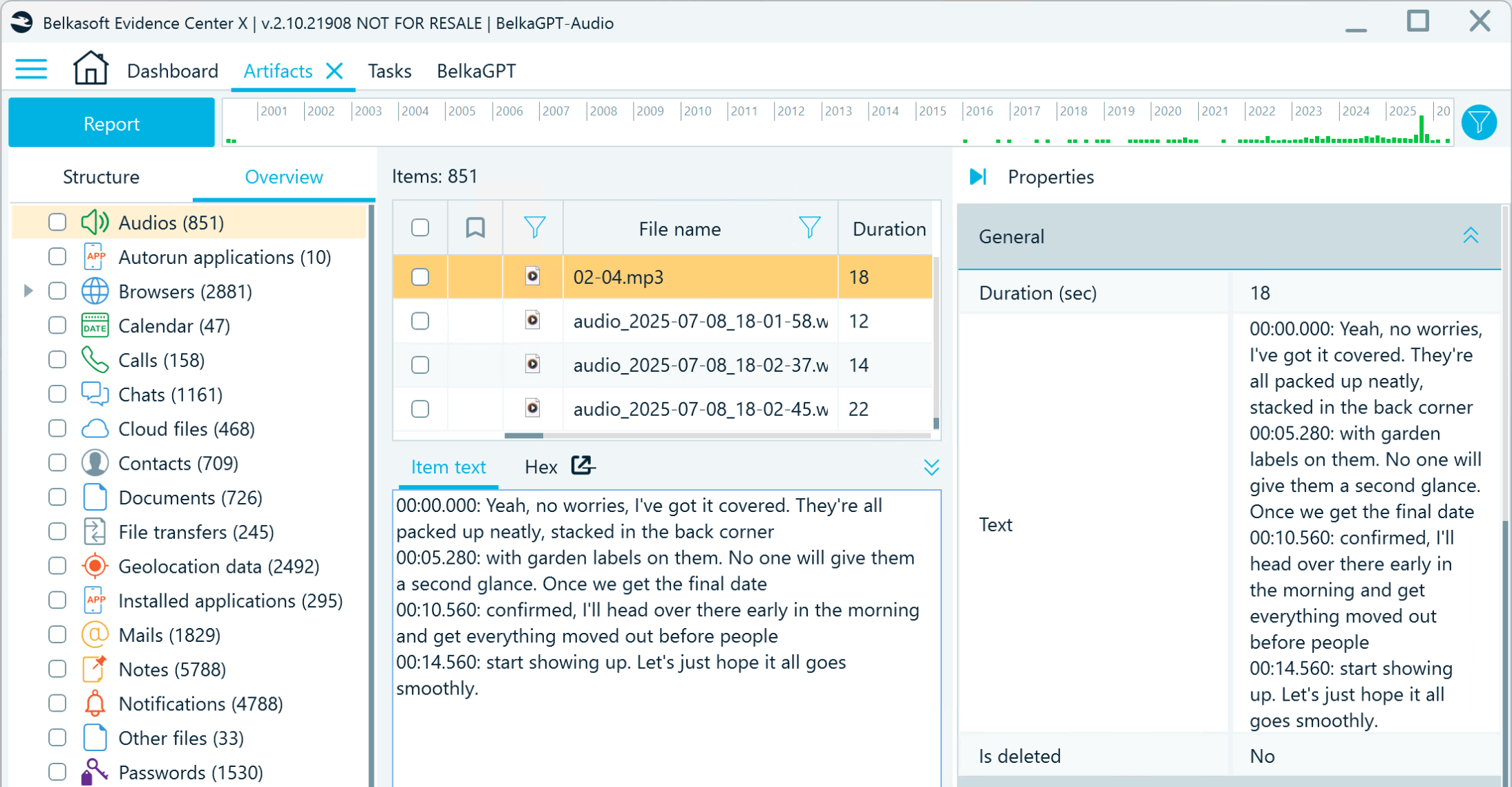
Speech-to-text conversion results in Belkasoft X

Searching for evidence in audio and video transcripts
Text converted from audio and video is automatically indexed for use with keyword search and filtering. It can also be processed for natural-language search with BelkaGPT. This is where the ASR and the large language model (LLM) components of BelkaGPT work hand in hand.
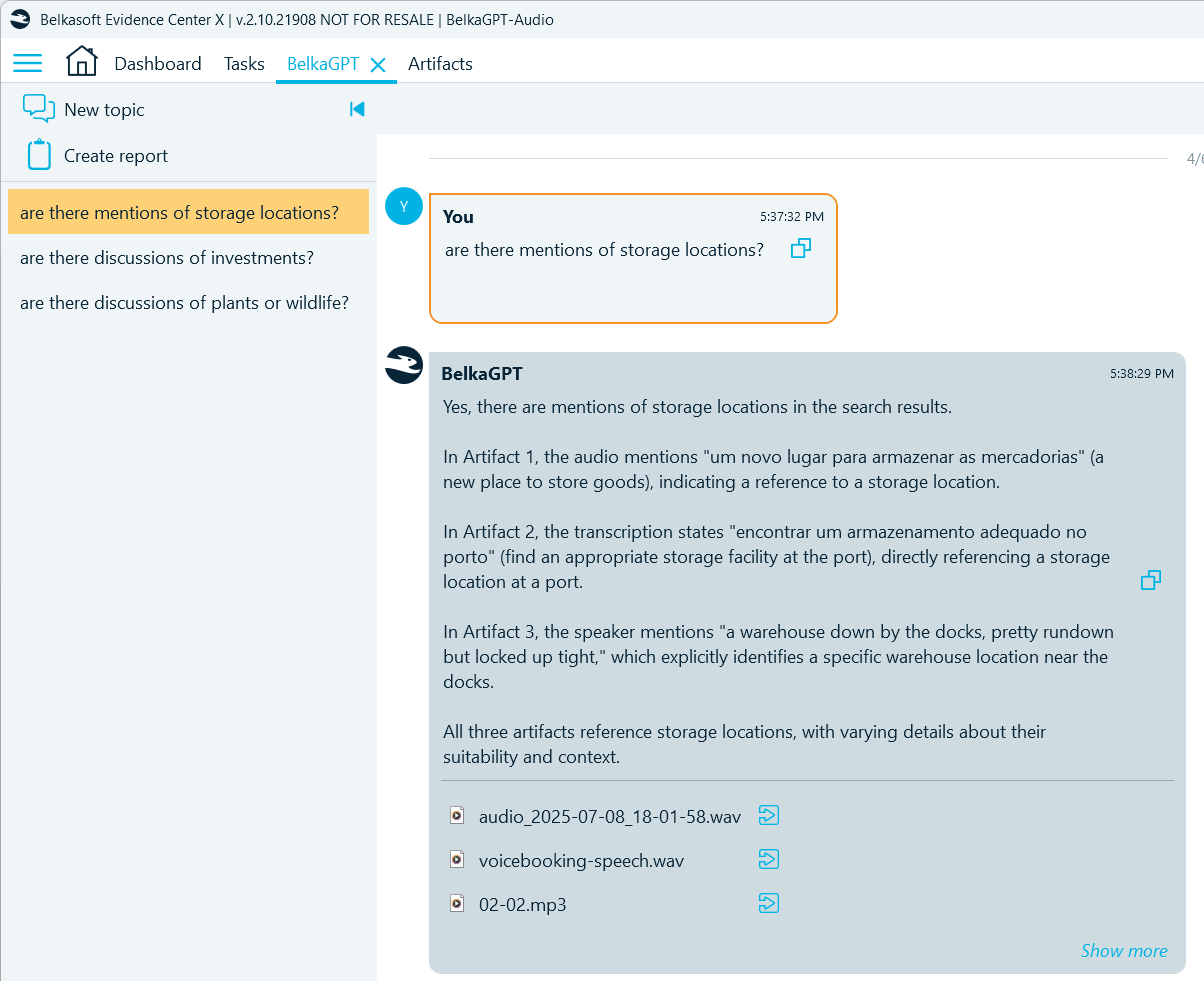
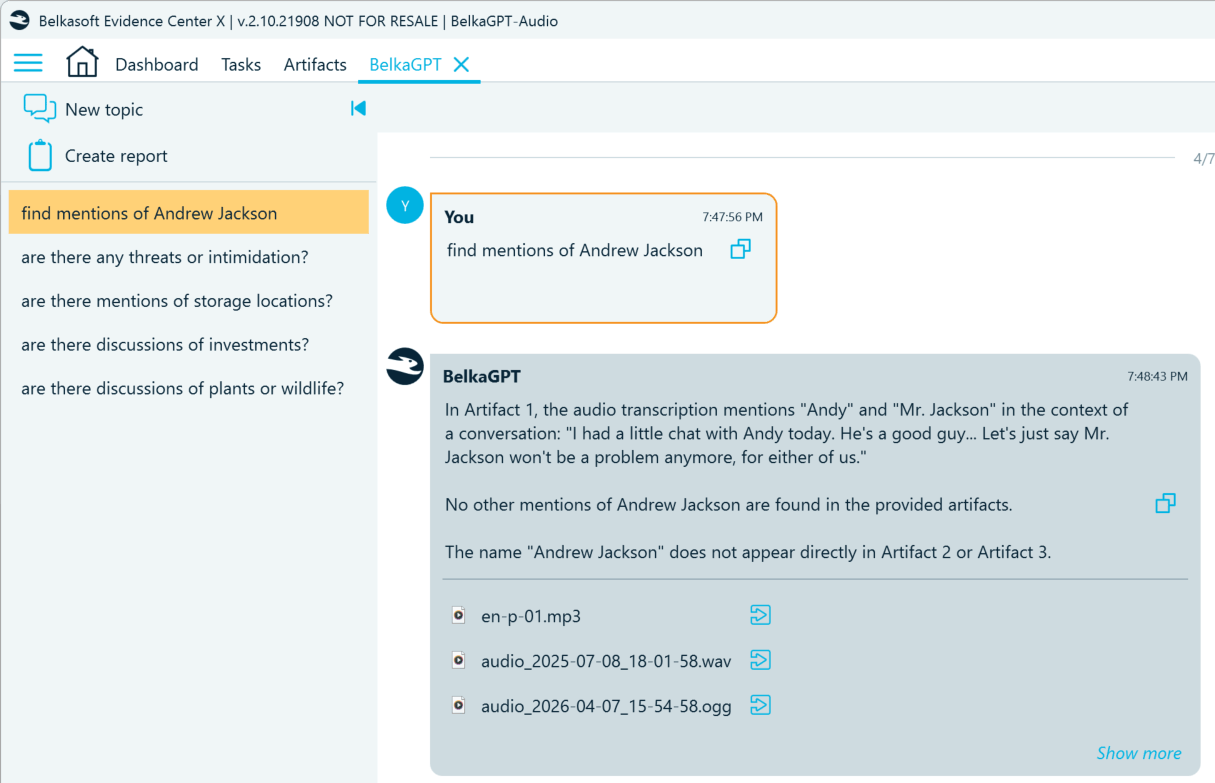
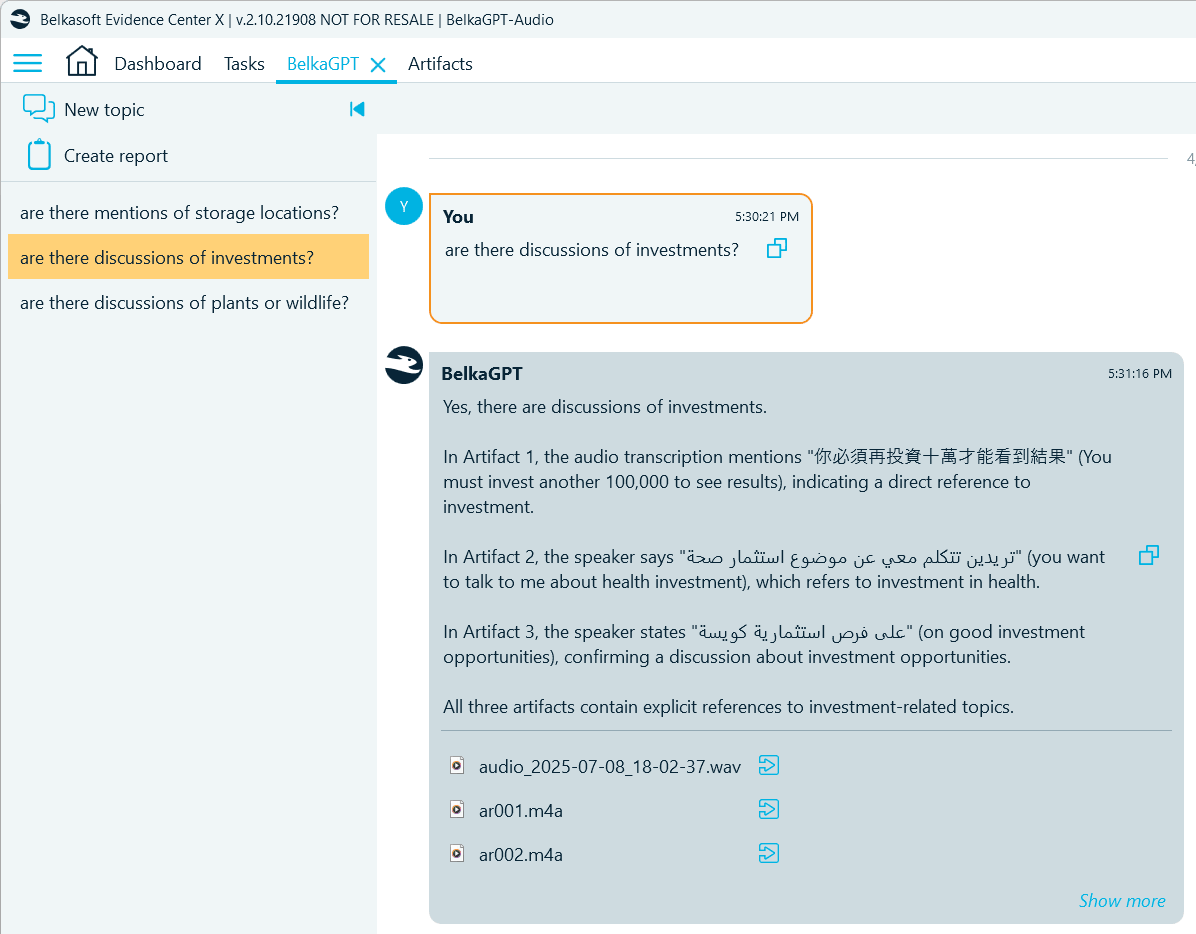
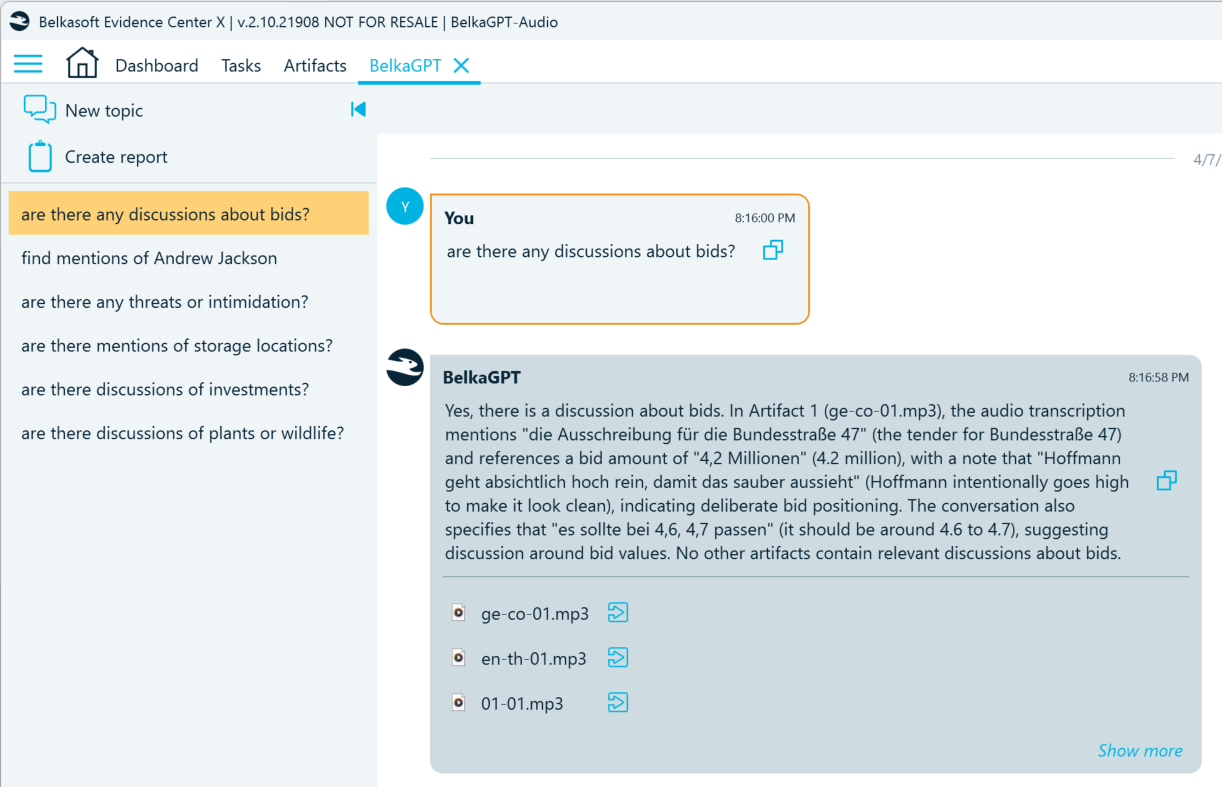
While keyword lists remain useful, they may lack some terms, especially if the target text includes slang or jargon. BelkaGPT looks beyond exact word matches. It understands the transcripts in context, relying on the meaning of the words regardless of the language they are in (within the supported range). Below are several examples of how it can detect the information of interest in recordings:
- Find mentions of locations:
- Detect mentions of persons of interest:
- Locate voice messages containing threats:
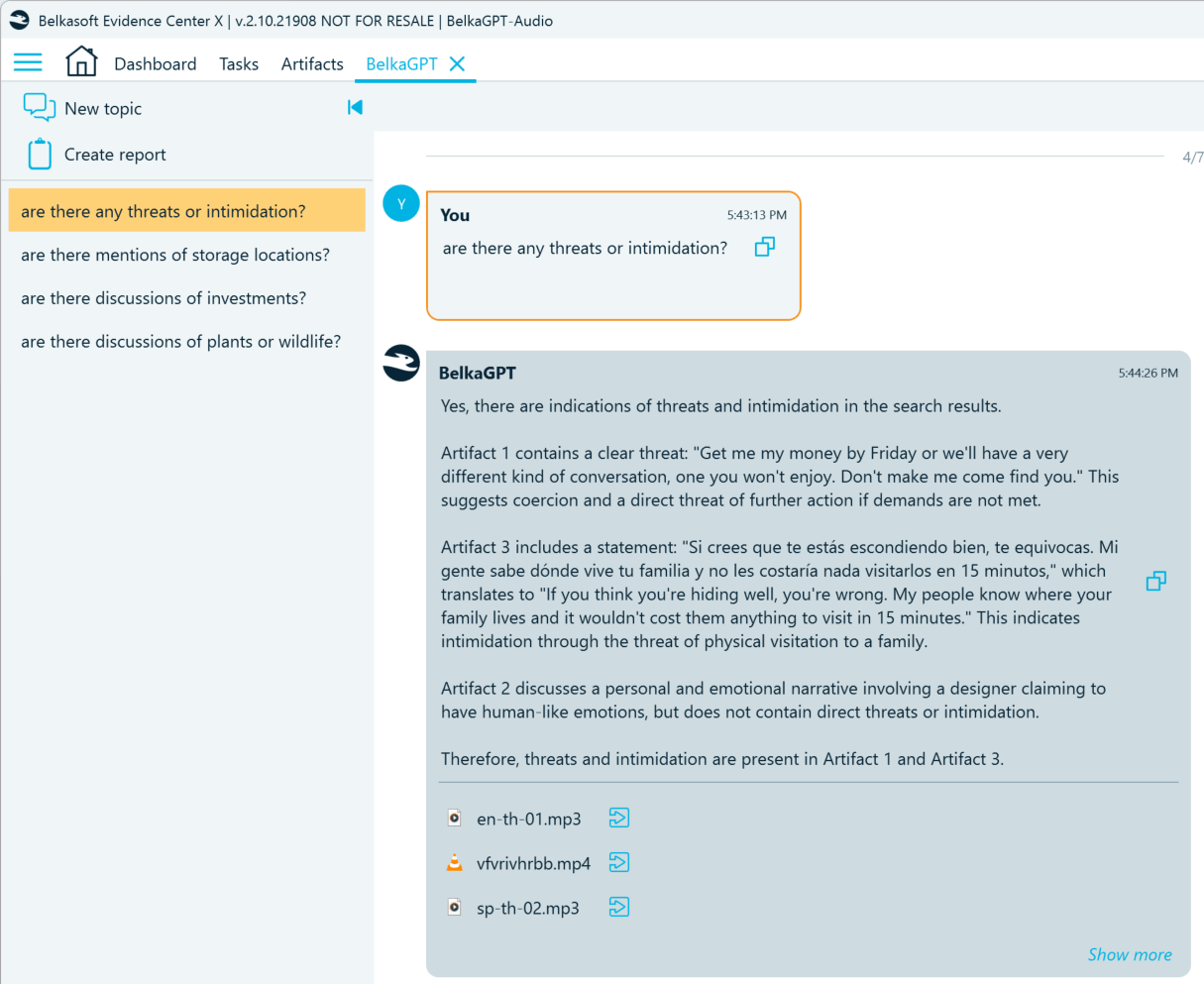
- Uncover indications of potential investment fraud:
- Find discussions of competition law violations:
Here are several things to consider when using natural language search for audio and video transcripts with BelkaGPT:
- Before speech recognition results become available for search with BelkaGPT Q&A, they must be processed by BelkaGPT. During the processing, transcripts are added to the AI-readable knowledge base where BelkaGPT can look for information related to your query. Note that if you enable speech recognition when adding a data source to a case, you must also go to the BelkaGPT tab and select the Enable BelkaGPT checkbox to make picture descriptions searchable with BelkaGPT Q&A:
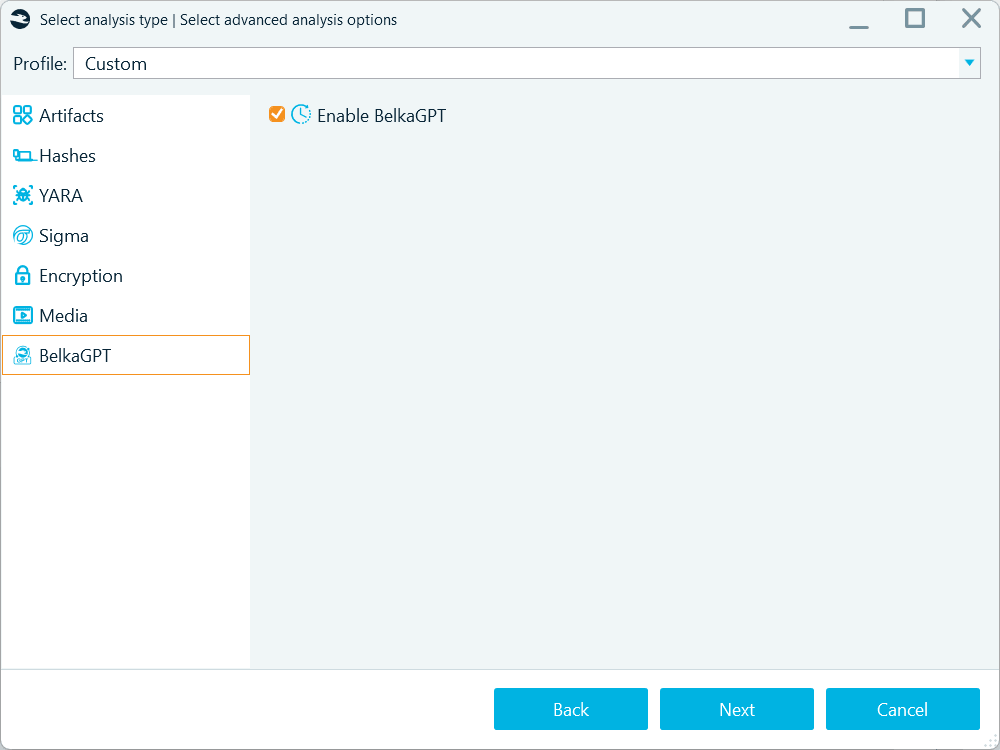
Use the Enable BelkaGPT option to process the contents of the artifacts extracted from a data source for search with BelkaGPT Q&A
However, if you run ASR from the Artifacts window, BelkaGPT will process the converted text automatically.
- While BelkaGPT is multilingual, tests show that Q&A retrieval works best when your search query is in the same language as the content you are looking for. Languages sharing the same alphabet and having other similarities usually work better together, but distant languages, for example, French and Chinese, are less likely to produce reliable results. If you know which languages most of your artifacts are in, we recommend using those languages when writing your questions.
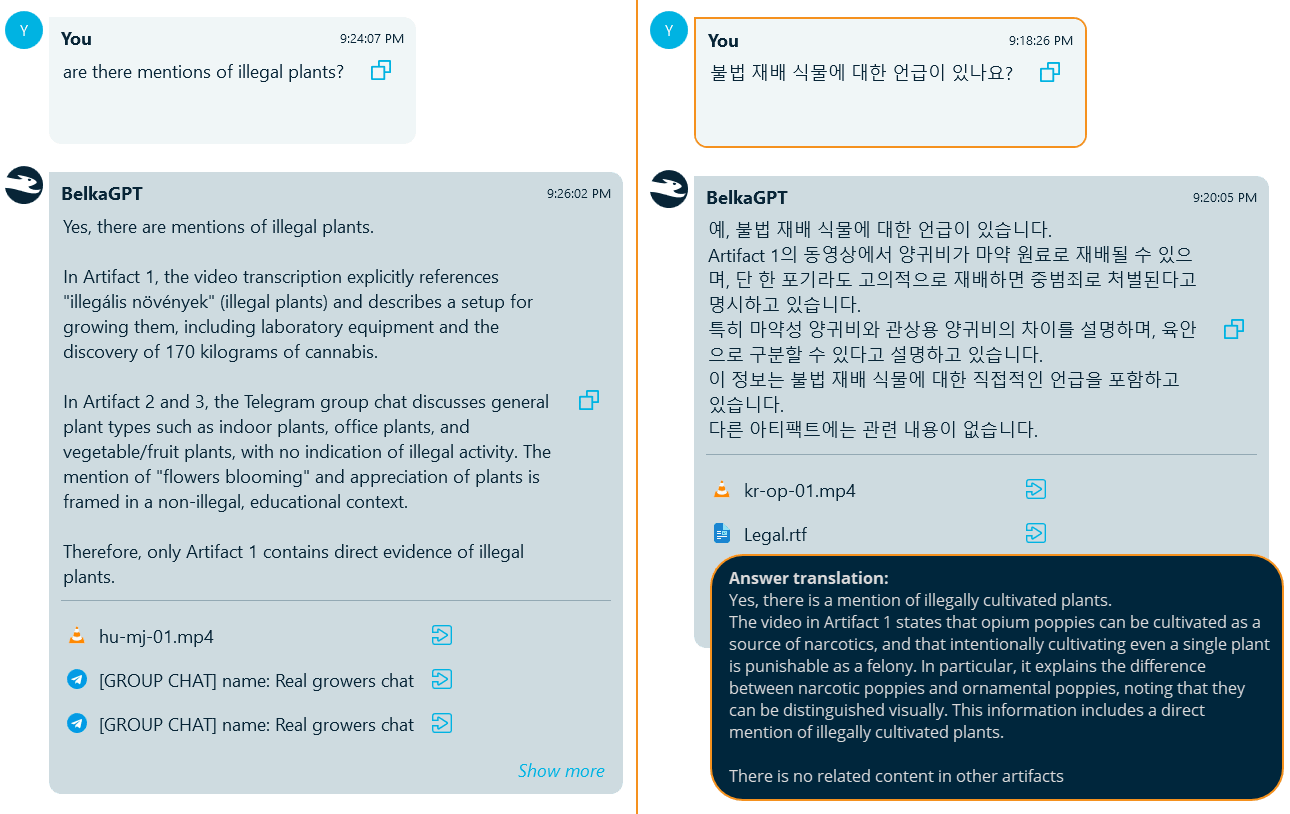
For example, here is the same case with the same question asked in English and Korean. The query in English was able to retrieve the transcript of a video in Hungarian and a few chats in English, but did not detect the video in Korean related to the same subject. Repeating the same query in Korean helped retrieve the target video.
BelkaGPT allows you to ask open-ended questions instead of predicting keywords in advance. It understands context, so it can catch implications and indirect references, not just explicit statements, helping you uncover relevant evidence for various types of investigations, both in the criminal and corporate fields.
Conclusion: From recordings to evidence, faster
Audio and video recordings are voluminous, time-consuming to review manually, and often multilingual. BelkaGPT combines automatic speech recognition with large language model analysis to help you query transcripts in natural language, surface relevant content across languages, and catch implications that keyword searches might miss.
What makes BelkaGPT particularly effective is that it applies the same natural-language interface across all supported artifact types. You can query transcripts, pictures, chats, browsers, and other digital artifacts and report on your findings without leaving the all-in-one Belkasoft X interface.