Preventing Data Leaks: Offline-First DFIR with Belkasoft X
In digital forensics and incident response (DFIR) workflows, data moves fast: corporate investigators, forensic experts, and security professionals alike juggle disk and mobile images, memory dumps, and multiple documents. Cloud tools can make work faster and simpler; however, without strict safeguards, the convenience can turn into a significant hazard. Sensitive case data leaves your environment, ends up in third-party storage, and appears in logs or backups that you cannot see or manage. Such unmanaged exposure reduces your control over data, damages trust, and undermines evidence integrity.
This risk is not theoretical. In many labs, investigators use cloud-driven platforms that provide online AI tools and services like OneDrive and Google Drive. Those paths can break your chain of custody and may compromise sensitive evidence.
At Belkasoft, we designed Belkasoft X and BelkaGPT to keep your investigations local, secure, and auditable.
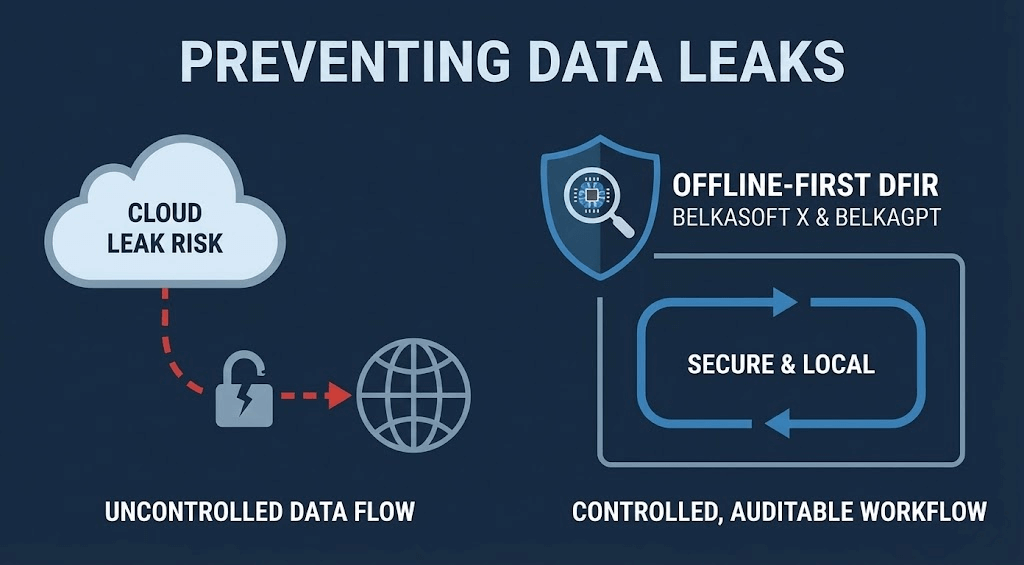
In this article, we outline common leakage vectors, explain how our tools help you avoid them, and give you practical tips to safeguard your data:
- Common leakage vectors in DFIR
- How cloud services affect your chain of custody
- How Belkasoft X prevents data leaks
- Why decision makers should care
- Why offline AI matters: Enter BelkaGPT
- A practical checklist to avoid data leaks
Read on to learn how Belkasoft X allows you to conduct end-to-end DFIR investigations while keeping an offline chain of custody.
Common leakage vectors in DFIR
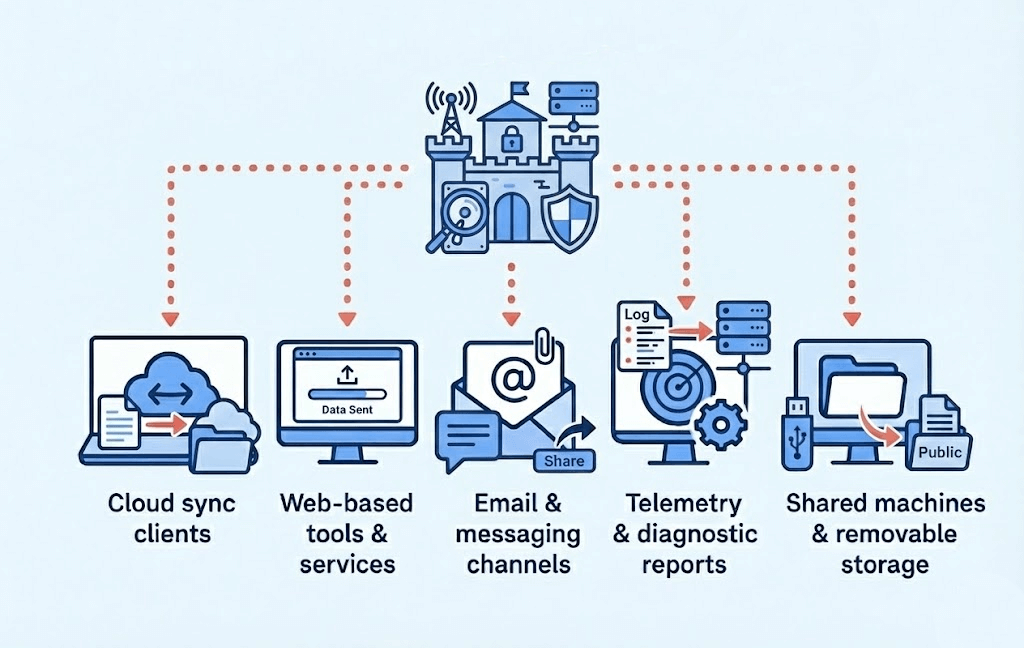
Case data can be transmitted outside your lab through various channels.
Cloud sync clients
Many workstations today have built-in or user-installed sync clients, such as OneDrive, Dropbox, or Google Drive. When you store case images or reports in those paths, you are copying your evidence to a third-party infrastructure. You can no longer reliably manage retention, access, or deletion of those external copies.
Web-based tools and services
Investigators often rely on online tools to convert logs, translate messages, or perform AI summarization. However, each upload can be a potential security risk. You lose clear oversight of who stores the data, how long they keep it, and whether they log it for future use.
Email and messaging channels
Sharing sensitive artifacts through email or chat apps creates uncontrolled shadow copies. Even if you delete a message, many platforms keep backups. Common leak points include provider backups, synchronization across multiple devices, and retention settings defined by the service owner rather than your lab.
Telemetry and diagnostic reports
Software tools, OS, or drivers may send anonymous crash reports or usage metrics back to vendors. But often those “anonymous” logs include file paths, sample artifacts, or metadata that could expose private case content if not correctly configured.
Shared machines and removable storage
Using non-dedicated machines for investigations or reusing USB drives without secure wiping can leave residual data: temporary files, thumbnail caches, and leftover database entries. These fragments may hold sensitive case content long after the active investigation is over.
How cloud services affect your chain of custody
A chain of custody record, at a minimum, should track:
- Who handled the evidence at each step
- When the evidence was collected, transferred, or examined
- Why was the evidence transferred or accessed
In digital forensics, you typically also record:
- Where the data was stored at each stage
- What was done to the evidence
- How you maintained its integrity
When you depend on cloud services and tools, you add the cloud provider as a third party in the chain. You no longer fully control your storage because the provider manages server location, retention policies, and access logs. This external management weakens your legal defensibility.
Cloud services may also store earlier versions of files. These copies can remain on remote servers even after you delete them locally, and they can also overwrite local versions during synchronization. This makes it harder to ensure that sensitive data sources are completely removed and can complicate compliance with privacy and corporate security. To maintain forensic integrity, you need a workflow that is predictable, auditable, and self-contained.
How Belkasoft's approach reduces data leak risks in DFIR
Belkasoft X is based on offline, local-first investigation principles, which enables it to operate in air-gapped labs. It does not rely on cloud storage or online services for core workflows, helping keep your data within your environment.
- Local-first acquisition and storage: Belkasoft X acquires data from mobile devices, RAM, disks, and cloud services. Additionally, with Belkasoft R, you can acquire data remotely while you retain full ownership of it: after acquisition, you store the evidence under your own access rules.
- No automatic cloud sync or uploads: Belkasoft X does not synchronize cases to cloud folders or send artifacts to external services in the background. You decide where cases live and where they are copied to.
- All-in-one package: Belkasoft X parses artifacts from various sources and provides powerful built-in viewers for data structures commonly encountered in DFIR investigations. You can explore source data using the File System and Hex viewer, as well as specialized format viewers for Windows Registry, Master File Table (MFT), SQLite, and Plist files—all without external tools. Meanwhile, higher-level features such as timeline analysis, connection graphs, and search capabilities help you uncover relevant evidence faster.
- Offline AI: BelkaGPT runs inside your infrastructure and processes artifacts locally. You can transcribe audio and video files, generate picture descriptions, and explore forensic images with natural-language questions without sending any case data to external AI providers.
- Granular exports and offline case review: Belkasoft X reporting options let you export only the artifacts you need. You can create a read-only Belkasoft Evidence Reader package with all BelkaGPT’s findings and hand it over for review. Reviewers can continue to ask the AI assistant questions while the case remains offline and the chain of custody is maintained.
- Local logging: Software stores its logs locally and does not automatically send them anywhere. If you need to send logs to product support or another third party, follow your lab’s review process, as you may need to sanitize them of sensitive information first.
Because Belkasoft X lets you work offline, you reduce the risk of case data leaving your storage. This means no untracked cloud folders, no third-party services handling your data, and no unknown extra copies.
When Belkasoft X requires an online connection
Belkasoft X works independently without an internet connection. However, some features are unavailable when offline. There are specific scenarios where an internet connection is required:
- Initial setup: The initial setup of BelkaGPT and integrations like ClamAV and Volatility requires downloading and updating resources, which can be done on a separate machine and then transferred via USB for air-gapped labs
- Product activation: The one-time activation process for trial versions or electronic licenses requires an internet connection; for complete isolation, users should use Offline Activation or a Dongle (Floating License)
- Certificate validation: When Belkasoft X launches, Windows attempts an online verification of its code-signing certificate (an OCSP check) to confirm that it has not been revoked; the software runs normally even if this connection is blocked or unavailable
- VirusTotal integration: When scanning memory processes for known malware, Belkasoft X requires internet access to work with VirusTotal
- Geolocation data: To view geolocations in the Belkasoft X’s Map window, you need an internet connection to load maps from the OpenStreetMap website
- Agent-based acquisition of iOS devices: This iPhone and iPad acquisition method allows you to extract a full file system copy of iOS devices, but requires contacting Apple's servers during the process
- Cloud data acquisition: To acquire data from cloud services, Belkasoft X requires internet connectivity to the relevant cloud servers
- Software updates: When automatic updates are enabled, Belkasoft X checks for new versions over the internet
- Video tutorials: When you click a tutorial link, Belkasoft X opens the YouTube video in your default web browser using your internet connection
Generally, you can customize your firewall settings to either block connections for Belkasoft X or allow all of them, or select specific ones as needed.
Why decision makers should care
An offline-first workflow in enterprise forensics may look like extra work. You can present its value to decision-makers in the following way:
- Risk reduction: Eliminating third-party cloud vendors for storing and processing case data removes a major exposure point
- Compliance: Many organizations must not move regulated or personally identifiable data to third-party cloud systems. Offline workflows help meet those requirements
- Cost predictability: On-premises deployments will eventually be less expensive than cloud storage and data transfer, not to mention the potential compliance violation fines
- Stronger evidentiary rigor: By restricting evidence to local workstations, you minimize uncontrolled transfers, helping ensure a clear chain of custody that records what was done, when, and by whom; this improves your defensibility in court
If your team uses Belkasoft X, you have a secure, all-in-one DFIR platform. Pairing it with BelkaGPT enhances your analysis and keeps data under your supervision. For more on why Belkasoft X is a compelling choice for forensic professionals, check out our Why choose Belkasoft X page.
Cloud AI disrupts the chain of custody? Meet BelkaGPT!
Artificial intelligence is increasingly used in forensic workflows. Investigators rely on it to speed up search, highlight relevant items, and reduce manual review time, especially in large or complex cases. Instead of reading every chat thread or document yourself, you can rely on an AI assistant to speed up the first pass over the data. AI can scan artifacts, find similar items, extract people and entities, and surface conversations that are likely to be relevant to your case.
BelkaGPT gives you these advantages without sending any case data to the cloud. It operates entirely offline, inside your own infrastructure, and processes your artifacts locally. BelkaGPT helps you by:
- Transcribing audio and video so that you can search spoken content as text and quickly skim calls, meetings, and recordings
- Describing and classifying pictures so that you can group similar images, locate relevant visuals, and filter out noise
- Answering questions about all artifacts in a case so that you can ask natural-language questions and get responses backed by specific items of evidence
- Working across languages so that you can analyze multilingual chats, documents, and media in a single workflow
BelkaGPT runs on your own hardware alongside Belkasoft X. For smaller teams, it can work on a single powerful forensic workstation. For heavier workloads or shared use, you can deploy BelkaGPT Hub. The software offloads compute-intensive tasks to more powerful machines on the network and serves multiple Belkasoft X instances simultaneously. With a suitable processor, enough memory, and, ideally, a supported graphics card, BelkaGPT and BelkaGPT Hub deliver fast offline AI assistance while your case data never leaves your environment.
A practical checklist to avoid data leaks
Here is a recommended checklist to review and secure your DFIR workflows. Use it to spot and address cloud leakage risks in your environment.
Lab setup
- Firewall Rules: Restrict unnecessary outbound traffic on forensic machines, but allow exceptions such as OCSP and update checks
- Documentation: Log the use of cloud acquisition features, record cloud acquisition authorizations, and manage credentials responsibly
- Change management: Define who may install software, modify firewall rules, or add browser extensions on forensic machines
Acquisition phase
- Imaging protocol: Perform acquisitions to local, non-synced storage and use write-blockers
- Workflow: Avoid direct-to-cloud acquisition workflows
- Validation: Record image hash values for every acquired source
- Evidence storage: Keep evidence in a secure, non-synced location
- Network: Apply strict outbound firewall rules on acquisition workstations
Disable or restrict data synchronization and telemetry
- Synchronization services: Remove or disable cloud sync clients on forensic machines
- Diagnostic data: Turn off software telemetry or set it to exclude filenames and paths
Restrict web-based tool use
- Banned applications: Prohibit the use of online AI, web editors, and file conversion tools for case data
- Safe alternatives: Use local tools like SQLite, Plist, and Registry viewers; if you need an AI assistant, use local systems, such as BelkaGPT
Manage exports and sharing
- Minimization: Export only the necessary artifacts
- Sanitization: Use redacted or filtered outputs where possible
- Transport: Use encrypted channels or physical media for external delivery, in line with your policy
- Audit trail: Log every export with metadata, hash values, and purpose
Isolate your hardware
- Dedicated workstations: Use dedicated forensic machines
- Sanitization: Wipe removable media thoroughly before reuse
- Access control: Do not allow personal accounts on lab machines
Maintain documentation
- Case logs: Keep detailed logs of case operations
- Chain of custody: Store hash values for all exported or shared files
- Archival: Archive logs in a repository you manage
When used consistently, this checklist enhances the protections built into Belkasoft X and BelkaGPT, significantly reducing your risks. To further learn how Belkasoft products can help you improve your investigation workflows, read our Digital Forensics Playbook for Enterprise Forensics article.
Conclusion
DFIR is about evidence. When that evidence leaks to the cloud, you risk breaking the chain of custody. You can still keep your investigations fast and effective without exposing case data online.
Belkasoft X offers a robust, full-featured forensic suite that operates entirely within your lab. BelkaGPT provides human-like AI analysis without transmitting a single prompt to the public Internet. Together, they deliver the efficiency of modern tools combined with the discipline and security of a true forensic environment.