What's new in Belkasoft X v2.13

Belkasoft Evidence Center X (Belkasoft X) is Belkasoft's flagship product for digital forensics, cyber incident response, and eDiscovery.
Belkasoft X v2.13 brings new features and improvements in AI-assisted analysis, file system forensics, acquisition, reporting, and artifact extraction:
- Chain of thought in BelkaGPT answers, showing the steps behind each answer for more transparent AI-assisted analysis
- Document summarization with BelkaGPT
- BelkaGPT topic detection for emails and SMS, with the same predefined and custom detectors available for chats
- BelkaGPT Q&A on BelkaGPT Hub, plus a fast answer mode that cuts answer time on computers without a compatible GPU to about 1 to 3 minutes
- Deleted file analysis based on MFT records, letting you find, examine, and restore deleted files right in the File System window
- Improved MTK acquisition, including dump.bin images and decryption of MTKClient dumps
- Browser-based sign-in for Google Cloud acquisition, with two-factor authentication support for all supported Google services
- Report splitting by contact or conversation for Mobile Apps and SMS, including RSMF reports
- Expanded Android and iOS artifact support, including Claude AI, Copilot, ChatGPT, and several Google and Samsung apps


Upgrading from previous versions of Belkasoft X to v2.13 is free for all customers with an active Software Maintenance and Support (SMS) contract. Customers with expired or expiring SMS contracts can review and renew them through the Customer Portal.
New feature details
BelkaGPT
Chain of thought in BelkaGPT answers
While generating a response, BelkaGPT now displays its chain of thought: the steps it takes to answer your question, each with the time it took.
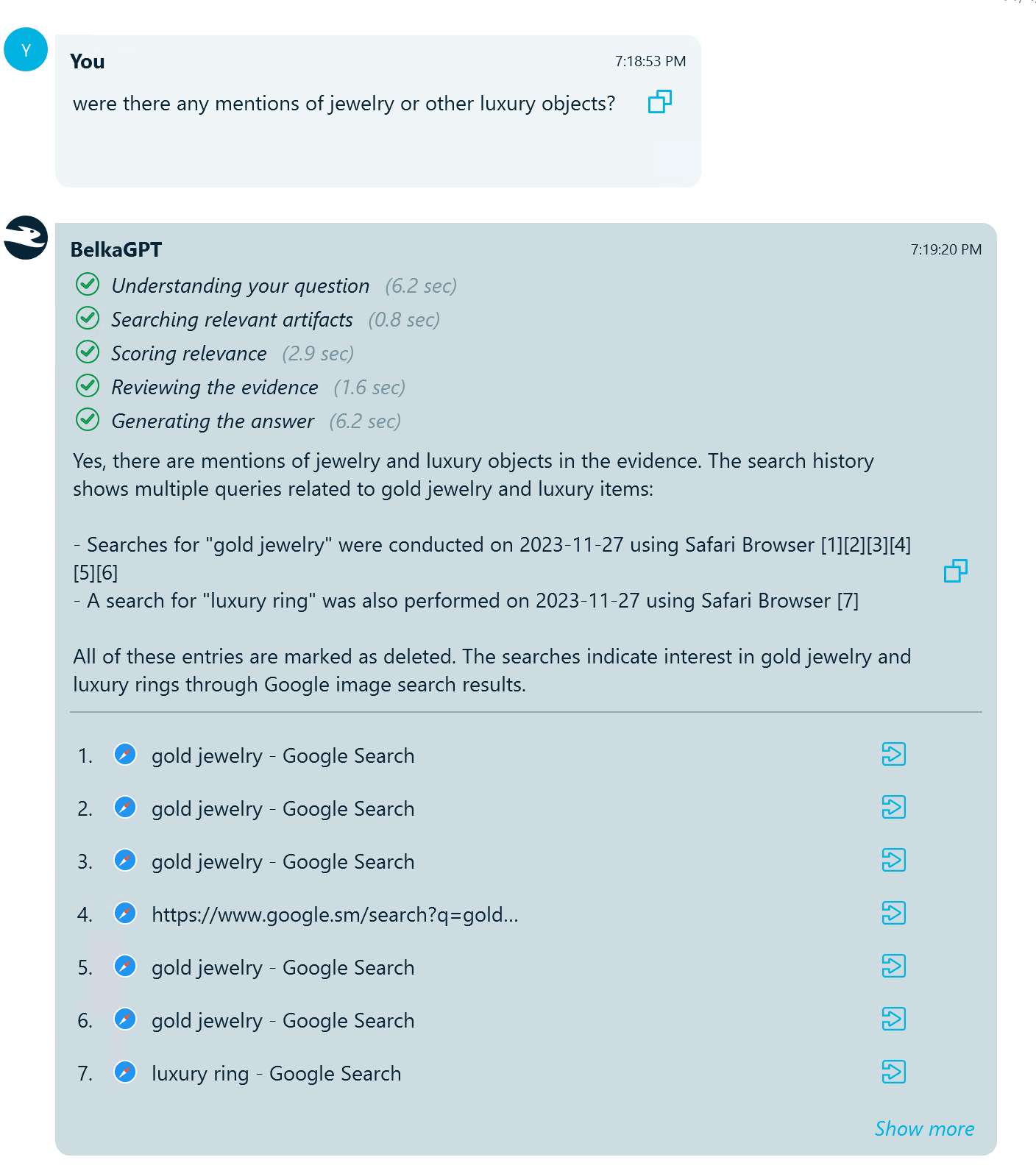
In digital forensics and incident response, an answer is only as valuable as your ability to explain it. By showing how it arrives at its conclusions, BelkaGPT makes AI-assisted analysis more transparent, helping you judge how far to rely on each answer and stand behind your findings with confidence.
Document summarization
BelkaGPT can now summarize documents, helping you quickly understand what each one is about and decide whether it deserves closer examination. Summarization handles documents across a wide range of formats, from word processor files, PDFs, spreadsheets, and slide decks to plain-text logs, making it a versatile tool for getting through large volumes of text information.
You can summarize all documents under the Documents profile, a selection of items, or a single document, choosing between two modes:
- Quick summary covers the first 500 words of a document and is the faster option
- Full summary covers the entire document, up to 25,000 words
Summaries are written in the language you select, regardless of the document's original language. And if your workstation lacks a compatible GPU, you can run summarization on BelkaGPT Hub, offloading the processing to other machines in your lab.
Topic detection for emails and SMS
Topic detection, introduced in v2.11 for chats, now also covers emails and SMS messages. BelkaGPT analyzes their contents and collects messages that match topics of interest, so you can review relevant correspondence across all these communication types.
The same detectors are available as for chats:
- Predefined detectors cover common investigative categories, such as money, drugs, operational coordination, and account access
- Custom detectors let you define your own classes based on case-specific knowledge, such as coded language within a criminal network or references to confidential projects in a corporate leak investigation
Because detection is powered by a large language model, it can capture slang, euphemisms, and indirect references that keyword lists often miss, and one detector works across many languages.
BelkaGPT answers on BelkaGPT Hub
The BelkaGPT Q&A chat can now use BelkaGPT Hub to generate answers, so answering questions no longer depends on the computing resources of an individual forensic workstation.
Fast answer mode on CPU
BelkaGPT now automatically detects the available hardware and applies the answer generation workflow optimized for it. On computers without a compatible GPU or BelkaGPT Hub, this means much faster answers: about 1 to 3 minutes per reply instead of 12 to 15 minutes.
BelkaGPT tutorial
Belkasoft X now includes a built-in BelkaGPT tutorial that walks you through BelkaGPT features, including the BelkaGPT options in the Add data source wizard and the BelkaGPT Q&A features. You can access the new tutorial in the Home screen's Tutorials pane.
Other BelkaGPT improvements
- GPU readiness check in the Add data source wizard: BelkaGPT processing is computationally demanding and runs much slower on CPU. Before processing starts, the wizard now warns you if it cannot be GPU-accelerated due to one of the following reasons:
- No compatible GPU is found
- The CUDA toolkit is not properly set up for a compatible GPU
- A BelkaGPT Hub is configured, but processing is set to run locally
- BelkaGPT classification results in Belkasoft Evidence Reader exports: Exports from the Artifacts window to Belkasoft Evidence Reader now include topic detection, SQLite database classification, and picture classification results, for all or selected categories. Previously, these results were only exported with the full case.
- Focus on new custom classifiers: After you add a new topic detector or classifier for custom analysis, it is automatically highlighted and selected in the grid.
- Translation copy command: A Copy context menu command has been added to the instant translation dialog.
Windows file system forensics
Deleted file analysis based on MFT records
Belkasoft X now reconstructs records of deleted files and folders from the NTFS Master File Table (MFT). In the File System window, every NTFS volume and each of its shadow copies now has a Deleted items node that brings together everything you need to locate, examine, and recover deleted files:
- Find the files: Every column in the list is sortable and filterable, so you can quickly find records of files with specific names, sizes, timestamps, and other properties
- Examine records in the Hex Viewer
- Restore deleted files whose data is still available on the disk by saving them to files
Deleted files are grouped into two lists:
- Orphans: Files and folders whose parent folder's record has already been reused, so their full path is unknown. Orphans can include existing files as well as deleted ones
- Path restored: Deleted files and folders whose original location could be fully reconstructed, from the volume root to the file name
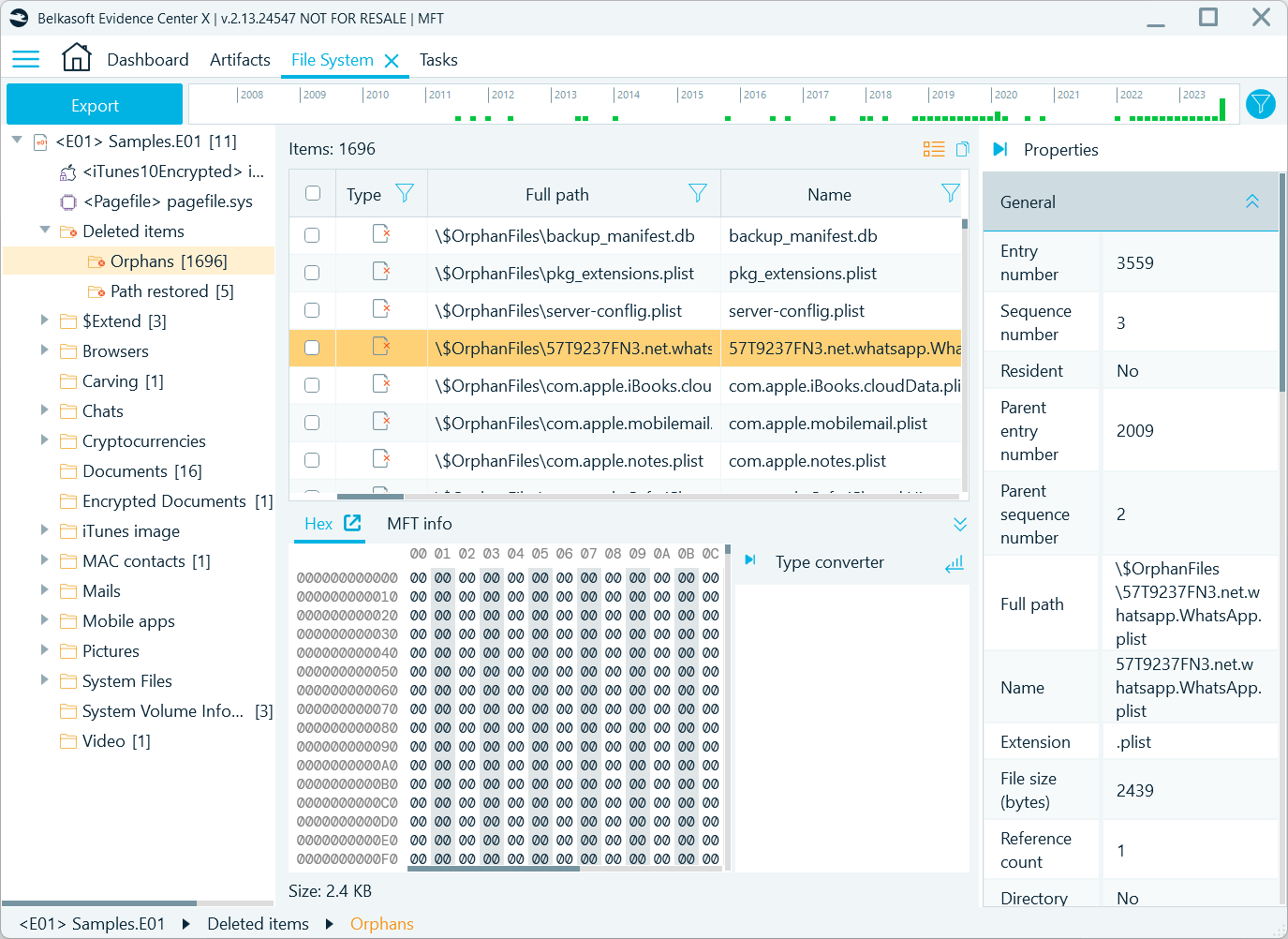
The lists display most of the information stored in each MFT record. The details most useful for investigations include:
- Full path, name, and size, and whether the file is resident, that is, small enough to be stored entirely within its MFT record. Resident files can usually be recovered even after TRIM has wiped the freed space on an SSD
- Both sets of timestamps, from $STANDARD_INFORMATION and $FILE_NAME
- Alternate data streams, including the contents of Zone.Identifier streams, which may show whether a file was downloaded from the internet and from which address
With deleted file records available right in the case, you can recover evidence that no longer appears in the regular folder structure and establish what was on a volume and when, all without leaving Belkasoft X.
File deletion time
File-type artifacts, such as pictures and documents, now have a Deletion time column. It shows when a file was deleted whenever that time is recorded, which is typically the case for files from trash or recycle bin–type applications.
Free space carving
Files found with the Carve free space option available for NTFS volumes now have correct offsets, so you can locate them precisely in the data source. As a result, you can preview carved pictures right away.
Mobile acquisition
MTK Dump improvements
Belkasoft X 2.13 continues improving the MediaTek (MTK) workflow redesigned in v2.12:
- Dumps without metadata-level encryption: Some devices use file-based encryption without encrypting file system metadata. In MTK dumps from such devices, Belkasoft X now correctly recognizes the user data partition as encrypted and decrypts it automatically once brute-force recovers the passcode.
- Decryption of MTKClient dumps: A new utility creates the material needed to decrypt dumps acquired with MTKClient in Belkasoft X. The utility is available on request from support@belkasoft.com.
- dump.bin as a mobile image: You can now add an MTK dump.bin file to a case as a mobile image, as an alternative to a .belkaml image.
- Clearer brute-force and decryption progress: Task statuses and logs for brute-force and decryption are now more informative, making it easier to follow these operations and understand their results.
Other mobile acquisition changes
- Unisoc brute-force and decryption: Restored passcode brute-force and decryption for Realme C35 devices based on the Unisoc T616 chipset.
- Portable agent backup: The Agent backup via SD card method has been renamed to Portable agent backup to better reflect its capabilities, and its on-screen instructions have been refined for clarity.
- Acquired data added to the case despite warnings: When a mobile acquisition finishes with warnings, the acquired data is now still automatically added to the case for analysis.
Artifacts
Android
Belkasoft X 2.13 adds support for AI assistants on Android, along with several Google and Samsung applications, and improves a number of existing parsers.
New
- ChatGPT v5.2
- Claude AI v1.260625.20
- Copilot v30.0.440623001
- Google Files v1.2263
- Google Messages v20240116_01_RC03–20240702_01_RC02
- Google Photos v5.9–6.89
- Samsung Gallery Trash v14.5.12
- Samsung My Files v14.5
Updated
- Google Quick Search Box: Added support for the app in Android 15.x
- Google Voice v2024.01.29.603156670: Added support for later app versions
- Google Workspace Chats v2025.11.09.830318453: Improved attachment extraction
- GroupMe v6.111.1: Added reactions
- MeWe v8.1.16.99: Contact names are now extracted from messages
- Telegram v12.7.3: Improved extraction of checklists, message marks, and other details
- Zalo v25.10.02: Added support for new databases
iOS
Version 2.13 adds Claude AI and Copilot for iOS and updates several popular messengers and apps.
New
- Claude AI v1.260618.1 (27978583058)
- Copilot v30.0.440608001
Updated
- ChatGPT v1.2026.267: Added support for the new app version
- Discord v305.1: Restored the extraction of chats, improved audio cache extraction
- Gmail v6.0.260615: Updated and improved analysis
- SMS: Restored extraction of SMS in iOS 15.8.2 images
- Telegram v12.7.3: Added message reply visualization
- TikTok v29.1.1: Improved the extraction of chat names and contacts, added visualization of replies and reactions
- Viber v21.6.2: Added the ability to split chats by conversation
- X (Twitter) v10.72.1: Group chats are now displayed correctly, and GIF files are marked as picture transfers
Cloud acquisition
Google Cloud acquisition: sign-in via browser
Google periodically changes its authentication protocols. To keep Google Cloud acquisition stable, Belkasoft X now falls back to signing in through a browser window when the initial sign-in attempt fails. The browser sign-in works for all supported Google services (Drive, Gmail, Keep, My Activity, and Sync) and supports two-factor authentication.
Other cloud acquisition changes
- iCloud: Find My data is now downloaded, and acquisition no longer fails on notes with invalid attachment dates
- Google Sync: Restored the acquisition of Google Sync data that contains valuable browser artifacts, including history, bookmarks, passwords, and more
- Google Timeline: Removed from cloud acquisition, as Google has discontinued the service
- Mega: Items from the trash are now extracted
Search
Substring search in Chinese, Japanese, and Korean
CJK text (Chinese, Japanese, Korean) is now indexed in two-character sequences (bigrams), so search finds substrings of two or more characters. Previously, words in these languages, which are not separated by spaces, could be missed by search.
Typed URL search
Typed URLs can now be found by domain name and by partial address, not only by the full URL.
Navigation and review
Map tab
The Tools pane now includes a Map tab where you can preview geolocation values on a map.
Show on Timeline
The Show on Timeline command now lets you jump from artifacts in the Artifacts window to their position on the Timeline, so you can quickly see what else happened around the same time.
New indication for encrypted artifact profiles
Encrypted artifact profiles detected during analysis are now marked with a lock icon in the Artifacts window. To decrypt one, right-click its node and supply the password or other information required for decryption. Previously, decryption was possible only from the Tasks window, using the Enter missing data button.
Report splitting for Mobile Apps and SMS
Reports on Mobile Apps and SMS artifacts can now be split by contact or conversation, in RSMF (Relativity Short Message Format) and other report formats. Separate reports per contact or conversation make large volumes of communications easier to review and let you share only what is relevant.
SQLite mapping improvements
The custom SQLite artifacts feature introduced in v2.12 gets two improvements:
- More timestamp formats are supported: You can now choose how timestamps are converted while mapping database fields
- Filtering: Database columns and target Belkasoft X fields can now be filtered, making it easier to locate required mapping pairs in large databases
Other improvements
Belkasoft X 2.13 also includes a number of refinements.
- Chinese localization: The Belkasoft X interface is now available in Chinese.
- Non-Latin characters displayed correctly in CSV reports: Reports now use UTF-8 encoding by default, so Chinese, Cyrillic, and other non-Latin characters no longer appear as question marks.
- Key dictionary: Generation of the key dictionary for password cracking has been improved, making the dictionary more complete.
- Command Line Configurator: CLI report generation now runs after BelkaGPT processing so that reports include its results.
- Full email text in Overview: The Item Text in Overview now shows the complete email text instead of a truncated preview.
- Thumbnail analysis: Thumbnail sizes extracted from Windows XP images are now shown correctly.
- Data source reattachment: The file system now loads correctly after reattaching a .belkaml mobile image or a logical drive, and the Tools pane still shows viewer tabs when a data source is disconnected.
- Project VIC hashsets: Validation of hashset database files has been improved, and an out-of-memory error has been fixed.
See also
Belkasoft X 2.12
Belkasoft X 2.11
Belkasoft X 2.10
Belkasoft X 2.9
Belkasoft X 2.8
Belkasoft X 2.7
Belkasoft X 2.6
Belkasoft X 2.5
Belkasoft X 2.4
Belkasoft X 2.3
Belkasoft X 2.2
Belkasoft X 2.1
Belkasoft X 2.0
Belkasoft X 1.17
Belkasoft X 1.16
Belkasoft X 1.15
Belkasoft X 1.14
Belkasoft X 1.13
Belkasoft X 1.12
Belkasoft X 1.11
Belkasoft X 1.10
Belkasoft X 1.9
Belkasoft X 1.8
Belkasoft X 1.7
Belkasoft X 1.6
Belkasoft X 1.5
Belkasoft X 1.4
Belkasoft X 1.3
Belkasoft X 1.2
Belkasoft X 1.1
Belkasoft X 1.0
Belkasoft Evidence Center 9.9
Belkasoft Evidence Center 9.8
Belkasoft Evidence Center 9.7
Belkasoft Evidence Center 9.6
Belkasoft Evidence Center 9.5
Belkasoft Evidence Center 9.4
Belkasoft Evidence Center 9.3
Belkasoft Evidence Center 9.2
Belkasoft Evidence Center 9.1
Belkasoft Evidence Center 9.0
Belkasoft Evidence Center 8.6
Belkasoft Evidence Center 8.5
Belkasoft Evidence Center 8.4
Belkasoft Evidence Center 8.3
Belkasoft Evidence Center 8.2
Belkasoft Evidence Center 8.1
Belkasoft Evidence Center 8.0
Belkasoft Evidence Center 7.5
Belkasoft Evidence Center 7.4
Belkasoft Evidence Center 7.3
Belkasoft Evidence Center 7.2
Belkasoft Evidence Center 7.1
Belkasoft Evidence Center 7.0
Belkasoft Evidence Center 6.3.1
Belkasoft Evidence Center 6.3
Belkasoft Evidence Center 6.2
Belkasoft Evidence Center 6.1
Belkasoft Evidence Center 6.0
Belkasoft Evidence Center 5.4
Belkasoft Evidence Center 5.3
Belkasoft Evidence Center 5.2
Belkasoft Evidence Center 5.1
Belkasoft Evidence Center 5.0
Belkasoft Evidence Center 4.2
Belkasoft Evidence Center 4.1
Belkasoft Evidence Center 4.0
Belkasoft Evidence Center 3.9
Belkasoft Evidence Center 3.8
Belkasoft Evidence Center 3.7
Belkasoft Evidence Center 3.6
Belkasoft Evidence Center 3.5
Belkasoft Evidence Center 3.0
Belkasoft Evidence Center 2.0